
Quick Answer: The best budget graphics card for most players in 2026 is the Gigabyte GeForce GTX 1660 OC 6G — 1,408 CUDA cores, 6GB GDDR5, Windforce 2X cooling, 120W TDP, solid 1080p/1440p performance. Best for small builds with no PCIe power connector: ASUS GTX 1650 Super (4GB GDDR6, compact, plug-and-play). Best value raw 1080p with 8GB VRAM: Sapphire Pulse RX 580 (1366 MHz boost, 256-bit bus, dual fan). Most reliable older card still earning its place: XFX Radeon RX 570 (VR-ready, dual BIOS, two generations of use across multiple rebuilds). Best compact entry-level: ASUS GTX 1050 Ti (no external power needed, dual-ball bearing fan, small form factor).
There's a moment — specific, uncomfortable, and almost rite-of-passage in PC gaming — when you launch a game, reduce every setting to medium, drop the resolution to 1080p, and the frame rate still stutters. It's not the CPU. It's not the RAM. It's the graphics card, quietly announcing that it is done. That it gave everything it had — which, it turns out, was not much — and it's time to have the conversation you've been avoiding about an upgrade.
That conversation, in 2026, still involves sticker shock. The flagship GPU market is not built for the faint of wallet. RTX 5090s exist in a pricing tier that feels less like consumer electronics and more like a different discussion about disposable income entirely. The GPU market has done many things since the chaos of the 2021–2022 shortage era — stabilised somewhat, added new architectures, given us some genuinely good news in the mid-range — but the top hasn't come down. If anything, it's gone further up, as if in deliberate defiance of the concept of value.
Which makes the budget segment more interesting than it's ever been. Because the floor has risen. The cards that occupy the sub-$270 / sub-$270 bracket in 2026 would have been mid-range contenders three years ago, and they know it. Some of them have been biding their time on used marketplaces and clearance shelves, accumulating driver maturity and price drops in equal measure. The "budget GPU" label still carries a stigma — people whisper it at LAN parties — but the actual performance ceiling has moved significantly higher than the label implies.
This list covers five. Some are older. Some are less celebrated. All of them run modern games at 1080p without embarrassing anyone.
What a Graphics Card Is Actually Doing
The GPU — Graphics Processing Unit — is the component responsible for rendering every pixel you see in a game. Not just drawing them, but calculating lighting, shadows, reflections, geometry, textures, particle effects, and the spatial relationships between all of these simultaneously, thousands of times per second.
Your CPU handles game logic: AI behaviour, physics simulation, audio, network state. The GPU handles what those things look like. The division of labour is roughly: CPU thinks, GPU shows. When the GPU can't keep up — when the calculations required per frame exceed what the hardware can process in the time available — frame rates drop. The game stutters. The immersion breaks.
VRAM (Video RAM) is the GPU's local memory — where textures, geometry, and frame buffers live during rendering. Running out of VRAM doesn't cause the game to fail; it causes the GPU to fetch data from system RAM instead, which is significantly slower, which causes stutters. Modern games at 1080p high settings often want 6GB comfortably; at 1440p, 8GB becomes the more confident choice.
Architecture matters more than clock speed in isolation. An older card with a higher core count in a previous-generation architecture will consistently underperform a newer card with fewer cores on a more efficient architecture. This is why raw numbers — CUDA count, clock MHz — don't tell the full story. The generation of the architecture those numbers belong to is context you need alongside them.
The Budget GPU Landscape After the Shortage
The semiconductor shortage of 2019–2022 distorted GPU pricing in ways that are still unwinding. In January 2022, the U.S. Department of Commerce confirmed what enthusiasts had been experiencing for two years: chip demand had spiked 17% while supply contracted, driving prices of even entry-level cards into ranges that made no historical sense. A GTX 1660 Super — a mid-range card at launch — was selling for $465+ on the secondary market at peak shortage. For context, that's close to what a used RTX 3070 costs today.
The market has largely normalised since. Prices have come down. Supply has stabilised. NVIDIA launched the RTX 40-series; AMD launched RDNA 3; the previous generations have filtered down to budget pricing that reflects their actual performance tier rather than desperation-era scarcity premiums.
What this means practically: in 2026, you can acquire genuinely capable 1080p gaming hardware for under $200–$360 without compromising to a degree that affects enjoyment. The GTX 1660 OC on this list was a $370+ card at launch. The RX 580 was a $330 card. Market gravity does, eventually, work.
The Specs You Should Actually Care About
CUDA cores / Shaders: More is generally better within the same architecture generation. Across generations, this comparison is unreliable — a Turing GTX 1660 with 1408 CUDA cores outperforms older architecture cards with 2000+ cores.
VRAM: 4GB is the functional minimum for 1080p in 2026, though some modern titles push against that limit. 6GB is more comfortable. 8GB (Sapphire RX 580 on this list) gives the most headroom for heavier textures and future titles.
TDP / Power draw: Your PSU needs to support it. A 120W card (GTX 1660 OC) is easy — nearly any 400W PSU handles it. A 225W card (RX 580) needs a more capable supply. Check your existing PSU's 12V rail rating, not just the total wattage rating.
PCIe power connectors: Some budget cards require no external PCIe connector — they run entirely on the power drawn through the PCIe slot. This matters for older or lower-wattage systems. The GTX 1050 Ti and GTX 1650 Super on this list don't require external power. The others do.
Memory bus width: 256-bit (RX 580) moves data between the GPU and VRAM faster than 128-bit. Higher bus width supports higher-resolution textures and higher frame rates in memory-bound scenarios. At 1080p, 192-bit (GTX 1660) is generally sufficient.
At a Glance — Comparison Table
| # | Product | Architecture | VRAM | TDP | PCIe Power | Best For | Rating |
|---|---|---|---|---|---|---|---|
1 | Gigabyte GTX 1660 OC 6G | NVIDIA Turing | 6GB GDDR5 | 120W | 1× 8-pin | All-round 1080p | ★★★★½ — 4.5/5 |
2 | ASUS GTX 1650 Super 4GB | NVIDIA Turing | 4GB GDDR6 | ~100W | None | Small builds, entry 1080p | ★★★★¼ — 4.3/5 |
3 | Sapphire Pulse RX 580 8GB | AMD GCN | 8GB GDDR5 | <225W | 2× 8-pin | 1080p/1440p, VRAM headroom | ★★★★ — 4.2/5 |
4 | ASUS GTX 1050 Ti 4GB | NVIDIA Pascal | 4GB GDDR5 | 75W | None | Budget, compact, older builds | ★★★★ — 4.0/5 |
5 | XFX Radeon RX 570 4GB | AMD Polaris | 4GB GDDR5 | ~150W | 1× 8-pin | Value, VR, dual BIOS | ★★★★ — 4.0/5 |
How to Choose Without Getting Lost
Start with the games you actually play. Not the games you might play. The games you actually play. Fortnite, Apex, CS2, Minecraft, older titles in your library — the GTX 1050 Ti or 1650 Super handles those without effort. Elden Ring, Cyberpunk 2077, Alan Wake 2 — those need the GTX 1660 OC or RX 580 to run at settings that feel intentional rather than compromised.
Check your PSU before anything else. Not just the total wattage — the spare 12V connectors. A 450W PSU with both PCIe connectors occupied by an older card cannot add the RX 580 without either an upgrade or a dangerous workaround. The GTX 1050 Ti and GTX 1650 Super eliminate this problem.
Measure your case. Genuinely. Modern GPUs are large. The RX 580 especially. A case that fits a GTX 750 Ti might not physically accommodate a card that extends 270mm. This is the most avoidable compatibility mistake in budget GPU upgrades, and it continues to happen to people who skipped this step.
Consider the VRAM long game. A 4GB card in 2026 is a 2–3 year proposition before VRAM constraints start affecting enjoyment. An 8GB card (RX 580) gives more headroom. If you're buying with the intention of using the card for four-plus years, the extra VRAM tier is worth prioritising.
Final Thoughts
The best budget GPU is, and has always been, the one that runs the games you own — at settings you can live with — for the price you can actually spend. Not the one that wins benchmarks you'll never run. Not the one that handles resolutions your monitor can't display. The one that makes Tuesday night gaming sessions feel like the thing they're supposed to feel like.
The GTX 1660 OC is the answer for most people. Turing architecture, Windforce cooling, 120W efficiency, 6GB GDDR5, and a decade of collective driver optimisation behind it. The RX 580 is the answer for the player who wants 8GB and is willing to manage the power draw. The GTX 1650 Super is the answer for the cramped build. The RX 570 is the answer for the player who wants a card that will still be working in 2030.
Budget gaming isn't a compromise. It's a calculation. You decide what matters, you spend where it matters, and you don't spend where it doesn't. These five cards represent the best of that calculation in 2026 — and every single one of them will make someone's game run better tonight than it did yesterday.
That's the job. They do it.
Can we help? We've done the research for you and found the Best Graphics Card on Amazon. Every day, we read hundreds of reviews and try the highest-rated products we have on our list.
Best Graphics Card - Reviews
Gigabyte GeForce GTX 1660 OC 6G — Best Overall
Rating: 4.5/5
Product information
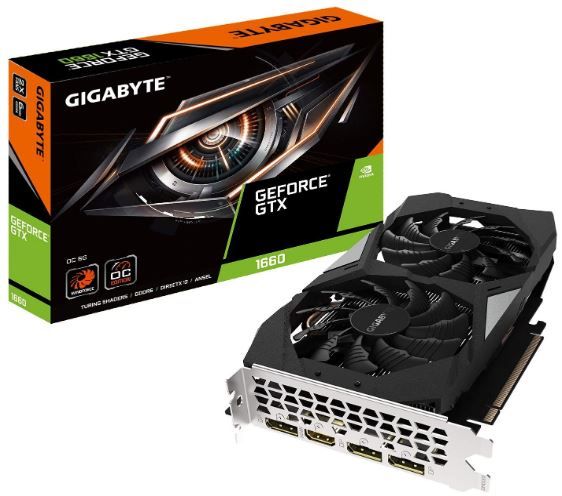
The GTX 1660 sits in a position that budget GPU discussions keep returning to — the sweet spot where architectural quality and price finally reach an equilibrium that doesn't require rationalisation. This isn't a card you settle for. It's a card you choose.
Turing architecture — the same generation that introduced RTX ray tracing on the 2060 and above — brings meaningful improvements to rasterisation performance over the previous Pascal generation, even in the non-RTX variants like the 1660. The shader architecture is more efficient per clock. Memory bandwidth is used better. The result is 1080p gaming that reaches 60fps in most titles on high settings and sustains it without the thermal-induced stuttering that afflicts cards with less composed cooling solutions.
The Windforce 2X system is the cooling story here. Two fans alternating spin direction — one clockwise, one counter-clockwise — creates a more turbulent, more efficient airflow pattern over the heatsink fins than two fans spinning identically. The thermal result is a card that rarely exceeds 70°C under sustained gaming load, even in a case without exceptional airflow. Quiet, too — under the noise floor of most case fans during normal gaming sessions.
The 120W TDP is lower than almost anything at this performance level from competing architectures. A 400W PSU handles this card comfortably alongside a mid-range CPU and standard components. For users upgrading an older pre-built with a modest PSU, the 1660 OC's power efficiency is a practical advantage that its raw benchmark scores don't capture.
The AORUS Engine software enables monitoring and light overclocking in real time, though the factory OC already pushes the card to 1830 MHz — there's modest headroom above that, but the returns diminish quickly, and the stock performance is already strong for the price. Six gigabytes of GDDR5 handles 1080p enthusiastically and manages 1440p in less demanding titles. It won't chase ultra settings at 1440p, but for most players' actual use, the VRAM ceiling is comfortable.
No RT or Tensor cores — this is not an RTX card. Ray tracing is unavailable. DLSS is unavailable. For budget gaming in 2026, that's an acceptable trade-off — the alternative is an RTX 3060 at approximately double the price. If ray tracing matters to you specifically, the 3060 is the correct step up. If 60fps at 1080p is the target, the 1660 OC hits it with headroom to spare.
Pros
- NVIDIA Turing architecture: more efficient per clock than Pascal predecessor
- Windforce 2X alternate-spin cooling — quiet and thermally composed under gaming loads
- 120W TDP — compatible with older and lower-spec PSUs without stress
- 6GB GDDR5 is comfortable at 1080p and manageable at 1440p in lighter titles
- Factory OC at 1,830 MHz boost — strong out of the box
- 7680 × 4320 digital max resolution with GeForce Experience software integration
Cons
- No RT cores — no ray tracing or DLSS
- Can be noisy under peak load (full fan speed during benchmark-level stress)
- Physical size may cause compatibility issues with smaller mini-ITX cases
- Overclocking headroom above factory OC is limited
Our Verdict: The GTX 1660 OC 6G is the budget GPU recommendation that doesn't require caveats for most users. It hits 60fps at 1080p in current titles, runs cool on modest PSUs, and was built on an architecture mature enough that drivers are stable and well-optimised. If you want to game rather than benchmark, this is the card.
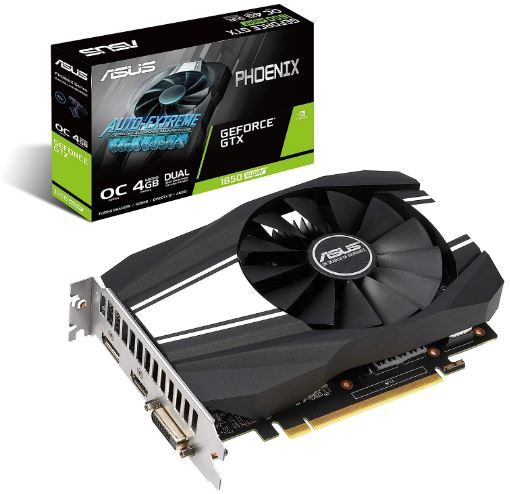
ASUS GeForce GTX 1650 Super Overclocked 4GB — Best for Compact Builds
Rating: 4.3/5
Product information
The GTX 1650 Super lives in a peculiar position in GPU history — it was released into a market gap where the GTX 1650 (non-Super) had underperformed expectations, and Nvidia needed a revision that wouldn't embarrass them. The Super did more than not embarrass. It offered genuinely competitive 1080p performance in a compact form factor that drew no external power and generated modest heat. For specific builds — small form factor systems, HTPCs, NUC-style gaming rigs — it became the answer that nothing else was providing at the price.
The move to GDDR6 memory from the original 1650's GDDR5 is the structural improvement that separates the Super from its predecessor. GDDR6 offers higher bandwidth per channel — meaningful at the 128-bit bus width this card uses, where memory bandwidth is the tighter constraint. The result is performance closer to the GTX 1660 than raw core count would suggest. Turing's efficiency amplifies the GDDR6 advantage. The 1650 Super regularly punches above its specification tier.
No external power connector. This is the feature that makes the GTX 1650 Super relevant for a specific category of upgrade: existing systems with modest PSUs, older prebuilts where the power supply doesn't have spare PCIe connectors, and small form factor cases where cable management inside a tight chassis is genuinely challenging. Slot it in, attach nothing else, and the system recognises it. For a gaming PC upgrade that someone does themselves for the first time, this removes one of the most anxiety-inducing steps.
The Wing-blade fan design — a large single fan with blade geometry optimised for static pressure over volume — keeps temperatures controlled on a card that doesn't generate enormous heat in the first place. ~100W TDP under gaming load means the fan rarely needs to work hard. In a quiet room, this card is essentially inaudible during normal gaming sessions.
Four gigabytes of GDDR6 is the limitation. It's functionally adequate for 1080p at medium-high settings in current titles, but more demanding games in 2026 — particularly open-world games with large texture sets — push against that 4GB ceiling. It's not a dealbreaker today; it's a constraint to plan around over the next two to three years.
Pros
- No external PCIe power connector — genuine plug-and-play upgrade for older systems
- GDDR6 memory: higher bandwidth than GDDR5 at the same bus width
- Compact form factor: fits mini-ITX, slim, and space-constrained cases
- ~100W TDP: extremely low heat generation, quiet single-fan cooling
- Turing architecture efficiency: performs above its core count in rasterisation
Cons
- 4GB VRAM: approaching the functional limit for demanding titles at 1080p in 2026
- No ray tracing
- Single fan can throttle under extreme sustained loads in poorly ventilated cases
- Overclocking headroom modest compared to dual-fan alternatives
Our Verdict: The GTX 1650 Super is the right card for a specific user: someone with a small case, a modest PSU, limited cable management options, and a target of reliable 1080p gaming without spending significantly. It delivers on all of those. Its limitation is the 4GB VRAM ceiling, which will tighten as 2027 approaches. Buy it knowing that, and it's excellent value.
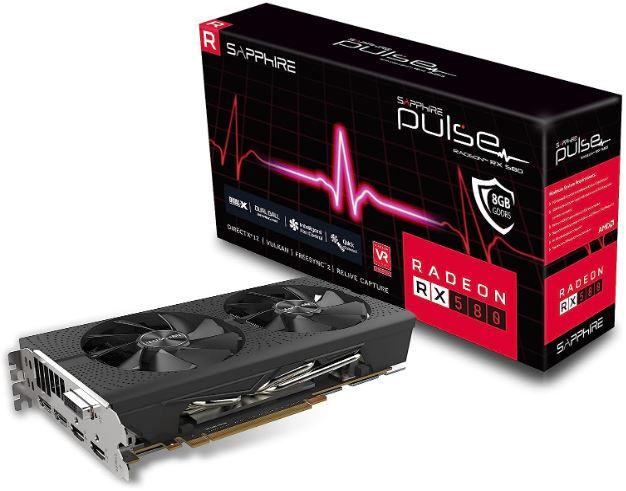
Sapphire Pulse RX 580 8GB GDDR5 — Best Value Raw 1080p
Rating: 4.2/5
Product information
Eight gigabytes of GDDR5 on a 256-bit bus at a budget price point. In 2026, that specification competes directly with cards that cost considerably more — not because the RX 580 is new, it emphatically is not, but because VRAM matters more now than it did at the card's 2017 launch, and 8GB was generous then in ways that have only become more prescient.
The Sapphire Pulse is the best-reviewed version of the RX 580. Sapphire's Pulse line uses higher-quality capacitors (high-polymer aluminium), better PCB layout, and the Dual-X cooling system — two fans with alternate spin direction for more turbulent, efficient heatsink coverage — than reference designs. The result is a card that runs cooler and quieter than the AMD specification suggests, which matters on a chip that can approach 225W under sustained load.
That power figure is the significant caveat. The RX 580 is not power-efficient by 2026 standards. It predates the architectural revisions that gave RDNA its efficiency advantage over GCN. At gaming loads, it will draw significantly more than the 120W GTX 1660 OC — meaning PSU requirements are stricter, system temperatures are higher, and electricity costs, across extended gaming sessions, are meaningfully different. None of this makes the card bad. It makes it a card you spec your system around rather than drop into any build.
What it delivers for that power draw: 1080p gaming at high settings with comfortable frame rates across a wide range of titles, and genuine 1440p capability in less demanding games. The 8GB VRAM is the specification most relevant to future-proofing — games that bump against 6GB VRAM limits run correctly on the RX 580 where they'd stutter on the GTX 1660's 6GB configuration. For players who buy a card and hold it for three to four years, that headroom is worth planning for.
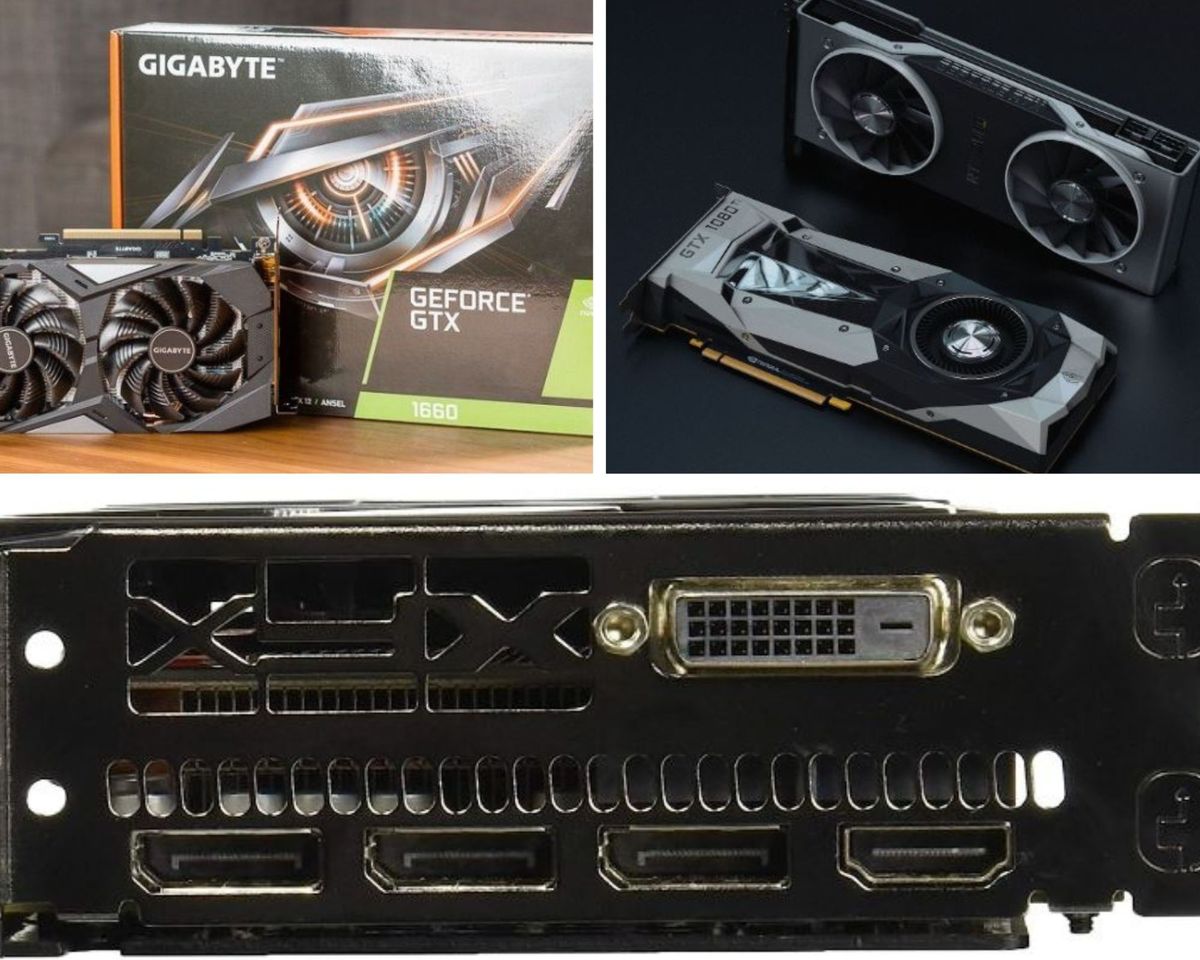
Multiple outputs — two HDMI, two DisplayPort, one DVI-D — make this an unusually flexible choice for multi-monitor setups or home theatre configurations where HDMI is needed alongside a gaming display.
Pros
- 8GB GDDR5 on a 256-bit bus — the most VRAM on this list, most relevant for long-term use
- 256-bit memory bus: higher bandwidth for memory-intensive scenarios at higher resolutions
- Sapphire Pulse build quality: high-polymer capacitors, better PCB than reference designs
- Genuine 1440p capability in lighter titles
- Multiple outputs: 2× HDMI + 2× DisplayPort + DVI-D for flexible multi-display use
- Excellent value per pound/dollar for raw 1080p performance
Cons
- <225W TDP — requires a capable PSU; 2× 8-pin power connectors
- GCN architecture is older and less power-efficient than Turing or RDNA2
- Physically large — may not fit smaller cases
- Can be audible under heavy load despite Dual-X cooling
Our Verdict: The RX 580 is the card for players who want maximum VRAM within a strict budget and are willing to accept higher power draw in exchange. If you're speccing a new build with a proper PSU and a mid-tower case, the 8GB headroom and 1440p capability make it a stronger long-term investment than the GTX 1660 in some configurations. If you're upgrading an older, power-limited system, the GTX 1660 OC is the more compatible choice.
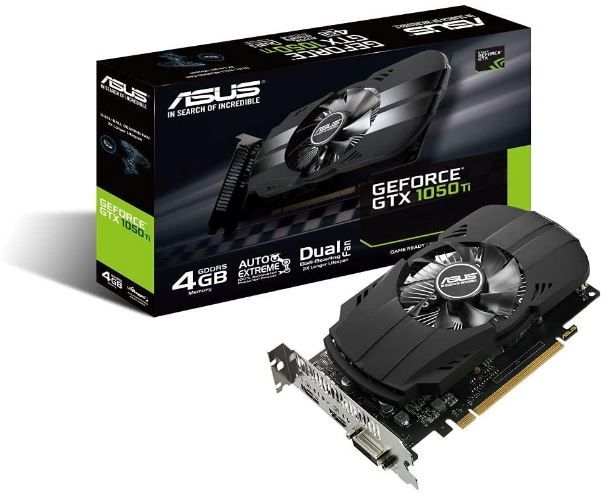
ASUS GeForce GTX 1050 Ti 4GB Phoenix Fan — Best Entry-Level
Rating: 4.0/5
Product information
The GTX 1050 Ti is an older card — Pascal architecture, launched in 2016 — and it's worth being honest about what that means in 2026. It will not run current open-world games at high settings at smooth frame rates. It will struggle with VRAM-heavy titles at anything above medium texture quality. Its architecture lacks the efficiency gains of Turing. In a head-to-head against any other card on this list, it finishes last on raw performance metrics.
And yet — it earns its place here, and the reason is practical rather than sentimental.
The 75W TDP requires no external power connector at all. Not a modest 8-pin connector. Nothing. The card draws everything it needs through the PCIe slot. For a user upgrading a slim desktop PC, an old office machine being repurposed for light gaming, or a prebuilt with a small 250W PSU that can't spare power connectors — the GTX 1050 Ti is sometimes the only upgrade path that works without also replacing the power supply. That's not a niche. That's a meaningful percentage of the used PC market.
The dual-ball bearing fan — Phoenix design — has a documented lifespan advantage over sleeve bearing alternatives. Dual-ball bearings reduce friction and resist wear across temperature cycling in ways that extend the fan's functional life. For a card that may live in a warm, low-airflow case in an old desktop, that longevity characteristic is genuinely relevant.
At 1080p on medium settings, in less demanding titles — Minecraft, League of Legends, Rocket League, CS2, older games in a backlog — the GTX 1050 Ti is completely functional. It won't choke on what it's asked to do in that context. The mistake is asking it to do more than that.
Pros
- 75W TDP, no external power connector — works in virtually any existing system
- Dual-ball bearing Phoenix fan: longer lifespan than sleeve bearing alternatives
- Compact form factor fits small and slim cases
- 4GB GDDR5: adequate for 1080p medium settings in lighter titles
- Pascal architecture: mature driver support, stable and well-optimised
Cons
- Pascal architecture: last generation, below all others here on performance/efficiency
- 4GB GDDR5: will struggle with demanding 2026 titles on high texture settings
- 768 CUDA cores: lowest on this list
- No ray tracing, no DLSS
Our Verdict: The GTX 1050 Ti has one use case in 2026, and it's a legitimate one: upgrading a power-limited system that can't accept an 8-pin PCIe connector without also replacing the PSU. In that context, it's the best answer available. For any build with a modern power supply, spend the extra and get the GTX 1660 OC — the performance gap is substantial.
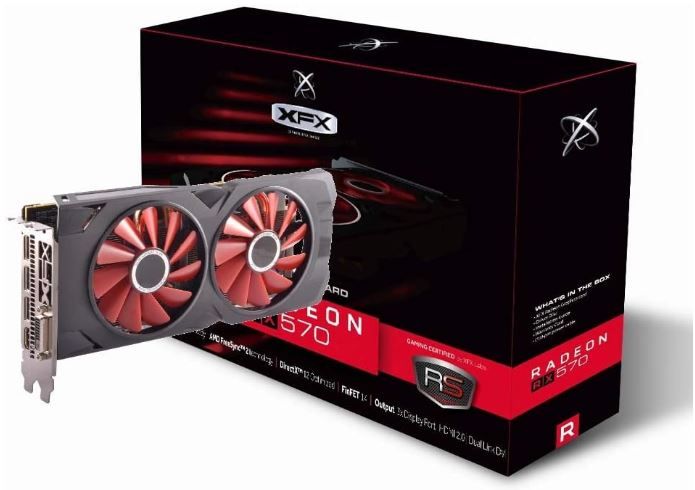
XFX Radeon RX 570 RS XXX Edition — Most Reliable Budget Veteran
Rating: 4.0/5
Product information
The RX 570 has a fan club that no GPU at this price point has any business having. Users keep it. Build after build, upgrade after upgrade — they move the CPU, change the motherboard, install new storage, and the RX 570 stays. Reviews consistently mention two or three system rebuilds with the same card surviving intact. That's not the performance story of a budget GPU. That's the reliability story of one.
AMD's Auto-Extreme Technology — aerospace-grade Super Alloy Power II components, robotic automated manufacturing to reduce solder defects — results in a card built to a physical quality standard above what the price suggests. The dual-ball-bearing Phoenix fan is the same longevity-oriented design as the ASUS GTX 1050 Ti above. The components underneath it are made to last.
Dual BIOS is the feature that makes overclockers and tinkerers specifically interested: two BIOS chips, switchable via a physical toggle on the card. Load a custom BIOS, a modified power target, an alternative fan curve — if anything goes wrong, flip the switch and return to the original. It's a safety net for experimentation that you rarely find at this price point. For users who enjoy pushing hardware, this is meaningful.
VR-ready certification means the card meets the minimum specifications for VR headsets including the Meta Quest series (via PC link) and older SteamVR titles. Not for the most demanding VR experiences, but for entry-level VR exploration — room-scale, moderate resolution, non-demanding applications — the RX 570 has the bandwidth and output capability to function.
The 2048 shading units on a 256-bit bus give the RX 570 strong memory bandwidth — better than the 1050 Ti and comparable to the lower configuration of some more expensive cards. In memory-bandwidth-limited scenarios, the RX 570 outperforms what its core clock would suggest.
Pros
- AMD Auto-Extreme Technology: aerospace-grade components, documented long-term reliability
- Dual BIOS: BIOS switch enables overclocking experimentation with full recovery safety net
- VR-ready: capable of entry-level VR gaming via PC link
- Double-ball-bearing fan: extended lifespan cooling
- 256-bit memory bus: strong memory bandwidth relative to price
- Known longevity — users report keeping this card across multiple system rebuilds
Cons
- Polaris architecture: older generation, lower efficiency than Turing or RDNA
- ~150W TDP requires a capable PSU and 8-pin connector
- 4GB VRAM is the tighter VRAM configuration on this list (vs. the RX 580's 8GB)
- Can be audible under sustained load
- Size may be challenging in smaller cases
Our Verdict: The RX 570 is for the buyer who values longevity, reliability, and the hands-on freedom of dual BIOS flexibility over raw specification numbers. It won't top the benchmark charts against the GTX 1660 OC. But it'll still be working when some of the more impressively specced cards on this list have developed coil whine, fan bearing wear, or BIOS corruption. For budget builders who plan to hold a card for four-plus years, that track record matters.
FAQs: Graphics Card
Can I Acquire a Cryptocurrency Mining GPU?
The cryptocurrency boom of 2017 saw GPU prices skyrocket. Cryptocurrency miners rushed to purchase the best graphics cards for the Bitcoin age, creating a graphics card price bubble.
Then, the cryptocurrency bubble ruptured. The GPU market was unexpectedly flooded with second-hand GPUs that had been in use at full speed, 24/7, for months on end. The continuous need for the interior components, the heat this generates, plus the heat and frequently bad airflow of a crypto-mining rig can badly damage the GPU.
Thankfully, the demand for crypto-mining has lowered, and GPU prices are currently steady (albeit more than before the cryptocurrency bubble). For some time, after the crypto-price bubble burst, the used GPU market was flooded with these ex-crypto mining GPUs, though this fad appears to have slowed for now.
How Much Should I Invest In a Graphics Card?
The GPU market is competitive, and the water is muddied further with used choices. Picking a GPU really does rely on your budget. If you can move other areas of your computer system budget around to suit a better graphics card, then you need to consider it.
Nonetheless, you should not endanger your CPU efficiency to purchase a partially better GPU.
Ideally, you must opt for an 8GB graphics card where feasible. Many will use 1080p video gaming with solid efficiency, with some 1440p gaming also.
Why Are Graphics Cards So Expensive?
Top-tier graphics cards are expensive since they consist of a huge quantity of complicated innovations, use pricey materials in the manufacturing process, as well as contain many components.
Budget GPUs are cheaper since they cut back in particular areas, using much less memory bandwidth or running at a lower clock speed. Additionally, a budget GPU might show up on the marketplace once it is surpassed by a brand-new technical generation. Our checklist of the best budget GPUs consists of a couple of choices of this type, and indeed, it is among the best methods to grab a powerful GPU for a better price.
What is the minimum RAM one would need for gaming?
Based on numerous sources, the minimum RAM needed for gaming tends to vary depending on the specific game and its requirements. However, generally speaking, 16GB of RAM is often considered the bare minimum for many games.
Games like Call of Duty Modern Warfare, Cyberpunk 2077, and Red Dead Redemption 2 recommend 12GB to 16GB of RAM for optimal performance. But for most PC gamers, 16GB of RAM provides solid performance and is currently the most common amount of RAM used in more games.
While 32GB of RAM might seem excessive for some gamers, it can be beneficial for those running other resource-intensive programs alongside their games or for a high-end gaming PC. However, unless you're running heavy applications or doing professional-grade work on your computer, 16GB should suffice for most gaming needs.
It's worth noting that while many of today's popular games list 16GB as the “minimum” RAM requirement, experts typically suggest having the manufacturer's “recommended” RAM. This ensures smooth gameplay and allows for future-proofing as game requirements continue to increase.
In conclusion, while the exact amount of RAM needed for gaming can depend on various factors, including the specific game and the player's use case, 16GB is usually seen as the minimum, with 32GB recommended for most gaming scenarios.
Is RTX better than GTX graphics?
When it comes to the debate between NVIDIA RTX and GTX graphics cards, there's a lot to consider. Both series have their strengths and are designed to cater to different user needs. However, if you're looking for a comprehensive answer to the question, "Is RTX better than GTX graphics?", let's dive into some details based on recent information gathered from various sources.
The NVIDIA RTX series generally offers superior performance compared to the GTX series, particularly in games that support ray tracing and Deep Learning Super Sampling (DLSS)1. Ray tracing is a rendering technique that creates realistic lighting effects, while DLSS uses AI to boost frame rates and generate sharp images for games.
Despite this, the GTX series shouldn't be dismissed outright. While it doesn't boast the same advanced features as its RTX counterpart, the GTX series can provide a more budget-friendly solution for gamers not requiring cutting-edge capabilities.
That said, the RTX series undeniably has an edge when it comes to future-proofing gaming monitors. With the gaming industry steadily moving towards ray-tracing technology, having an RTX card could keep your rig relevant for longer.
Another notable difference between the two cards lies in their construction. The RTX series utilizes faster GDDR6 memory, which results in better resolutions compared to the GTX.
In conclusion, while the GTX series may still be a viable choice for some, the RTX series stands out as the superior option in terms of technological advancements and future-proofing. As always, the best choice depends on individual needs, preferences, and budget.
So, are RTX graphics better than GTX graphics? In terms of performance and advanced features, the answer leans towards yes. However, GTX may still be a suitable choice for those on a tighter budget or with less demanding gaming requirements.
Is a budget graphics card worth buying in 2026?
Yes — with the right expectations. Budget GPUs in 2026 are architecturally mature, driver-stable, and capable of smooth 1080p gaming across a wide range of current titles. They're not 4K-capable, and they won't run the most demanding titles at maximum settings. For players targeting 60fps at 1080p in the genres they actually play, budget GPUs deliver genuinely satisfying results at a fraction of flagship pricing.
How much VRAM do I need for 1080p gaming?
A minimum of 4GB for current titles at medium settings; 6GB for high settings with more headroom; 8GB for comfort across demanding titles and some 1440p. The RX 580 on this list offers 8GB at budget pricing. The GTX 1660 OC offers 6GB with better architecture efficiency. The GTX 1050 Ti and 1650 Super at 4GB are approaching their ceiling for the most demanding 2026 titles.
Should I buy a used GPU?
Used GPUs offer access to higher-tier cards at budget prices — but come with risks. Warranty is absent or limited. Usage history (including cryptocurrency mining, which stresses GPUs at sustained loads for extended periods) may not be disclosed honestly. Fan bearing wear, thermal paste degradation, and capacitor aging are difficult to assess before purchase. If buying used, test thoroughly on arrival and purchase from sellers with return policies.
What PSU wattage do I need for these cards?
GTX 1050 Ti / GTX 1650 Super: 350W minimum (no external connectors). GTX 1660 OC: 400W minimum (single 8-pin). XFX RX 570: 450W minimum (single 8-pin). Sapphire RX 580: 500W+ recommended (dual 8-pin). Always add headroom — running a PSU at 90%+ of rated capacity reduces efficiency and lifespan.
Do these budget GPUs support ray tracing?
None of the cards on this list support hardware ray tracing. Ray tracing requires NVIDIA RTX cores (RTX 2060 and above) or AMD RDNA2 ray accelerators (RX 6000 series and above). For ray tracing at a budget, the minimum realistic entry point in 2026 is a used RTX 3060 — which places it above the price range this list covers.
You may also be interested in the following reviews.
 Neil Fajardo
 Save With Reviews
 Neil Fajardo