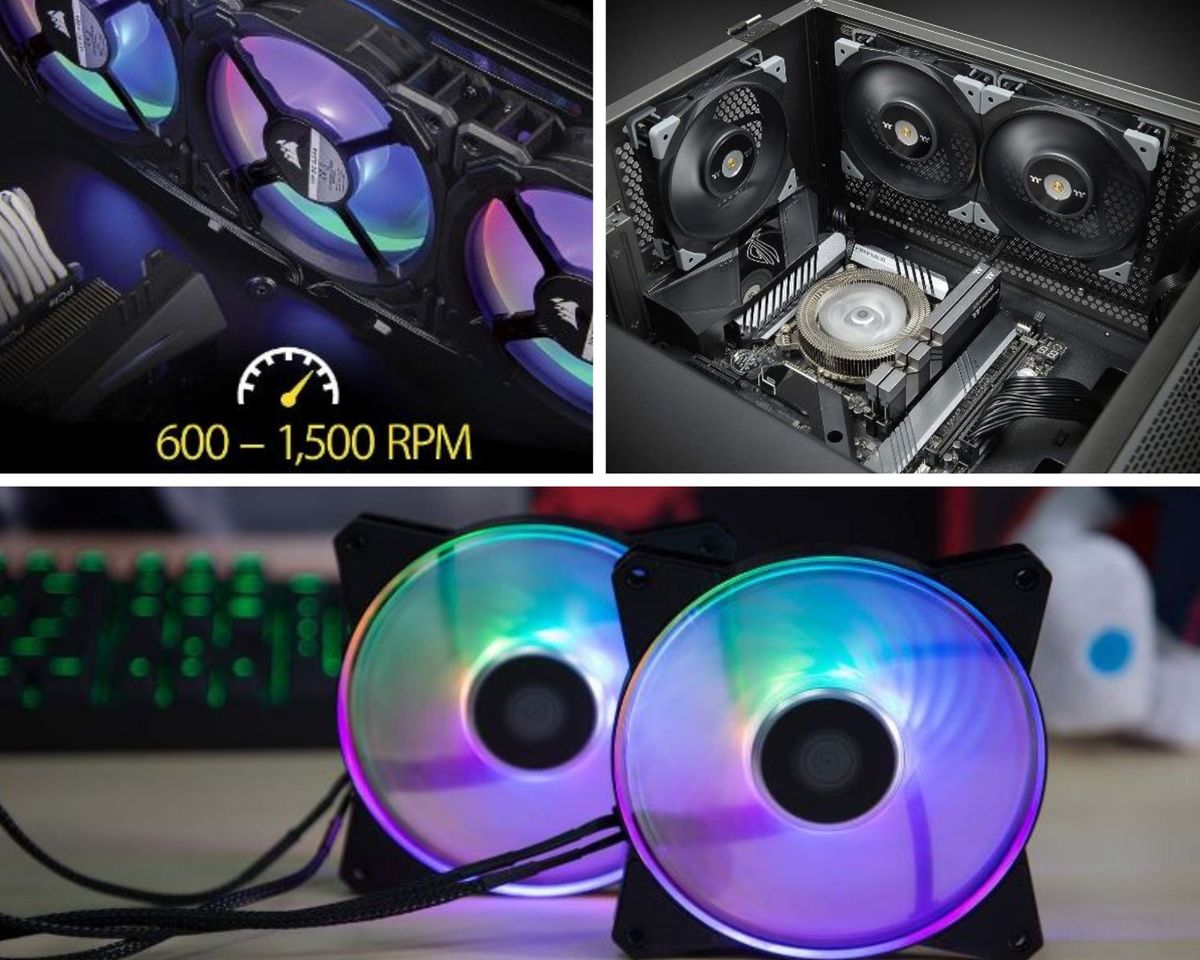
The best PC fan for most builds in 2026 is the Noctua NF-A12x15 PWM — 1,850 RPM, 23.9 dBA, 150,000+ hour MTTF, slim 15mm profile for tight spaces. Best RGB showpiece: Corsair LL120 RGB (16 independently addressable LEDs, 24.8 dBA at max speed). Best value quiet performer: Noctua NF-S12B Redux-1200 (18.1 dBA, six-year warranty, no RGB distraction). Best hybrid static pressure + airflow: Cooler Master MasterFan MF120R ARGB (1.6 mmH2O static pressure, 90 CFM, jam protection). Best for radiator/AIO setups: Thermaltake TOUGHFAN FN1500 (LCP blades, second-gen hydraulic bearings, steel motor hub).
There's a specific sound that precedes every gaming disaster involving thermals — and it's not loud, exactly. It's a subtle pitch shift. The fans that were humming along at a reasonable RPM suddenly climb, audibly straining, and somewhere behind that sound your frame rate is quietly falling apart. You don't always notice the drop until the boss fight you were winning becomes the boss fight you're losing in slow motion, one dropped frame at a time.
Heat is the actual villain in most PC performance stories. Not the CPU. Not the GPU. Not even your questionable overclocking decisions from three years ago. Heat — accumulated, poorly managed, unaddressed heat — is what turns capable hardware into hardware that throttles itself into mediocrity to avoid literally cooking.
Fans exist to prevent that outcome. Not glamorously. Not with the marketing budget of a graphics card launch. They just spin, continuously, moving air across hot components and out of the case, doing genuinely unglamorous work that determines whether every other component in your system performs at its rated capability or quietly underperforms because nobody thought about airflow.
We tested five fans that do this job well — differently, for different situations, but all well.
What a PC Fan Actually Does (Beyond "Spins")
A PC fan's job is thermal transport. Hot components — CPU, GPU, VRMs, storage under sustained load — generate heat that needs to move from the component, into the surrounding air, and then out of the case entirely before it accumulates. Fans are the mechanism for that last step: moving air across hot surfaces (or radiators, in liquid-cooled setups) and expelling it, or drawing cooler replacement air in.
The physics is straightforward. Air absorbs heat from whatever it passes over. Move enough air, fast enough, and the heat gets carried away faster than the component generates it. Fail to move enough air, and heat accumulates until the component's thermal protection kicks in — throttling clock speeds to reduce heat generation, at the direct cost of performance.
This is why "just add more fans" isn't automatically the answer, and why fan selection matters more than raw quantity. A case full of fans moving air in conflicting directions, or fans mismatched to their job (a high-airflow fan forced through a dense radiator, for instance), can underperform a smaller number of correctly chosen fans working in coordination.
Static Pressure vs. Airflow: The Distinction That Actually Matters
This is the single most important concept in fan selection, and it's frequently glossed over in favour of RPM and dBA numbers that are easier to compare at a glance.
Static pressure fans are engineered to push air through resistance — dense mesh filters, radiator fins, tight clearances. The blade geometry is steeper, designed to maintain airflow even when something is blocking the path. If you're mounting a fan on a radiator, behind a restrictive front panel, or through a dust filter with small openings, static pressure is the specification that matters. A high-airflow fan in that position will move less air than its open-air CFM rating suggests, because it wasn't designed to fight resistance.
High airflow fans are optimised for open space — moving maximum volume of air with minimal resistance in the way. Case fans mounted in open intake or exhaust positions, without a radiator or dense filter directly behind them, benefit from airflow-optimised blade designs that move more air per rotation in unobstructed conditions.
Several fans on this list — the Cooler Master MasterFan specifically — attempt to balance both, with hybrid blade designs that provide reasonable static pressure alongside reasonable airflow. This compromise is genuinely useful for case fans in positions where you're not certain which characteristic will matter most, or where the fan needs to perform adequately in both roles across different case configurations.
The Specs Worth Actually Reading
RPM range: Higher max RPM generally means more airflow and more noise at full speed. What matters more is the range — a fan that idles quietly at 300-600 RPM and ramps to 1,500-2,200 RPM under load, controlled by PWM, gives you silence at idle and performance when needed.
dBA (noise level): Anything under 25 dBA is close to inaudible in a normal room. 25-35 dBA is noticeable but not intrusive. Above 35 dBA under load is where fans become a background presence you consciously register during quiet moments.
MTTF/MTBF (reliability): Mean Time To/Between Failure — a statistical reliability estimate, not a guarantee. 150,000+ hours (as multiple Noctua fans on this list carry) translates to roughly 17 years of continuous operation before statistical failure likelihood becomes significant. In practice, most fans in that MTTF bracket will outlast the rest of your build.
PWM vs. voltage control: PWM (4-pin) allows the motherboard to control fan speed via signal rather than voltage variation, giving smoother, more responsive speed curves, particularly at low RPM where voltage control can cause fans to stall or stutter.
At a Glance — 2026 Comparison Table
| # | Product | Size | Max RPM | Noise | Bearing/Tech | Best For | Rating |
|---|---|---|---|---|---|---|---|
1 | Noctua NF-A12x15 PWM | 120×120×15mm | 1,850 RPM | 23.9 dBA | SCD, 150,000+ hr MTTF | Slim/tight builds, overall quiet | ★★★★½ — 4.5/5 |
2 | Corsair LL120 RGB | 120×120×25mm | 2,200 RPM | 24.8 dBA | Hydraulic bearing, 16 RGB LEDs | RGB showcase | ★★★★¼ — 4.3/5 |
3 | Noctua NF-S12B Redux | 120×120×25mm | 1,200 RPM | 18.1 dBA | SCD, 150,000+ hr MTTF | Quiet value, no RGB needed | ★★★★¼ — 4.3/5 |
4 | Cooler Master MF120R ARGB | 120×120×25mm | 1,500 RPM | 33.5 dBA | Rifle bearing, hybrid blade | Static pressure + airflow hybrid | ★★★★ — 4.0/5 |
5 | Thermaltake TOUGHFAN FN1500 | 120mm/140mm | High-speed | Moderate-high | 2nd-gen hydraulic, LCP blades | Radiators, AIO setups | ★★★★ — 4.0/5 |
How to Choose Fans for Your Build
Match the fan to its position, not just its specs. A radiator or dense-mesh-filtered intake needs static pressure. An open case interior benefits from airflow-optimised blades. Buying based on CFM alone without considering where the fan will actually be mounted is the most common mistake in fan selection.
Decide how much you care about noise, honestly. If your case sits under your desk within arm's reach during late-night sessions, the difference between 18 dBA and 34 dBA is the difference between forgetting your PC exists and hearing it every time the room goes quiet.
RGB is a genuine feature, not a compromise. If lighting is part of your build's identity, don't apologise for prioritising it — but check the ecosystem compatibility (motherboard RGB software, or dedicated lighting hubs) before buying, so the fans actually integrate the way you expect.
Reliability figures are worth the premium for fans you don't want to think about again. A fan with a documented 150,000+ hour MTTF and a multi-year warranty is a fan you install once and never revisit. Cheaper alternatives without those figures may work fine — but you're accepting more uncertainty for the savings.
Final Thoughts
Nobody buys a gaming PC to admire the fans. That's fair — fans are not the reason anyone chooses a GPU, brags about a build, or feels a specific emotional attachment to their rig. But every other component's performance is downstream of whether the fans are doing their job correctly, quietly, and reliably, for years, without demanding attention.
The Noctua NF-A12x15 is the fan I'd default to for most builds — quiet, well-engineered, solves the slim-clearance problem elegantly. The NF-S12B Redux is the value alternative that somehow manages to be even quieter. The Corsair LL120 is for builders who want the lighting to be part of the show. The Cooler Master MasterFan is the pragmatic generalist. And the Thermaltake TOUGHFAN is the specialist for anyone running a liquid loop who wants fans engineered for that specific job rather than repurposed case fans.
Keep it cool. Keep the noise where you want it. And if the fan happens to look good doing it — that's a genuine bonus, not the point.
Can we help? We've done the research for you and found the five Best PC Fans on Amazon. Every day, we read hundreds of reviews and try the highest-rated products we have on our list.
Best PC Fans - Reviews
Noctua NF-A12x15 PWM — Best Overall
Rating: 4.5/5
Product information
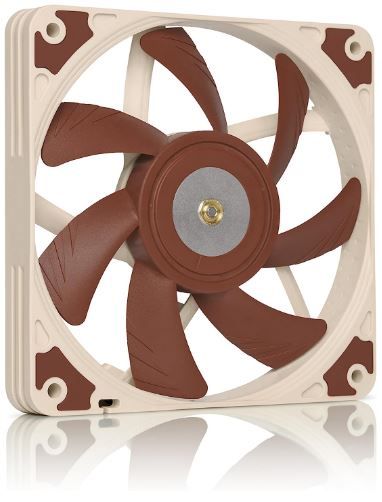
Noctua's reputation in the cooling space is built on a specific formula that this fan represents extremely well: unglamorous, brown-and-beige aesthetics wrapped around engineering that consistently outperforms flashier competitors on the metrics that actually matter for cooling. The NF-A12x15 continues that tradition, and does it in a form factor — a slim 15mm profile — that solves a specific problem most fans don't even attempt.
That slim profile is the headline feature. At 15mm thick rather than the standard 25mm, this fan fits in spaces that a normal case fan physically cannot: low-profile CPU coolers, HTPC builds where case depth is constrained, Mini-ITX systems where every millimetre of clearance has already been fought over by other components. The engineering challenge of maintaining strong airflow performance in a compressed blade depth is significant — most slim fans sacrifice performance for the reduced footprint. Noctua's Flow Acceleration Channels — a blade geometry feature that increases airflow speed through the reduced blade depth — largely close that gap.
The acoustic performance is the other defining characteristic. At 23.9 dBA maximum — and considerably quieter at typical operating speeds below max — this fan is close to inaudible in a normal room even at moderate distance. The Smooth Commutation Drive system, Noctua's proprietary motor control technology, eliminates the torque variations and switching noise that create audible clicking or humming in cheaper fan motors. The result is not just quiet, but quiet in a way that doesn't introduce the subtle irritating frequencies that make some "quiet" fans still noticeable in an otherwise silent room.
Reliability sits at 150,000+ hours MTTF — among the industry's most trusted longevity figures — and the included accessories (anti-vibration mounts, extension cable, Y-cable for running two fans off one header) reflect a company that assumes you're building something you intend to keep for years, not a disposable component.
The honest limitations: the brown-and-tan colour scheme is genuinely divisive, and while Noctua offers a Chromax black variant for users who want a more neutral aesthetic, it's a separate purchase. The 4-pin PWM requirement can be a compatibility gap on very old motherboards with only 2 or 3-pin headers. And the price sits above budget alternatives — this fan costs more than a generic case fan of similar dimensions.
Pros
- 15mm slim profile — fits low-profile coolers, HTPC, and Mini-ITX builds where standard fans don't
- 23.9 dBA maximum noise — among the quietest fans available at this performance tier
- Flow Acceleration Channels compensate for reduced blade depth without sacrificing airflow
- 150,000+ hour MTTF — exceptional documented reliability
- Included Low-Noise Adaptor, anti-vibration mounts, Y-cable for multi-fan setups
Cons
- Brown/tan colour scheme divisive — Chromax black variant costs extra
- Requires 4-pin PWM header — limited compatibility with older 2/3-pin-only motherboards
- Priced above generic alternatives
- No RGB — purely function over form
Our Verdict: The NF-A12x15 earns "best overall" through unglamorous excellence — it's quiet, it's reliable, and it solves the slim-clearance problem that most fans don't even attempt to address. If your build has space constraints or you simply want the best acoustic-to-performance ratio available, this is the fan to buy without much further comparison shopping.
Corsair LL120 RGB — Best RGB Showcase
Rating: 4.3/5
Product information
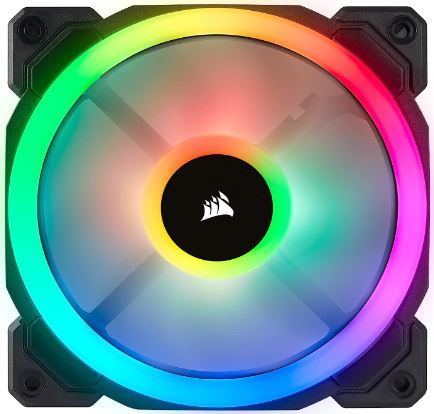
The LL120 exists at the intersection of two priorities that are often treated as mutually exclusive: genuine cooling performance and genuine visual spectacle. Most RGB fans lean hard into the lighting and treat airflow as secondary. The LL120 doesn't quite reverse that balance, but it comes closer than most — 24.8 dBA at maximum speed is a legitimately competitive noise figure for a fan carrying this much RGB hardware, and the hydraulic bearing technology provides both quiet rotation and a longer service life than cheaper bearing types.
Sixteen individually addressable LEDs across two separate light loops are the visual centrepiece — a dual-ring design that creates layered lighting effects rather than a single flat colour wash. Combined with Corsair's iCUE software (via the required Lighting Node PRO), the customisation depth extends to per-LED colour assignment, animated effects, and synchronisation with other Corsair peripherals and components in your build.
The performance range — 600 to 1,500 RPM under PWM control, up to 2,200 RPM at absolute maximum — gives genuine flexibility between silent idle operation and higher-airflow performance when thermal load increases. For most gaming loads, the fan operates comfortably in the 1,000-1,200 RPM range, which keeps noise well controlled while providing adequate airflow for standard case cooling duties.
The complexity cost is real and worth acknowledging directly. Full RGB functionality requires the Lighting Node PRO — additional hardware, additional cables, additional software (iCUE) running in the background. For a single fan or a small installation, this overhead is a genuine hassle relative to a plug-and-fan-header RGB solution. For a full case of matched LL120 fans synchronised through one Lighting Node, the overhead amortises across the whole installation and becomes proportionally less burdensome.
Pros
- 16 individually addressable RGB LEDs across dual light loops — genuinely striking visual effects
- 24.8 dBA at maximum speed — competitive acoustic performance despite the RGB hardware
- Hydraulic bearing technology: quiet, long service life
- Wide RPM range (600–2,200) for flexible noise/performance balancing
- iCUE integration for deep customisation and synchronisation across Corsair ecosystem
Cons
- Requires Lighting Node PRO for full RGB control — additional cost and cable complexity
- Priced at a premium relative to non-RGB fans of similar cooling performance
- Doesn't excel specifically at either static pressure or high airflow — a performance generalist
- Cable management becomes noticeably more involved with multiple RGB fans installed
Our Verdict: The LL120 RGB is the right choice for builders who specifically want RGB as a core feature of their build's identity, not an afterthought — and who are willing to accept the Lighting Node hardware investment to get proper per-LED control. The cooling performance doesn't disappoint while you're admiring the lighting, which is the balance this fan is actually selling.
Noctua NF-S12B Redux-1200 PWM — Best Value Quiet Performer
Rating: 4.3/5
Product information
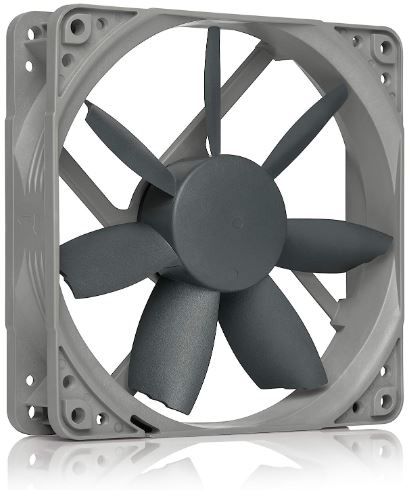
If the NF-A12x15 is Noctua's premium slim-fit solution, the NF-S12B Redux is the brand's answer to "give me the quiet reliability without the premium price tag." At 18.1 dBA maximum — genuinely quieter than the flagship NF-A12x15 — this fan is close to silent even at full speed, and the lower 1,200 RPM ceiling means it's simply not generating the higher-frequency noise that faster-spinning fans produce.
The trade-off for that exceptional quietness is a lower maximum airflow ceiling than higher-RPM alternatives. For standard case cooling — intake, exhaust, general chassis ventilation — this is a non-issue; the airflow-optimised blade design delivers adequate CFM for typical thermal loads without needing to spin fast enough to become audible. For radiator-mounted or high-static-pressure applications, the higher RPM ceiling of other fans on this list would provide more headroom.
The Redux line represents Noctua's approach to value — proven core technology (the same Smooth Commutation Drive system, the same NE-FD1 automatic speed control) delivered in a simplified, cost-reduced package. The grey colourway is also, frankly, a relief for builders who found the standard Noctua brown-and-tan scheme visually incompatible with their build — several reviewers specifically note this as an improvement.
The six-year manufacturer warranty is worth highlighting as a differentiator. Combined with the 150,000+ hour MTTF rating, this fan is backed by both a statistical reliability claim and a genuine commercial guarantee that most competing fans, particularly budget alternatives, don't match.
The absence of RGB is a deliberate simplification rather than an oversight — this fan is aimed at builders who want quiet, reliable performance without paying for or managing lighting features they don't need.
Pros
- 18.1 dBA maximum — quieter than the premium NF-A12x15
- Six-year manufacturer warranty — exceptional confidence backing
- 150,000+ hour MTTF with proven Noctua Smooth Commutation Drive technology
- Grey colourway — more universally build-compatible than classic Noctua brown
- Excellent value: proven technology at a reduced price point
Cons
- Lower 1,200 RPM ceiling limits maximum airflow versus higher-RPM alternatives
- No RGB — a deliberate omission but a limitation for aesthetic-focused builds
- 4-pin PWM requirement limits compatibility with older motherboards
- Less optimal for radiator/static-pressure-demanding applications
Our Verdict: The NF-S12B Redux is the fan to buy when quiet reliability is the priority, and RGB is irrelevant to your build's identity. It undercuts the flagship NF-A12x15 on price while somehow being even quieter — the trade-off in maximum airflow is a fair one for standard case cooling duties, and the six-year warranty removes most of the risk from the purchase decision.
Cooler Master MasterFan MF120R ARGB — Best Static Pressure + Airflow Hybrid
Rating: 4.0/5
Product information
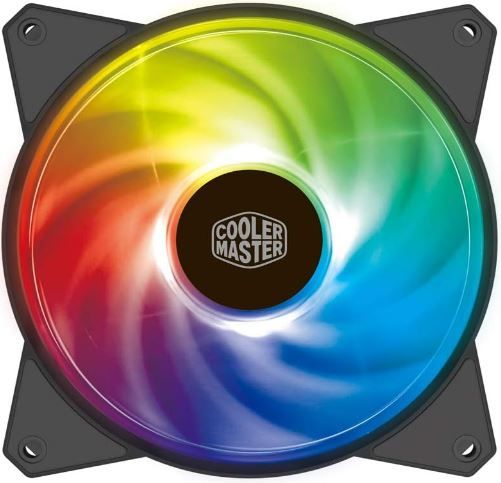
The MasterFan's hybrid blade design — inspired, according to Cooler Master, by jet engine and helicopter blade geometry — attempts to solve the static-pressure-versus-airflow dilemma by delivering competent performance at both rather than excelling narrowly at one. The result, 1.6 mmH2O static pressure alongside 90 CFM airflow, is a genuinely useful middle ground for builders who aren't certain whether their specific case configuration will demand more of one characteristic or the other.
This versatility matters practically for a common scenario: a case fan mounted in a position that's partially obstructed by a dust filter or mesh panel, but also expected to move meaningful volume through a relatively open case interior. Neither a pure airflow fan nor a pure static pressure fan is optimally suited to that in-between scenario — the MasterFan's hybrid geometry is specifically designed for exactly that ambiguity.
The RGB implementation — 24 individually controlled LEDs across two rings — is extensive, and certified compatibility with Asus Aura, ASRock RGB, and MSI RGB covers the major motherboard RGB ecosystems without requiring proprietary hardware the way the Corsair LL120 does. This is a genuine convenience advantage for builders already committed to one of those motherboard RGB ecosystems. Pre-set manual controller options are also available for non-RGB-compatible motherboards, extending compatibility further.
The smart fan sensor jam protection deserves mention as a practical safety feature — cables occasionally do drift into fan paths during builds with imperfect cable management, and jam protection prevents that scenario from damaging either the fan or the snagged cable.
The noise figure — 33.5 dBA at maximum — is meaningfully higher than the Noctua options on this list, and some users specifically note the clear fan blades don't showcase RGB lighting as effectively as opaque designs, since the light is visible straight through rather than diffused. The 3-pin A-RGB connector (rather than standard 4-pin) can also require an adapter depending on motherboard compatibility.
Pros
- Hybrid blade design delivers genuinely competent static pressure and airflow simultaneously
- 24 individually controlled ARGB LEDs, certified compatible with major motherboard RGB ecosystems
- Smart fan sensor jam protection — practical safety feature against cable snagging
- Rifle Bearing technology with sound-absorbing pads for controlled operation
- Twist-and-play installation — straightforward even for first-time builders
Cons
- 33.5 dBA maximum noise — noticeably louder than the Noctua alternatives on this list
- Clear fan blades don't diffuse RGB lighting as effectively as opaque alternatives
- 3-pin A-RGB connector may require an adapter for some motherboards
- Doesn't excel decisively at either static pressure or airflow individually — a generalist by design
Our Verdict: The MasterFan MF120R is the pragmatic choice for builders who don't want to commit fully to either static-pressure or airflow-optimised fans and would rather have one fan that handles ambiguous mounting positions reasonably well. The extensive RGB ecosystem compatibility is a genuine convenience if you're already building around Asus, ASRock, or MSI RGB software.
Thermaltake TOUGHFAN FN1500 — Best for Radiators & AIO Setups
Rating: 4.0/5
Product information
The TOUGHFAN takes a materials-first approach to fan durability that shows up specifically in radiator and AIO cooling applications, where fans run at higher sustained speeds against the static-pressure resistance of tightly packed radiator fins for extended periods — a demanding use case that wears out lesser fan constructions faster than open-air case cooling duty does.
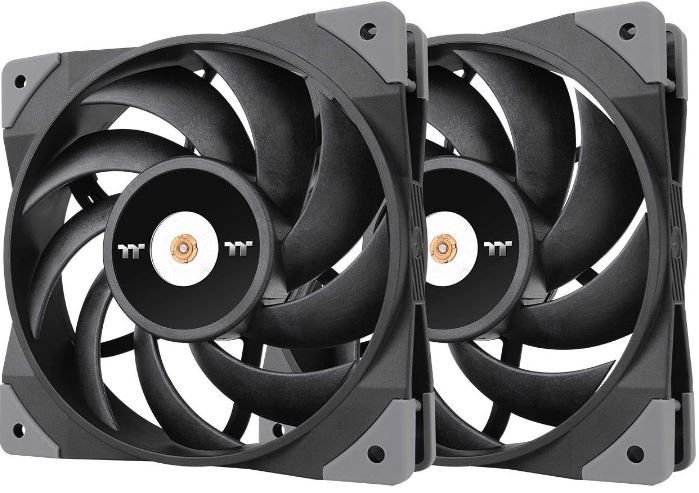
Liquid Crystal Polymer blades are the notable material choice here. LCP is significantly more heat-resistant and dimensionally stable at high rotational speeds than standard plastic fan blades, which can develop subtle warping or flex under sustained high-RPM operation — a flex that, over months of continuous radiator duty, translates into reduced efficiency and increased vibration. The LCP construction resists that degradation, maintaining consistent blade geometry (and therefore consistent airflow characteristics) across the fan's operational lifespan.
Second-generation hydraulic bearings reduce friction relative to sleeve bearing designs, contributing to both quieter operation and extended service life — hydraulic bearings generally outlast sleeve bearings in continuous high-speed duty, which matters specifically for AIO and radiator applications where fans rarely idle at low speed the way case fans do.
The steel motor hub adds structural stability that plastic hub designs lack, particularly relevant at the sustained higher RPMs that radiator cooling typically demands. Combined with rubber vibration-dampening pads on all four corners, the FN1500 is engineered specifically around the higher-stress, higher-duration operating profile of liquid cooling loops rather than general case ventilation.
The availability of both 120mm and 140mm variants gives flexibility for matching radiator sizes exactly — a detail that matters more for liquid cooling than for general case fans, where slight size mismatches are more tolerable.
The honest trade-off: the higher operating speeds that make this fan effective on radiators also produce higher noise levels than the Noctua options on this list, and while anti-vibration pads are included, some users report minor residual vibration at sustained high speed — a common characteristic of fans built for performance over acoustic optimisation.
Pros
- LCP blade material resists warping and degradation under sustained high-RPM radiator duty
- Second-generation hydraulic bearings: quieter and longer-lasting than sleeve bearing alternatives
- Steel motor hub adds structural stability at high sustained speeds
- Available in both 120mm and 140mm for exact radiator size matching
- Purpose-engineered for the demanding conditions of AIO and custom loop cooling
Cons
- Higher noise levels than case-fan-optimised alternatives on this list
- Some users report minor residual vibration despite anti-vibration pads
- Not the ideal choice for standard open-air case cooling where quieter options perform equally well
- Higher sustained operating speed profile means more audible presence during heavy loads
Our Verdict: The TOUGHFAN FN1500 is purpose-built for radiator and AIO cooling duty specifically, where the LCP blade durability and hydraulic bearing longevity matter more than they would for standard case cooling. If you're running a liquid-cooled build and want fans engineered for that specific stress profile rather than general-purpose case fans repurposed for radiator duty, this is the more considered choice.
FAQs: PC Fans
What are the different types of PC fans?
Computer fans are essential components that help keep the various parts of a computer cool, enhancing performance and prolonging lifespan. There are several types of PC fans, each serving a unique purpose:
Case Fan: As the name suggests, case fans are mounted on the case of the computer. They work to circulate air within the computer's case, reducing heat by moving hot air out and drawing cooler air in.
CPU Fan: The Central Processing Unit (CPU) is the brain of a computer and tends to generate a lot of heat. A CPU fan is specifically designed to cool down the CPU, preventing overheating and maintaining optimal performance.
GPU Fan: The Graphics Processing Unit (GPU) also generates considerable heat, especially during graphics-intensive tasks like gaming or video editing. A GPU fan helps dissipate this heat, ensuring the graphics card functions smoothly.
Expansion Slot Fan: These fans are added to the expansion slots available in the PC case to enhance airflow and cool specific components like the GPU.
Power Supply Fan: Power Supply Units (PSU) have built-in fans. They expel the heat produced within the PSU, helping it run efficiently.
Laptop Fan: These are specially designed fans for laptops, compact and efficient in cooling the limited space of a laptop.
USB Fan: USB fans are portable fans powered by a USB connection. They provide additional cooling, especially for laptops.
In addition to these types, PC fans can be categorized based on their design, such as static pressure fans and high airflow fans. Static pressure fans are designed to combat resistance and are ideal for areas with restricted airflow, like heatsinks and radiators. High airflow fans, on the other hand, are designed to deliver maximum airflow in open environments with less resistance.
How many fans would one need for a high-end PC?
When it comes to building a high-end PC, one question that often arises is, "How many fans should I install?" The answer to this can vary based on several factors, including the type of components in your system, the size of your case, and the amount of heat your system generates.
According to multiple sources, for most systems, having at least three case fans is considered ideal for adequate cooling. This typically includes two intake fans at the front of your case to draw in cool air and one exhaust fan at the back to expel hot air.
For larger case sizes or systems with more powerful components that generate more heat, you may need more fans. Some sources suggest up to five to seven fans may be necessary, depending on the size of the PC case.
For systems with high airflow demands – such as those running intensive applications or games that push your hardware to its limits – you may even need six to eight fans (source: cgdirector.com). This would typically involve 2-3 outtake fans and 4-5 intake fans to ensure optimal airflow and temperature control.
However, it's essential to remember that more fans don't necessarily mean better cooling. Having too many fans can create excessive power draw, noise, and turbulent airflow, which can disrupt the efficient flow of air through your system.
Why is my PC fan so loud when gaming?
If you're a gamer, you might have noticed your PC fans becoming noticeably louder when playing demanding games. This is a common occurrence, and there are several reasons behind it.
Heat Generation
Firstly, gaming is a resource-intensive task that pushes your computer's hardware to its limits. Your Central Processing Unit (CPU) and Graphics Processing Unit (GPU) work harder during gaming, generating more heat. To prevent overheating, your PC's fans kick into high gear, spinning faster to dissipate this heat. The faster the fans spin, the louder they become.
Inefficient Cooling System
Another reason could be an inefficient cooling system. Prebuilt gaming PCs often have poor ventilation, with cheap plastic panels blocking airflow. This results in the fans having to spin much faster and louder to keep the system cool. Also, if your fans are loose, too small, or not powerful enough, they can create more noise.
Dust Accumulation
Over time, dust accumulates in the PC, clogging air vents and sticking to fan blades. This not only obstructs airflow but also causes the fan to work harder, resulting in increased noise. Regular cleaning of your PC can help mitigate this issue.
Wear and Tear
Fans, like any mechanical components, are subject to wear and tear. Over time, a fan's bearings may wear out, causing it to spin unevenly or vibrate, which can increase noise levels.
How to Reduce Fan Noise: Several ways to reduce fan noise while gaming. First, ensure your PC has adequate ventilation. If necessary, upgrade your case to one with better airflow. Second, regularly clean your PC to remove dust that could obstruct airflow and make your fans work harder.
You could also consider upgrading your fans to models designed for quiet operation. These fans use advanced bearing technologies and noise-reducing designs to deliver efficient cooling with minimal noise. Lastly, consider investing in a high-quality CPU cooler, which can provide superior cooling performance and quieter operation compared to stock coolers.
How many fans does a gaming PC actually need?
Most mid-tower builds perform well with 2-3 intake fans and 1-2 exhaust fans, creating a positive-to-neutral pressure balance that manages both cooling and dust intrusion. More fans aren't automatically better — mismatched airflow direction or excessive fans fighting each other can reduce overall efficiency. Balance matters more than raw quantity.
What's the difference between static pressure and airflow fans?
Static pressure fans use steeper blade angles to push air through resistance — radiators, dense mesh filters, tight clearances. Airflow fans use blade geometry optimised to move maximum volume through open, unobstructed space. Using the wrong type in a given position (airflow fan on a radiator, for example) results in noticeably reduced real-world performance versus the fan's rated specifications.
Is a higher dBA rating always bad?
Not necessarily — dBA at maximum RPM doesn't reflect real-world operation if the fan runs at lower speeds most of the time under PWM control. A fan rated at 33 dBA maximum might run inaudibly at typical gaming loads if its PWM curve keeps it well below that ceiling. Check the RPM range and typical operating speed for context, not just the peak noise figure.
Do I need RGB fans, or is that purely cosmetic?
Purely cosmetic — RGB lighting has no cooling performance benefit. It's a legitimate feature if visual customisation matters to your build's identity, but don't sacrifice actual cooling performance (static pressure, airflow, noise characteristics) to prioritise lighting unless the case has a window and you genuinely want the visual payoff.
How long do PC fans typically last?
Quality fans with 150,000+ hour MTTF ratings (like the Noctua options on this list) can realistically operate for a decade or more under normal use. Budget fans without published MTTF figures may last considerably less, particularly in dusty environments without regular cleaning. Bearing type matters significantly — hydraulic and rifle bearings generally outlast basic sleeve bearings in longevity testing.
You may be interested in these other reviews!
 Save With Reviews
 Neil Fajardo
 Neil Fajardo