Quick Answer: The best gaming PC case for most builders in 2026 is the NZXT H-Series Mid-Tower — dedicated GPU cooling fan, 365mm GPU clearance, RTX 40-Series compatibility, and pre-installed RGB. For dual-system builders: Phanteks PH-ES518XTG (E-ATX + ITX, 10 HDDs + 9 SSDs, 420mm radiator support). Best all-round value: Corsair 4000D with RapidRoute cable management and AirGuide fans. Best RGB showpiece: Corsair iCUE 4000X RGB with three SP120 Elite fans included. Best mesh airflow design: Cooler Master MasterBox TD500 with polygonal mesh front and triple ARGB fans.Reviewed and updated June 2026 by Save With Reviews.
Let me tell you something nobody admits in PC building guides. The moment of truth isn't when you press the power button. It's not when your monitor flickers to life for the first time, either. It's about forty-five minutes into a build — cable in one hand, mounting screw somewhere in the carpet — when you look at the case and think: why did I cheap out on this?
I've been there. Twice, actually. Maybe three times if you count the mid-tower I bought because it was on sale and fit in my car, not because it made any engineering sense for the components I was pairing it with. The case looked fine in photos. It looked less fine when my GPU ran at 87°C during a gaming session, and the side panel became genuinely hot to the touch.
The case isn't just housing. It's the thermal environment your expensive components live in, permanently, for however many years that the build survives. Airflow determines temperatures. Temperatures determine longevity. And the layout of the interior — the cable channels, the fan mounts, the radiator brackets, the clearances — determines whether building inside it feels like a puzzle designed by an engineer or an argument designed by entropy.
This list covers five cases we'd actually recommend in 2026. Different priorities, different price points. All of them are better than the one I bought at a car park car boot sale in 2019.
What the Box Is Actually Doing
The case houses everything — but more specifically, it manages how air moves through everything. And that distinction matters more than almost any other spec when you're comparing options.
Hot components produce heat. CPUs under load, GPUs under load, SSDs under sustained transfer — they all generate thermal energy that needs to go somewhere other than into the ambient air inside a sealed metal box. The solution is airflow: cool air in through the front or bottom, across the components, and out through the rear or top. Simple in principle. Enormously variable in execution, depending on how well the case channels that airflow toward the components that need it most.
Mesh fronts let more air in. Dense plastic fronts look cleaner and let less air in. Positive pressure (more intake than exhaust) keeps dust out but traps some heat. Negative pressure (more exhaust than intake) runs cooler but accumulates dust faster. Most mid-tower cases compromise somewhere in the middle and let you configure fan layouts to suit your preference.
The GPU cooling problem is worth addressing separately, because modern GPUs — RTX 4080s, 4090s, RX 7900 XTs — are physically massive and thermally demanding in ways that cases from five years ago weren't designed for. Some now extend nearly the full length of a mid-tower interior. And they pull air from below the card, which means the space between the GPU and the bottom of the case, and the ventilation in that zone, directly affects temperatures. The NZXT case on this list has a dedicated angled fan specifically for this, which is either a revelation or an obvious solution to a problem that shouldn't exist, depending on your perspective.
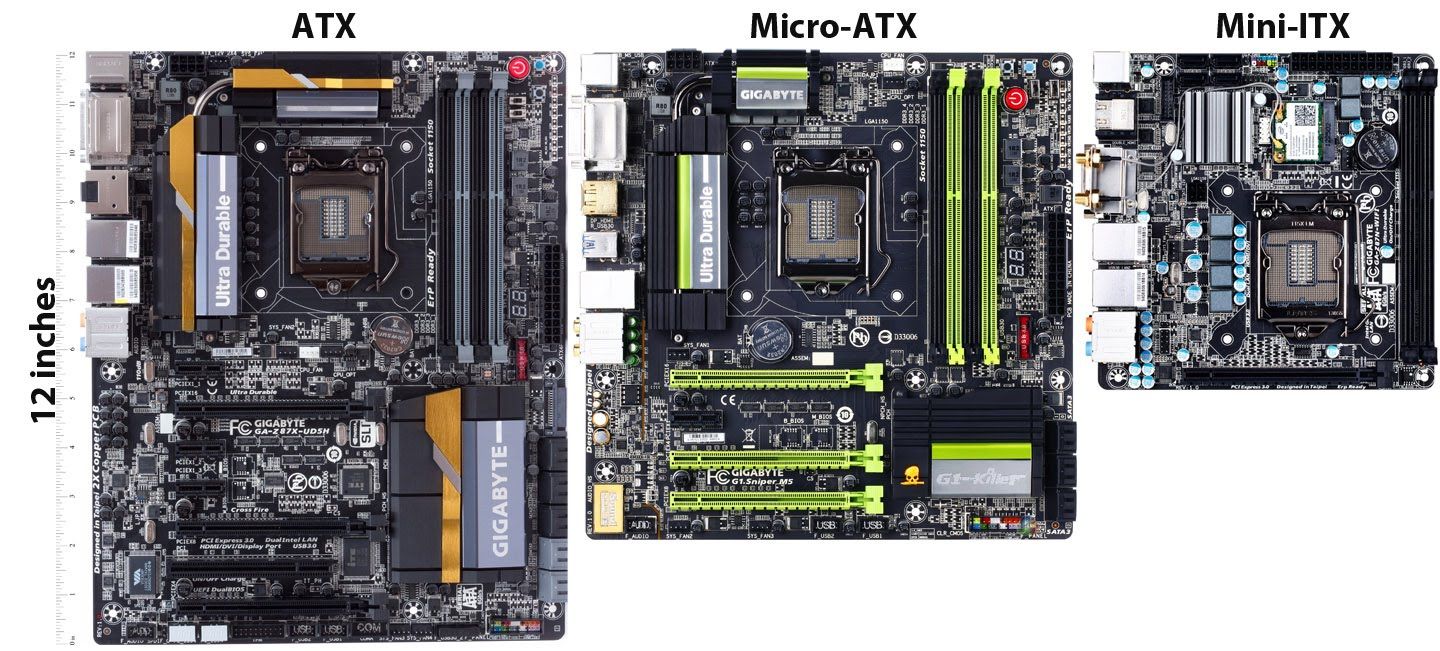
Does Motherboard Size Actually Matter for Case Selection?
Yes — but not in the way most guides present it.
The hierarchy: E-ATX (extended) → ATX (standard) → M-ATX (micro) → Mini-ITX. Full-tower cases support all four. Mid-tower cases typically support ATX and below. Smaller form factors need smaller cases, or at a minimum, cases designed for their layout.
Performance-wise, the motherboard size barely matters. An M-ATX board runs an i9 or Ryzen 9 identically to a full ATX board in most gaming scenarios. What changes are: PCIe slot count, RAM slot count (usually four on ATX, two on Mini-ITX), and expansion headroom. For a gaming rig — GPU, sound card maybe, and not much else in the expansion slots — M-ATX is genuinely viable and often sensible.
Mini-ITX is a special case (pun intended). The form factor is elegant, and the resulting builds are compact enough to feel like you've cheated the laws of physics. The building process, on the other hand, is a test of patience and dexterity that I'd recommend approaching only with good lighting, a magnetic screwdriver, and the emotional composure of someone who has never thrown anything in frustration.
Cable Management Is More Than Aesthetics
This comes up in every PC build guide and somehow still gets treated as optional. It isn't.
Cables that run freely across the interior create two problems: they block airflow, which raises temperatures, and they become genuine obstacles every time you need to add, remove, or upgrade a component. A build with clean cable routing runs measurably cooler than the same components in a case with cables draped loosely across the interior.
The practical benchmark: you should be able to close the back panel of your case without forcing it. If the panel bows outward because cables are massed behind the motherboard, something has gone wrong. Modern cases include cable routing channels, velcro ties, and pass-through grommets specifically to prevent this. Some of the Corsair cases on this list, particularly, have routing systems so comprehensive that cable management becomes straightforward rather than a test of spatial reasoning.
Modular PSUs help enormously. Only connecting the cables you need, rather than bundling unused cables somewhere behind the motherboard, makes a meaningful difference to interior cleanliness. If your case has the space and your budget allows, a modular PSU is the upgrade that costs relatively little and affects the build experience substantially.
At a Glance — 2026 Comparison Table
| # | Product | Form Factor | Max GPU | Storage | Fans Included | Best For | Rating |
|---|---|---|---|---|---|---|---|
1 | NZXT Mid-Tower | ATX | 365mm | Standard | 2× 140mm RGB | All-round, RTX 40 Series | ★★★★½ — 4.5/5 |
2 | Phanteks PH-ES518XTG | E-ATX + ITX | Standard | 10 HDD + 9 SSD | None (fan mounts) | Dual-system, power users | ★★★★¼ — 4.3/5 |
3 | Corsair 4000D | ATX | 360mm rad. | Standard | 2× 120mm AirGuide | Value, cable management | ★★★★¼ — 4.3/5 |
4 | Corsair iCUE 4000X RGB | ATX | 360mm rad. | Standard | 3× 120mm SP120 Elite RGB | RGB showcase, iCUE ecosystem | ★★★★ — 4.2/5 |
5 | Cooler Master MasterBox TD500 | ATX | Standard | Standard | 3× ARGB | Mesh airflow, aesthetics | ★★★★ — 4.0/5 |
Mother Boards
How to Choose the Right Gaming PC Case
Decide on size first, then everything else. Mid-tower fits ATX and accommodates the vast majority of gaming builds. Full-tower gives you more expansion, more storage, more cooling capacity — and more desk space consumed. Mini-ITX cases are elegant and compact; they also require patience, smaller components, and acceptance that thermal headroom is reduced.
Check your GPU dimensions before purchasing. The three numbers that matter: length (most cases publish max GPU length in mm), width (triple-fan cards are wider), and height (some cases have PSU shrouds that limit GPU height). The NZXT case's 365mm clearance handles everything currently on the market. Measure before assuming.
Count your storage drives. If you have two drives, almost any case works. If you have four to six, check the drive bay count explicitly — many mid-towers have reduced drive bay counts to maximise interior space. The Phanteks PH-ES518XTG is the extreme answer to this if you need double-digit drive capacity.
Think about who's going to look at this. Cases have aesthetics. They live on your desk or floor for years. The Corsair iCUE 4000X RGB is designed to be admired. The Corsair 4000D is designed to be functional. The TD500 is designed to be dramatic in a particular way. None of these is wrong — but it's worth matching the visual ambition to where the case will actually live and who will see it.
Final Thoughts
PC cases attract a specific kind of debate that almost nothing else in the hobby generates — because they're simultaneously the least and most important component in a build. Least important because the case contributes nothing to processing power. Most important because every other component's thermal performance lives inside it.
The NZXT mid-tower is the one I'd build in if I were starting fresh right now. The GPU fan is the feature I didn't know I wanted until I had it, and the clearances accommodate current-generation hardware properly. The Corsair 4000D is the one I'd recommend to a friend building for the first time, because the cable management system actually teaches good habits rather than accommodating bad ones. And the Phanteks is the one I'd recommend to someone who built their first PC, loved the process, and now wants to do something genuinely unusual with their next one.
The TD500 is the one I'd put in a dark room with a glass of something and just look at for a while. The ARGB fans through that polygonal mesh, in the dark — it's one of those things that doesn't survive a product photo and absolutely survives the experience of actually being in the room with it.
Build something good. The GPU's comfort depends on it.
Can we help? We've done the research for you and found the best computer cases on Amazon.
Every day, we read hundreds of reviews and try the highest-rated products we have on our list.
Best PC Cases for Gaming - Reviews
NZXT Mid-Tower PC Gaming Case — Best Overall
Rating: 4.5/5
Product information
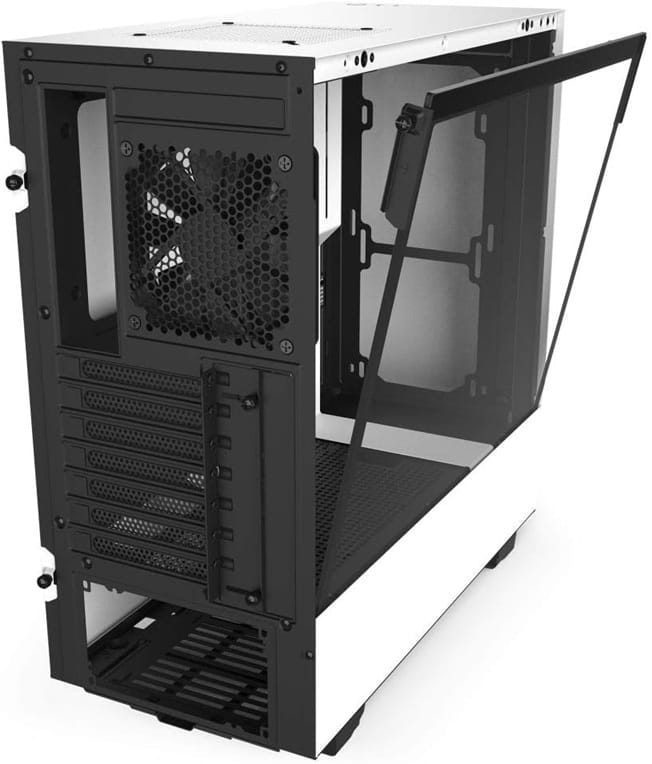
There's a feature on this NZXT case that I haven't seen executed this cleanly elsewhere: a dedicated angled fan positioned beneath the GPU, drawing cool air from under the case specifically to cool the graphics card. It sounds like an obvious solution. It probably should have been standard years ago. The fact that most cases still don't do it, and that the temperatures are noticeably better in GPU-heavy workloads as a result, suggests either that the engineering is harder than it looks or that the rest of the industry has been inexplicably incurious about a real problem.
Modern GPUs — I'm talking RTX 4080s, 4090s, the cards that came out with power requirements that caused genuine discourse — generate heat differently from their predecessors. They're physically larger (the 4090's triple-fan cooler is the size of a small book), they draw significantly more power under load, and they pull air from below. The space between the card and the case floor, and the availability of cool air in that zone, is a genuine thermal variable. The NZXT's angled GPU fan addresses that directly. It's not a gimmick. The temperatures reflect it.
The two pre-installed 140mm RGB fans look excellent through the tempered glass side panel. The RGB controller means sync without requiring additional software in most setups — though if you're running NZXT's CAM software anyway for an AIO cooler, the integration is seamless. The 365mm GPU clearance accommodates virtually every consumer GPU currently on the market, including the larger triple-fan cooler designs that cause problems in tighter cases.
Radiator support is comprehensive: 280mm front, 240mm top, 120mm rear — meaning you can run a full custom loop or AIO across multiple configurations without fighting the layout. Six total fan slots give sufficient flexibility to configure positive or negative pressure depending on your environment and dust sensitivity.
The case does lean toward modest-to-mid-range builds in our opinion. The interior is optimised for the components most builders pair it with, rather than extreme configurations like dual GPUs or professional workstation builds. For a gaming rig — single GPU, AIO or tower cooler, two to four storage drives — it's extremely well suited.
Pros
- Dedicated angled 120mm GPU cooling fan — genuinely addresses RTX-generation thermal challenges
- 365mm GPU clearance — fits virtually all current triple-fan GPU designs
- Two pre-installed 140mm RGB fans with an independent RGB controller
- Comprehensive radiator support across front, top, and rear
- Tempered glass side panel with excellent build quality
- Clean interior layout optimised for standard gaming builds
Cons
- Vertical GPU mount requires a separate NZXT kit (sold separately — additional cost)
- Better suited to mid-range builds than extreme multi-GPU configurations
- NZXT CAM software quality and stability have historically been inconsistent
Our Verdict: The NZXT mid-tower earns its "best overall" position through specificity — it's designed for the exact build most people are actually building in 2026, with the dedicated GPU cooling feature that's more relevant now than it's ever been. If you're pairing it with an RTX 40-series GPU, the thermal benefits are real and worth the price premium over generic alternatives.
Phanteks PH-ES518XTG — Best for Power Users & Dual Builds
Rating: 4.3/5
Product information
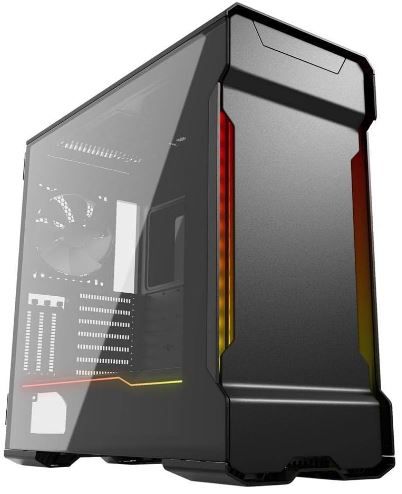
Most cases house one computer. The Phanteks PH-ES518XTG houses two. That's not marketing language — it's a genuine engineering feature for a specific type of user whose needs are underserved by the standard mid-tower market. Dual-system setups have legitimate use cases: one system for work (stable, clean, work software), one for gaming (overclocked, unstable, everything else). Content creators who edit on one machine and render on another. Professionals who need different OS environments simultaneously and don't want to manage that through virtualisation.
For that user, this case is the most cost-efficient answer to a problem that otherwise requires two cases, two sets of cooling, and twice the desk space. The dual glass doors aren't just aesthetic — they provide independent access to each system's interior without disturbing the other. The dual-system support is genuine E-ATX + Mini-ITX, which means a full workstation board and a compact gaming board can coexist without either compromising the other's expansion potential.
The storage numbers alone justify attention: ten HDDs and nine SSDs simultaneously. I'm not sure most users will ever fill that, but for content creators, home media servers, or anyone who stores large project files locally, the limitation of most mid-tower cases (two to four drive bays) is a genuine frustration. Here, it genuinely doesn't exist.
Liquid cooling support up to 420mm radiators with integrated fill and drain ports is a serious feature for water-cooling enthusiasts. The drain port specifically — allowing you to drain the loop from the front panel without fully dismantling the cooling system — is the kind of quality-of-life engineering that you don't appreciate until you've drained a loop without one.
The aluminium exterior with a 3mm sandblasted finish looks and feels genuinely premium. It's a case that reads as a professional tool rather than a consumer gaming product, which is either appealing or mildly antiseptic depending on your aesthetic preferences. Cable Management 2.0 with door covers keeps the interior clean despite the complexity of a dual-system configuration.
Pros
- Dual-system capable — E-ATX + Mini-ITX simultaneously, independent access
- Enormous storage: 10 HDDs + 9 SSDs — removes storage constraints entirely
- 420mm radiator support with integrated fill/drain port — serious water-cooling capability
- 3mm sandblasted aluminium exterior — premium build quality and professional aesthetic
- Cable Management 2.0 with cable door covers
- Integrated digital RGB illumination and vertical GPU mounting included
Cons
- Physically large — requires substantial desk or floor space
- Thermals are described as mediocre, given the size and price point
- Price point is high relative to single-system alternatives
- Overkill for builders who don't need dual-system capability
Our Verdict: The Phanteks PH-ES518XTG is for a specific builder who knows exactly why they need it — and for that builder, there isn't a better answer at the price. For everyone else, it's an impressive piece of hardware that addresses problems you probably don't have. Know which category you're in before committing.
Corsair 4000D — Best Value Mid-Tower
Rating: 4.3/5
Product information
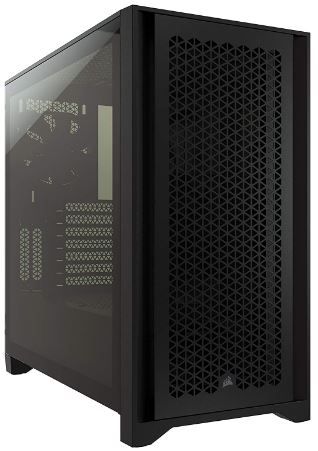
The 4000D does something that the higher-end cases on this list occasionally forget to do: it solves the actual problems most builders face, efficiently, without overcomplicating things. Cable management is the most universally hated part of PC building. The RapidRoute system is the most effective implementation of a cable channel system I've used in a mid-tower — a dedicated pass-through that routes all major cables from the PSU bay to the motherboard zone through a single managed channel, with 25mm of space behind the motherboard for everything that doesn't use the main channel. The result is an interior that looks intentional rather than improvised.
The two 120mm AirGuide fans with anti-vortex vanes are pre-installed and functional on day one. They're not the most spectacular RGB fans you'll ever see — they're not trying to be. What they do is direct airflow accurately onto hot components rather than dispersing it across the interior in a turbulent, partially wasteful pattern. The anti-vortex design, which uses radial fins to break up the circular airflow from the fan hub, genuinely improves thermal performance versus standard fan designs. It's measurable, not theoretical.
Radiator support is competitive: 360mm front, 280mm roof — meaning a 360mm AIO cooler installs without modification in the most effective thermal position (front-mount, pushing cool air directly across the motherboard and CPU). RAM height determines whether you can use the full 280mm roof position, which is a minor constraint worth checking against your specific memory heatsink profile.
The tempered glass panel is clean and functional. It frames the interior without dominating it. The front I/O is comprehensive for the price — USB 3.1 Type-C inclusion at this price point is not guaranteed on competitive alternatives and worth noting.
One thing worth mentioning — and this is slightly irrational — is that this case feels almost criminally good for what it costs. The build quality, the cable management execution, the airflow design: it reads as a more expensive product than the price suggests. That's either Corsair over-delivering or the rest of the market under-delivering. Possibly both.
Pros
- RapidRoute cable management: 25mm channel behind motherboard — the most functional cable system on this list
- AirGuide anti-vortex fans: directional airflow that improves thermal performance over standard fans
- 360mm front + 280mm roof radiator support — full AIO compatibility
- USB 3.1 Type-C front I/O at this price point
- Tempered glass panel with an uncluttered aesthetic
- Exceptional build-quality-to-price ratio
Cons
- No pre-installed RGB fans — aesthetically more understated than the iCUE 4000X
- Minor niggly quality control issues reported by some users (minor fit inconsistencies on some units)
- Roof radiator position restricted by RAM height in some configurations
Our Verdict: The 4000D is the case we'd recommend first to someone building their first serious gaming rig, or to an experienced builder who wants the cleanest cable management in the mid-tower segment without paying a premium for RGB they don't care about. It's excellent at what it prioritises, and it prioritises the right things.
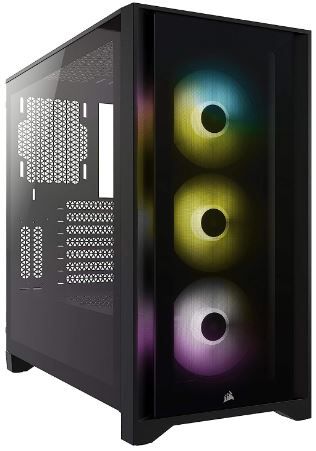
Corsair iCUE 4000X RGB — Best RGB Showcase
Rating: 4.2/5
Product information
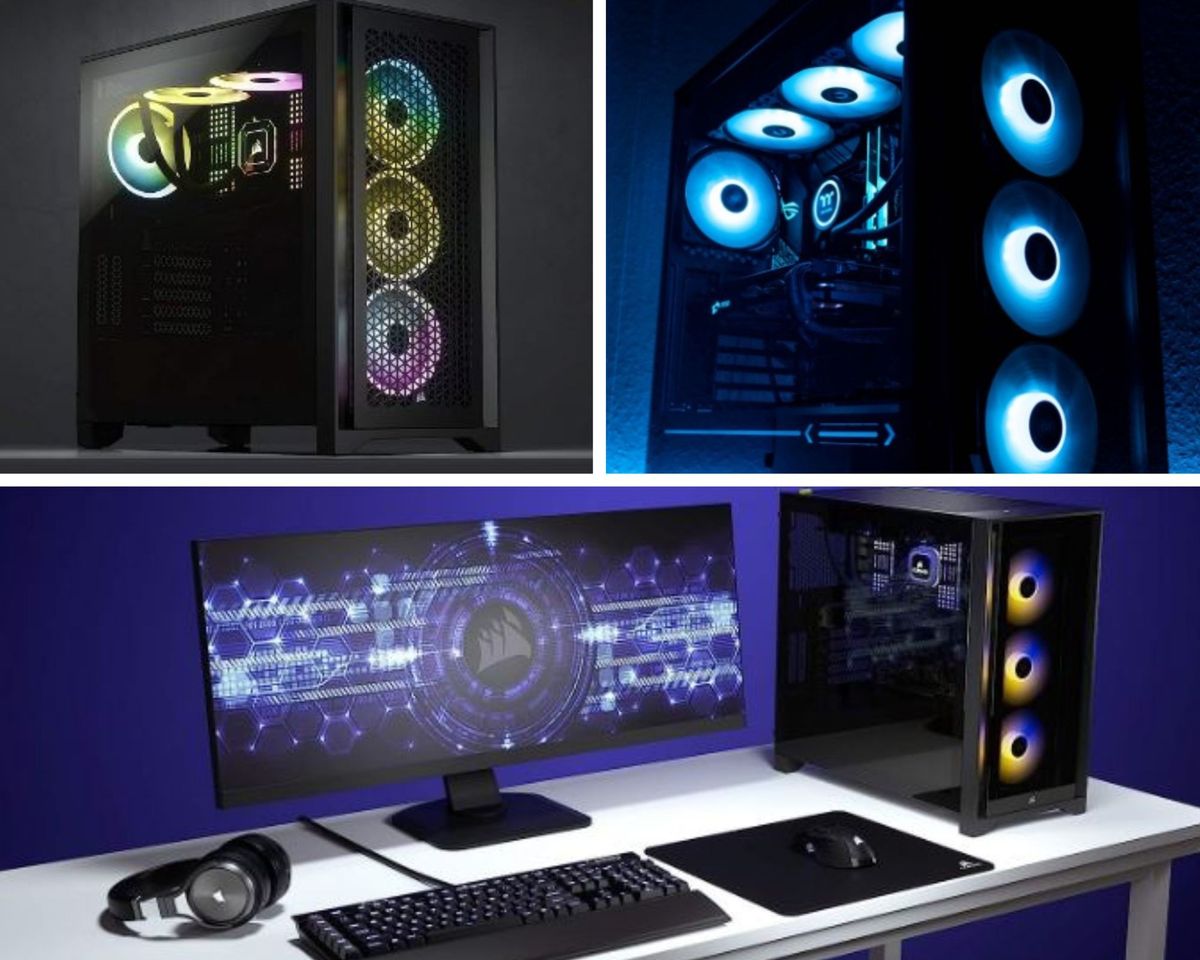
The 4000X RGB is the 4000D with the aesthetic dial turned up. Same RapidRoute cable management, same mid-tower ATX layout, same front I/O and radiator support. What changes: three SP120 Elite RGB fans pre-installed, an iCUE Lighting Node CORE included in the box, and tempered glass on both the side and front panels. The visual difference is significant.
Twenty-four individually addressable RGB LEDs across the three pre-installed fans. Each SP120 Elite RGB fan carries eight LEDs, and the ICUE Lighting Node CORE allows them to be controlled and synchronised via Corsair's iCUE software — which, if you're already in the Corsair ecosystem (keyboard, mouse, headset, AIO cooler), ties everything together into a single lighting interface. You can synchronise the case fans with your cooler's pump head, your keyboard's effects, and your mouse's underglow. You can make it react to music. You can, if the mood strikes, make every Corsair peripheral in your life respond to your heart rate through a third-party integration.
Is this necessary? No. Is it genuinely impressive when it works? Yes.
The front tempered glass panel is the aesthetic differentiator from the standard 4000D. It exposes the fans behind it — visible through the glass, illuminated and spinning — in a way that makes the front of the case as much a visual element as the side. This does require that the front ventilation relies on channels around the glass rather than direct mesh intake, which slightly reduces raw airflow compared to the airflow-variant models. It's not a significant thermal compromise for most builds, but worth noting if you're pushing extreme cooling requirements.
Setup complexity is the primary consideration. The fans require iCUE for RGB control and synchronisation, and iCUE's fan curves default to aggressive behaviour that most users will want to adjust manually on first boot. The default curves prioritise cooling at the expense of noise, which is a reasonable default for hardware that doesn't know what components it's cooling, but noticeably loud in a quiet room until tuned.
Pros
- Three SP120 Elite RGB fans pre-installed — premium out-of-box RGB
- iCUE Lighting Node CORE included — full ecosystem sync via Corsair iCUE
- RapidRoute cable management inherited from standard 4000D
- Tempered glass front and side panels — visually striking from two angles
- 24 individually addressable LEDs across three fans
- Excellent setup experience with most cables pre-routed and tied from the factory
Cons
- Requires iCUE software to unlock RGB control — additional software layer with its own quirks
- Default fan curves are aggressive (loud) — requires manual adjustment at first setup
- No rear fan in the box — requires a separate purchase to complete a balanced push-pull airflow setup
- Front glass slightly reduces airflow versus mesh-front alternatives
Our Verdict: The 4000X RGB is the correct choice if you're building specifically for visual impact and want the iCUE ecosystem to handle lighting synchronisation across multiple Corsair peripherals. If the RGB isn't the priority, the standard 4000D saves money for nearly identical thermal performance. If it is the priority, this is genuinely excellent at it.
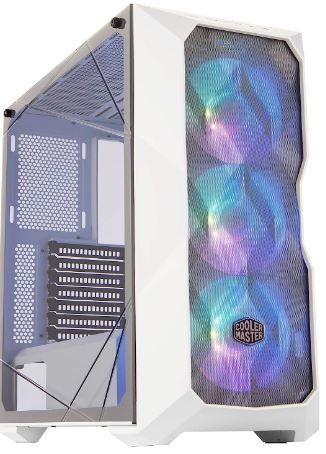
Cooler Master MasterBox TD500 — Best Mesh Design
Rating: 4.0/5
Product information
The TD500 is the mesh-front option on this list, and it's upfront about what that means: maximum airflow intake, striking visual design, and a build identity that leans toward enthusiast aesthetic rather than clean minimalism. The polygonal mesh front panel — a three-dimensional contoured design rather than a flat perforated panel — looks genuinely distinctive when lit from behind by the three included ARGB fans. The geometric facets catch the light differently as viewing angles change. It's not subtle. It's not meant to be.
Functionally, the mesh design means more unobstructed airflow through the front intake than tempered glass or solid plastic alternatives. Mesh fronts are consistently better for thermal performance in cases where front airflow is the primary intake path, because they reduce the pressure differential between the fan's discharge and the intake side. The three-dimensional contour also serves as a first-stage dust filter — the geometry breaks up direct particle penetration more effectively than a flat mesh, though less completely than dedicated magnetic dust filters.
Radiator support is extensive: two 360mm radiators simultaneously — one front, one top — which gives custom water-cooling builders the capacity for a genuine dual-radiator setup without cramping. Seven total 120mm fan positions across front, top, and rear covers, all standard configurations. Support for front, top, and rear liquid cooling means you're not choosing between positions when planning a complex cooling loop.
The crystalline tempered glass side panel is slightly different in character from standard tempered glass — the manufacturer uses "crystalline" to describe the clarity and optical consistency of the glass, which in practice means the RGB fans behind it display with minimal distortion or colour shift. Under the right lighting conditions — particularly in a dark room — the visual impact is significant.
The minor criticisms: some users report small quality control inconsistencies (missing hardware on isolated units, minor fit variations on the mesh panel). The power supply bay area is the most commonly noted weak point in build experience — functional but slightly less considered than the rest of the interior design.
Pros
- Polygonal mesh front panel: best raw airflow intake on this list, genuinely attractive design
- Three addressable RGB fans pre-installed — solid visual impact from day one
- Dual 360mm radiator support (top + front) — comprehensive water-cooling capability
- Seven 120mm fan positions + front/top/rear liquid cooling compatibility
- Crystalline tempered glass with excellent optical clarity for RGB display
- Durable steel and plastic construction at a competitive price
Cons
- Quality control inconsistencies reported (missing hardware on some units)
- Power supply installation area less refined than premium alternatives
- Mesh front accumulates dust faster than glass alternatives — requires more frequent cleaning
- "Cooler Master Engine" RGB software is less polished than Corsair iCUE
Our Verdict: The TD500 is for the builder who wants maximum airflow, a visually striking mesh design, and the ability to run a serious water-cooling setup — without the premium pricing of full-tower alternatives. The polygonal mesh, genuinely illuminated, is among the most distinctive front-panel designs at this price point. Just check the box contents on arrival.
FAQs
What are the four common PC case sizes for gaming?
The four common case sizes for gaming PC cases are:
Full Tower: This is the largest standard size for a PC case and is ideal for gamers and professionals who need a lot of space for multiple components or advanced cooling options.
Mid Tower: The most common size for gaming PC cases, Mid Towers offer a good balance between space and size. They have plenty of room for components like graphics cards and hard drives, while still being compact enough to fit comfortably in most spaces.
Mini Tower: Mini Towers are smaller than Mid Towers but still have enough space for a decent amount of hardware. They're a good option for gamers who want a more compact build without sacrificing too much space for components.
Small Form Factor (SFF): These are the smallest PC cases and are ideal for users who want a highly compact and portable system. Despite their size, many modern SFF cases can still house powerful components, making them a great choice for high-performance gaming builds where space is at a premium.
How much should one spend on a reasonable gaming PC case?
Building a gaming PC can be an exciting project for any gaming enthusiast. However, determining how much to spend on each component, especially the PC case, can be challenging. This article will guide you on how much one should ideally spend on a reasonable gaming PC case.
Understanding the Role of a PC Case
Before discussing the cost, it's important to understand the role a PC case plays in your gaming setup. A PC case houses all your components, from the motherboard and GPU to the power supply and storage drives. It also provides cooling, either via built-in fans or compatibility with additional cooling systems. Lastly, it contributes significantly to the aesthetics of your gaming rig.
Budget-Friendly Cases
If you're working with a tight budget, you can find decent gaming PC cases for as low as $50. These cases usually offer basic features, such as adequate ventilation, room for a few storage drives, and support for standard-sized components. However, they may lack advanced features like extensive cable management solutions or pre-installed fans.
Mid-Range Cases
For those willing to spend a bit more, the sweet spot for price-to-performance typically lies around the $100 mark. Cases in this range often offer better build quality, more space for components, improved cooling support, and more aesthetic options such as tempered glass side panels or built-in RGB lighting.
High-End Cases
If you're after top-tier features, exceptional build quality, and the most aesthetically pleasing designs, you might want to consider high-end gaming PC cases. These can range from $150 to $300 or even more. They often include superior cooling support, unique features like vertical GPU mounting, integrated RGB lighting systems, and noise-damping materials.
Conclusion
The amount you should spend on a gaming PC case largely depends on your budget and requirements. If you just need basic housing for your components, a budget case will suffice. If you want a balance of aesthetics and function, a mid-range case would be ideal. And if you're looking for the best features and build quality, consider investing in a high-end case.
Remember, while the case is an important part of your gaming PC build, it's not the only component that matters. Allocate your budget wisely across all components to create a balanced and powerful gaming system.
Is it cheaper to build a gaming PC?
In the world of gaming, one question that often arises is, "Is it cheaper to build a gaming PC?" The answer to this question isn't as straightforward as one might think. It requires an understanding of both the costs and benefits associated with building your PC versus buying a pre-built system.
Understanding the Costs
When you decide to build your gaming PC, you're essentially becoming your own systems integrator. This means you're responsible for sourcing each component individually and assembling them into a cohesive unit. The cost of these components can vary widely based on their performance level and the brands you choose. However, by selecting each part yourself, you have the power to control where your money goes. You can prioritise spending on components that will significantly impact your gaming performance, like the GPU and CPU, while saving on others.
The Potential Savings
Building your PC typically allows for greater potential savings in the long run. This is particularly true if you plan on upgrading your system over time. With a self-built PC, you can easily swap out parts as needed. In contrast, pre-built systems often use proprietary parts or complex designs that can make upgrades more difficult and costly.
The Convenience Factor
While building a gaming PC can be more cost-effective, buying a pre-built system offers convenience. Pre-built systems come ready to use out of the box, saving you the time and potential stress of assembly. Plus, they often include a warranty for the entire system, offering peace of mind that individual components purchased separately may not provide.
However, this convenience comes at a cost. Pre-built systems often carry a premium price tag, meaning you might be able to build a comparable system for less if you're willing to put in the time and effort.
The Bottom Line
So, is it cheaper to build a gaming PC? Generally speaking, if you're comfortable with the assembly process and willing to invest the time, building your gaming PC can offer significant cost savings, both upfront and in the long term.
However, it's important to consider the value of your time and the convenience factor. If you prefer a hassle-free experience and aren't concerned about potential future upgrades, a pre-built system might be worth the extra cost.
Ultimately, whether you choose to build or buy your gaming PC should depend on your personal preferences, technical comfort level, and gaming needs. Both options have their pros and cons, and both can lead to a high-quality gaming experience.
How much RAM for normal gaming would one need?
For a normal gaming experience, the recommended amount of RAM varies depending on the specific games you play and their requirements. However, as per the search results from various sources:
Most modern games recommend a minimum of 32GB of RAM for smooth, high-performance play. This amount of memory allows for changes in what games you play and helps avoid issues with lag and stuttering (source: www.crucial.com, www.gaminggem.com).
16GB of RAM is generally considered the minimum for gaming. It can handle most games, but for higher-end AAA titles or for future-proofing your system, 32GB or more is advised (source: www.wepc.com, www.microcenter.com).
Some high-end games and professional gamers may benefit from 64GB of RAM, but for most gamers, this would be overkill and not noticeably improve gaming performance (source: www.reddit.com/r/buildapc).
Remember that while having enough RAM is important, your gaming performance also heavily depends on other components like the CPU and GPU. It's always a good idea to balance your investment across all components for the best gaming experience.
What is the most important feature in a gaming PC case?
Airflow — specifically the design of intake and exhaust paths relative to your components. A case with inadequate ventilation will allow hot components to throttle performance or degrade faster, regardless of how good the hardware inside it is. After airflow: cable management quality, because clean cabling directly affects airflow. Aesthetics are legitimate considerations, but a third priority.
What size case do I need for an ATX motherboard?
A mid-tower or full-tower case. Mid-towers are the most common choice for ATX, including large GPUs, tower coolers or AIO systems, and multiple drives. Full-towers add expansion headroom for builders who need extensive storage, multiple radiators, or dual GPU configurations.
Is tempered glass worth it for a PC case?
If you want to display your build, yes. Tempered glass side panels add minimal cost and provide a clean, secure view of the internals. They collect fingerprints and are slightly fragile compared to acrylic, but the visual quality difference is substantial. If you never look at the side of your PC, a solid panel costs less and is entirely equivalent thermally.
How much should I spend on a gaming PC case in 2026?
$80–$160 covers the vast majority of mid-tower ATX cases with good airflow, cable management, and tempered glass. Under $80: functional, but features are compromised. $160–£270: premium builds, full RGB integration, dual-system capability, or specialised cooling configurations. Above $270: diminishing returns unless you have specific professional or extreme-cooling requirements.
Can I build a gaming PC in a small form factor case?
Yes, with caveats. Mini-ITX and M-ATX cases require compact components (Mini-ITX motherboard, shorter GPU if the case requires it), tend to run warmer due to reduced volume, and are more challenging to build in due to tighter clearances. The results can be impressive, and the footprint advantage is real. First-time builders are better served by mid-tower ATX before exploring SFF — the learning curve is easier, and upgrades are simpler.
You may also be interested in the following reviews!
 Neil Fajardo
 Neil Fajardo
 Neil Fajardo