
Quick Answer: The best gaming headset for most players is the Razer Kraken — surround sound, cooling gel ear cushions, inline controls, and a price under $100 that genuinely undercuts the competition without punishing you for it. For wireless freedom: Razer Barracuda X, 20-hour battery, and USB-C charging. For noise cancellation that's actually world-class: Bose QuietComfort 35 II Gaming, though it requires a wired connection for in-game audio. For THX surround sound with serious driver hardware: Razer BlackShark V2. Platform coverage and durability on a budget: Astro A10 Gen 2.Reviewed and updated June 2026 by Save With Reviews.
The first time I heard footsteps behind me in a game — proper, directional, close footsteps, not the vague muffled thud I'd been getting through cheap speakers — I actually spun my chair around. Not my in-game character. My actual chair. In my actual room.
That's what spatial audio does to you when it's working right. It tricks the part of your brain that's been tracking sound in three-dimensional space since before you could walk. Your body reacts before your rational mind catches up. It's a little embarrassing. It's also why people who play with good headsets can never go back to built-in speakers or whatever $15 earbuds came with a phone in 2019.
Here's the thing nobody really warns you about, though: once your ears calibrate to quality audio, everything else in your gaming setup starts to feel like it's the bottleneck. You notice the colours less. The frame rate becomes secondary. Because the sound — the layering of it, the directionality, the texture of a reload or a footstep on gravel versus concrete — that's what's doing the heavy lifting for immersion. Always was. You just didn't know because your headset was lying to you.
Choosing one that doesn't is, admittedly, overwhelming. So here are five that actually deliver — ranked honestly, with their flaws included.
What Makes a Gaming Headset Worth Buying?
Driver size. Start there. The driver is the speaker element inside each ear cup — larger drivers (40mm to 50mm and above) move more air and typically produce richer bass and more accurate spatial cues. This matters more than any marketing claim about "surround sound technology." A 50mm driver doing its job correctly will outperform a 40mm driver running a software simulation, in most configurations.
Surround sound — real versus virtual. True surround sound requires multiple physical speaker elements. Most gaming headsets use two drivers (stereo) and apply DSP (digital signal processing) to simulate surround positioning. The quality of that simulation varies enormously. THX Spatial Audio (on the BlackShark V2) and Dolby Atmos implementations are among the better ones. Check whether your headset's surround feature works on your platform — some require Windows, some require specific software, and some only function over USB.
Microphone type. Boom mics (the adjustable arm extending from the ear cup) are almost always better than inline mics for gaming. Cardioid pattern mics (which capture primarily what's directly in front of them) suppress background noise more effectively than omnidirectional mics. Flip-to-mute is a quality-of-life feature that matters more than you expect during long sessions. Nobody wants to fumble for a mute button.
Wired versus wireless. Wired headsets have zero latency and zero battery management. Wireless headsets have freedom of movement and a tidier setup. The latency difference on premium wireless headsets (2.4GHz, not Bluetooth) is now negligible for most gaming — sub-10ms, which your ears can't distinguish from wired. For competitive FPS players who obsess over every millisecond, wired is still the theoretical choice. For everyone else, wireless is fine.
Comfort over hours, not minutes. This is the one that gets ignored in reviews because discomfort takes time to develop. Memory foam ear cushions, cooling gel inserts, lightweight frames, and adjustable headbands — these aren't luxury additions. They're the difference between a two-hour session and a six-hour session. Try the headset for two hours before you decide whether you like it.
Wired vs. Wireless: The Real Trade-offs
Wired headsets will never die on you mid-game. That's nothing — there's a specific, spiking rage that accompanies a wireless headset dropping to 5% battery during a clutch round, and avoiding that experience entirely has real value. Wired is also cheaper at the same audio quality tier and eliminates any possibility of wireless interference.
Wireless headsets, on the other hand, let you walk to the kitchen without removing them. Let you lean back without the cord tugging. Let your desk look like a workspace rather than a cable management project. For couch gaming connected to a TV across the room, wireless isn't a preference — it's a requirement.
The middle ground is headsets that do both — the Razer Barracuda X and BlackShark V2 can run wired as a fallback. That flexibility is worth paying for if you game in multiple contexts.
One thing I'll note from experience: the wireless headsets that die on you most dramatically are the ones you forget to charge because their battery life is good enough that you stop thinking about it. The Razer Barracuda X's 20 hours is exactly in that zone — long enough to feel endless, short enough to catch you off guard after a long weekend.
At a Glance — 2026 Comparison Table
| # | Product | Driver | Connectivity | Surround Sound | Mic Type | Battery | Rating |
|---|---|---|---|---|---|---|---|
1 | Razer Kraken | 50mm drivers | Wired (3.5mm + USB) | 7.1 surround | Retractable cardioid | N/A | ★★★★½ — 4.5/5 |
2 | Astro A10 Gen 2 | 32mm dynamic | Wired (3.5mm) | Stereo | Flip-to-mute boom, 6mm unidirectional | N/A | ★★★★ — 4.2/5 |
3 | Razer Barracuda X Wireless | TriForce 40mm | 2.4GHz USB-C + wired | Stereo | Detachable HyperClear cardioid | 20 hrs, USB-C | ★★★★ — 4.1/5 |
4 | Razer BlackShark V2 | TriForce Titanium 50mm | Wired USB + 3.5mm | THX 7.1 (Windows) | Detachable HyperClear cardioid | N/A | ★★★★ — 4.0/5 |
5 | Bose QC35 II Gaming | N/A (Bose ANC) | Wired for gaming (2.5mm) | No spatial audio | Detachable boom, 2.5mm | 20 hrs (ANC wireless) | ★★★★ — 4.0/5 |

Also Worth Knowing About
Four more headsets that keep appearing in best-of lists for good reason:
SteelSeries Arctis Nova Pro Wireless — Audiophile-level sound in a gaming headset. Dual wireless systems (2.4GHz and Bluetooth), active noise cancellation, a hot-swap battery system so you never run out of power. Expensive. Worth it if audio quality is the ceiling, not the floor.
Corsair Virtuoso RGB Wireless XT — Premium aluminium build, 50mm drivers, Bluetooth and 2.4GHz wireless, Dolby Atmos and Tempest 3D Audio compatible. The build quality is conspicuously better than most gaming headsets at the price — the kind of thing you notice when you first hold it.
Logitech G Pro X Wireless — The streamer and content creator pick. The Blue Voice microphone technology (Logitech acquired Blue Microphones) produces mic clarity that's noticeably above the gaming headset category standard. Clean, neutral sound profile.
HyperX Cloud Alpha Wireless — 300 hours of battery life on a single charge. That is not a typo. For players who absolutely refuse to think about charging, this is the answer.
Final Thoughts
There's something slightly philosophical about audio quality in gaming — or maybe I'm just writing this late, and the headset I'm wearing is making everything feel more significant than it is.
But genuinely: sound shapes how games feel in ways that visual fidelity doesn't. A game can look incredible on a high-refresh monitor and still feel hollow with bad audio. Conversely, a game with competent visuals and exceptional sound design — the footsteps, the spatial positioning, the ambient texture of a world — can pull you in deeper than any frame rate benchmark.
The headsets on this list all do the thing that matters: they make the audio honest. What's behind you sounds like it's behind you. What's in front sounds close. The mic makes your voice clear instead of muddy. And they don't crush your skull after three hours, which — ask anyone who's been through a cheap headset phase — is not a given.
Pick the one that matches your platform, your environment, and how you actually sit when you play. The Kraken for versatility and value. The Barracuda X is if you're done with cables. The QC35 II, if you can hear your neighbours through your walls. The BlackShark V2 is for Windows PC, and THX spatial audio is your world. The A10 Gen 2 is if you want something that keeps working after you've stopped being careful with it.
Any of them will make your next session sound different. Better. More like what the developers actually intended when they mixed the audio.
That's worth something. More than most people think before they experience it.
Can we help? We've done the research for you and found the Best Gaming Headset on Amazon.
Every day, we read hundreds of reviews and try the highest-rated products we have on our list.
Best Gaming Headset - Reviews
Razer Kraken — Best Overall
Rating: 4.5/5
Product information
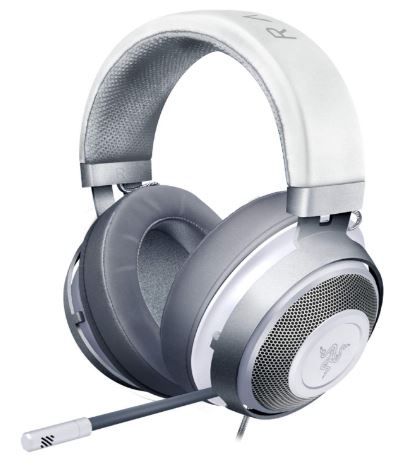
The Razer Kraken has been on gaming headset lists for the better part of a decade. Not because Razer keeps putting it there — because people keep buying it, using it, and not replacing it. That kind of staying power in a market that moves this fast is worth paying attention to.
The 50mm drivers are the headline spec for good reason. At that driver diameter, you get genuine bass response — not the muddy, boosted-low-end fake bass that some headsets use to simulate fullness, but actual low-frequency presence with room to breathe. The 7.1 virtual surround through the USB connection is among the better software implementations in this price range, particularly for FPS games where positional audio matters.
What most reviews don't spend enough time on is the cooling gel ear cushions. This sounds like marketing language — it isn't. After three hours in a warm room, most memory foam headsets have you sweating through the cushion material. The Kraken's oval gel-infused cups stay cooler. Not cold, not miraculous, but meaningfully more comfortable during long sessions than the competition at this price. That's a tangible thing that affects whether you actually enjoy using this headset in practice rather than just in a ten-minute test.
The retractable mic is a small but smart design choice — it tucks away cleanly when not in use and extends to a position close enough to your mouth for solid pickup. The inline analogue volume control and mic mute switch are physical, responsive, and easy to find by feel during a game. Small details. They add up.
The only honest limitation here is customer service — multiple reviews flag slow or unhelpful responses from Razer's support team, which matters if you encounter a hardware fault. The headset itself, though? It earns its position at the top of this list.
Pros
- 50mm drivers: genuine bass depth and spatial accuracy at this price point
- 7.1 virtual surround via THX Spatial Audio — competitive-grade positional audio
- Cooling gel ear cushions — noticeably more comfortable during extended sessions
- Retractable mic stays out of the way when unused
- Inline volume and mute controls — physical, reliable, no software required
- Bauxite aluminium frame — durable without being heavy
- Under $100 — outstanding value for the specification
Cons
- Customer service response times frequently criticised in reviews
- 7.1 surround requires a USB connection — 3.5mm is stereo only
- Wired only — no wireless option in this version
Our Verdict: The Razer Kraken is the starting point for anyone who wants to understand what a proper gaming headset sounds like without paying premium prices to find out. Comfortable for long sessions, genuinely capable spatially, and built from materials that don't feel like they'll crack the first time you drop them. Start here.
Astro A10 Gen 2 — Best for Multi-Platform & Durability
Rating: 4.2/5

Product information
The Astro A10 Gen 2 doesn't try to be the most impressive headset in the room. It tries to be the one you're still using in three years when everything else has developed a driver rattle or a mic that cuts in and out unpredictably. That's a different design philosophy — and honestly, it's the right one for a lot of players.
The 32mm drivers are smaller than the Kraken's 50mm — and the audio quality reflects that. Not bad. Not embarrassing. Just more straightforward, less layered. For single-player RPGs, platformers, casual shooters — it's more than adequate. For competitive FPS where you're relying on sound positioning for every decision, it's the weakest audio on this list.
What compensates significantly is the engineering around durability and platform flexibility. The ultra-durable headband is built for the specific kind of abuse that gaming headsets receive: being tossed on a desk, stuffed into a bag, and stretched over larger-than-average heads repeatedly. The replaceable ear cushions and headband pad are a genuinely thoughtful design choice — instead of buying a new headset when the foam wears out (as inevitably happens), you swap the consumable parts. Cheaper in the long run.
The flip-to-mute mic is the cleanest implementation of mute functionality on this list. Flip up to mute. Flip down to unmit. No buttons, no software, no guessing whether you're muted. The kind of obvious solution that makes you wonder why more headsets don't do it this way.
Works on everything. PS5, PS4, Xbox Series X, Nintendo Switch, PC, Mac — a single 3.5mm connection. No dongles, no USB adapters, no platform-specific drivers. Just plug in and play.
Pros
- Built to outlast less durable competitors — headband rated for serious daily use
- Replaceable ear cushions and headband pad — extend the product lifespan significantly
- Flip-to-mute boom mic — the most intuitive mute implementation on this list
- Single 3.5mm connection works across all major gaming platforms
- Removable cable with inline volume control
- Comfortable closed-back over-ear design for extended sessions
Cons
- 32mm drivers produce noticeably less spatial depth than 50mm competitors
- Stereo only — no surround sound processing
- No personalisation or EQ features — what you hear is what you get
- Some reports of inconsistent audio delivery between units
Our Verdict: The A10 Gen 2 is the headset for players who want something reliable, multi-platform, and built to survive the way gaming peripherals actually get used — which is to say, not carefully. The audio isn't the headline. The durability, the mic, and the platform compatibility are. If you switch between consoles and PC regularly, this is the path of least resistance.
Razer Barracuda X Wireless — Best Wireless Pick
Rating: 4.1/5
Product information
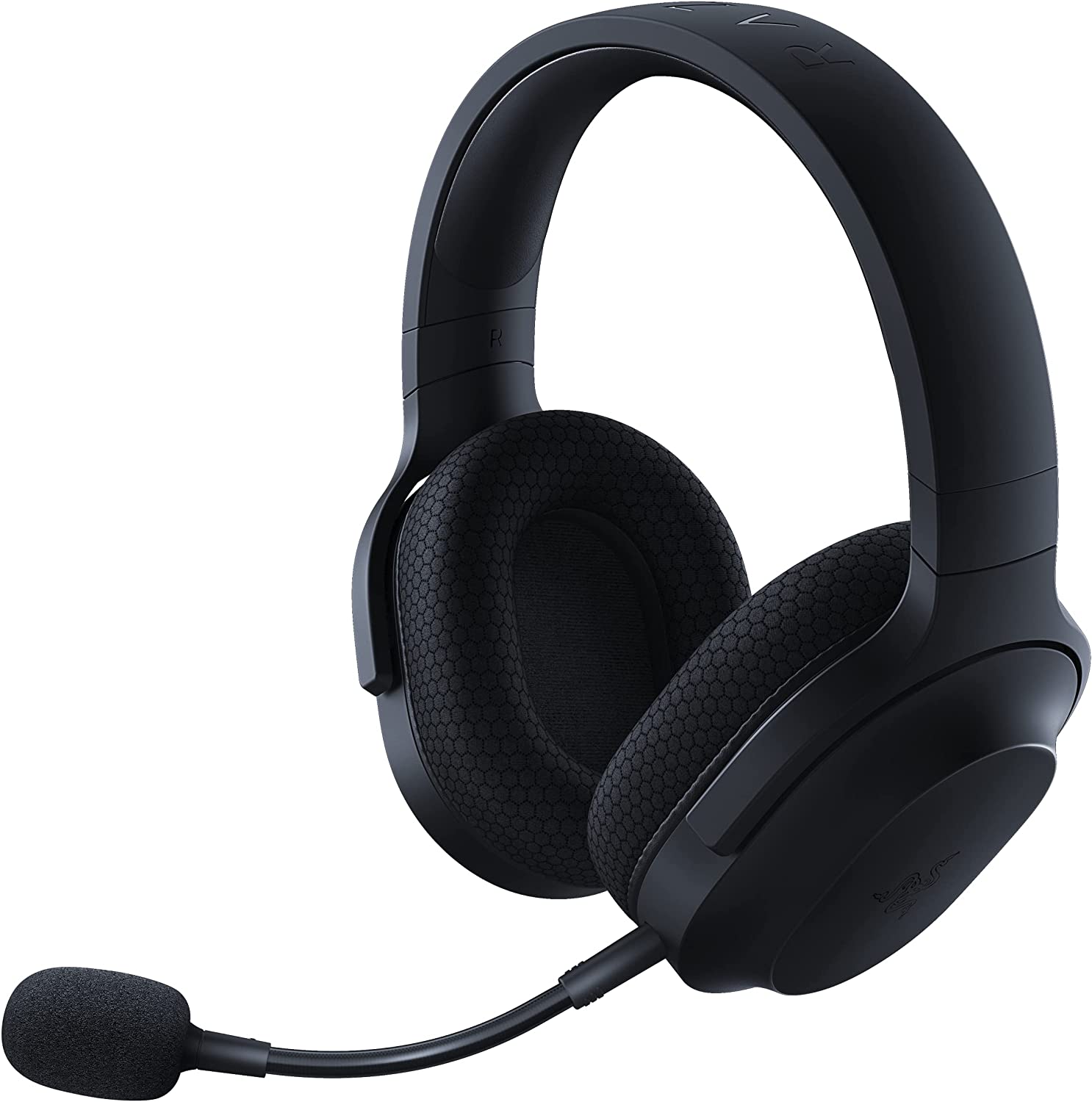
The Razer Barracuda X arrived in a crowded wireless headset market and immediately made a reasonable case for itself: light, versatile, genuinely comfortable, and charged via USB-C. That last point matters more than it sounds. We're in 2026. A wireless headset that charges via its own proprietary cable is an inconvenience the category doesn't need anymore.
The TriForce 40mm driver design — three separate tuned sections handling highs, mids, and lows independently — is clever engineering that produces a more balanced sound profile than single-element drivers typically manage at this size. You won't confuse it for 50mm performance. The highs are crisp, the mids are clear, and the bass is present but not dominant. For gaming, that balance serves you better than an aggressively bass-forward profile that muddies footstep cues.
The 2.4GHz USB-C wireless connection has meaningfully lower latency than Bluetooth — the difference matters in fast-paced games. The USB-C dongle comes with a USB-A extender, which means it works on both newer laptops with USB-C only and older desktops with USB-A. A small but sensible inclusion.
At 250 grams, it's one of the lighter headsets on this list. The breathable memory foam ear cushions and swiveling ear cups manage extended sessions reasonably well without the premium cooling gel of the Kraken. The detachable cardioid mic removes cleanly for travel and mobile use, which is a feature worth having.
The limitations are real and should be stated clearly. There's no app, no EQ, no sound customisation whatsoever — you get the headset's default profile, and that's it. For most casual-to-competitive players, this won't matter. For players who tweak audio profiles per game, it's a genuine absence.
Pros
- Lightweight at 250g — comfortable during extended sessions
- TriForce 40mm drivers: balanced highs, mids, lows without bass dominance
- 2.4GHz USB-C wireless — low latency, works across PC, PlayStation, Xbox, Switch
- USB-C charging — universal, fast, no proprietary cables
- Detachable mic — clean removal for travel or mobile use
- 20-hour battery life
Cons
- No companion app, no EQ, no sound customisation
- Stereo only — no surround sound processing
- 40mm drivers fall short of 50mm competitors in spatial depth
- Memory foam cushions less effective for cooling than gel alternatives
Our Verdict: The Barracuda X is the wireless headset for players who want the simplest, cleanest wireless gaming experience — no software overhead, no complicated setup, no platform restrictions. Plug in the dongle, put on the headset, and play. For that specific use case, it's a well-executed product. Just know what you're not getting: customisation, surround sound, and premium driver performance.
Razer BlackShark V2 — Best for THX Surround Sound
Rating: 4.0/5
Product information
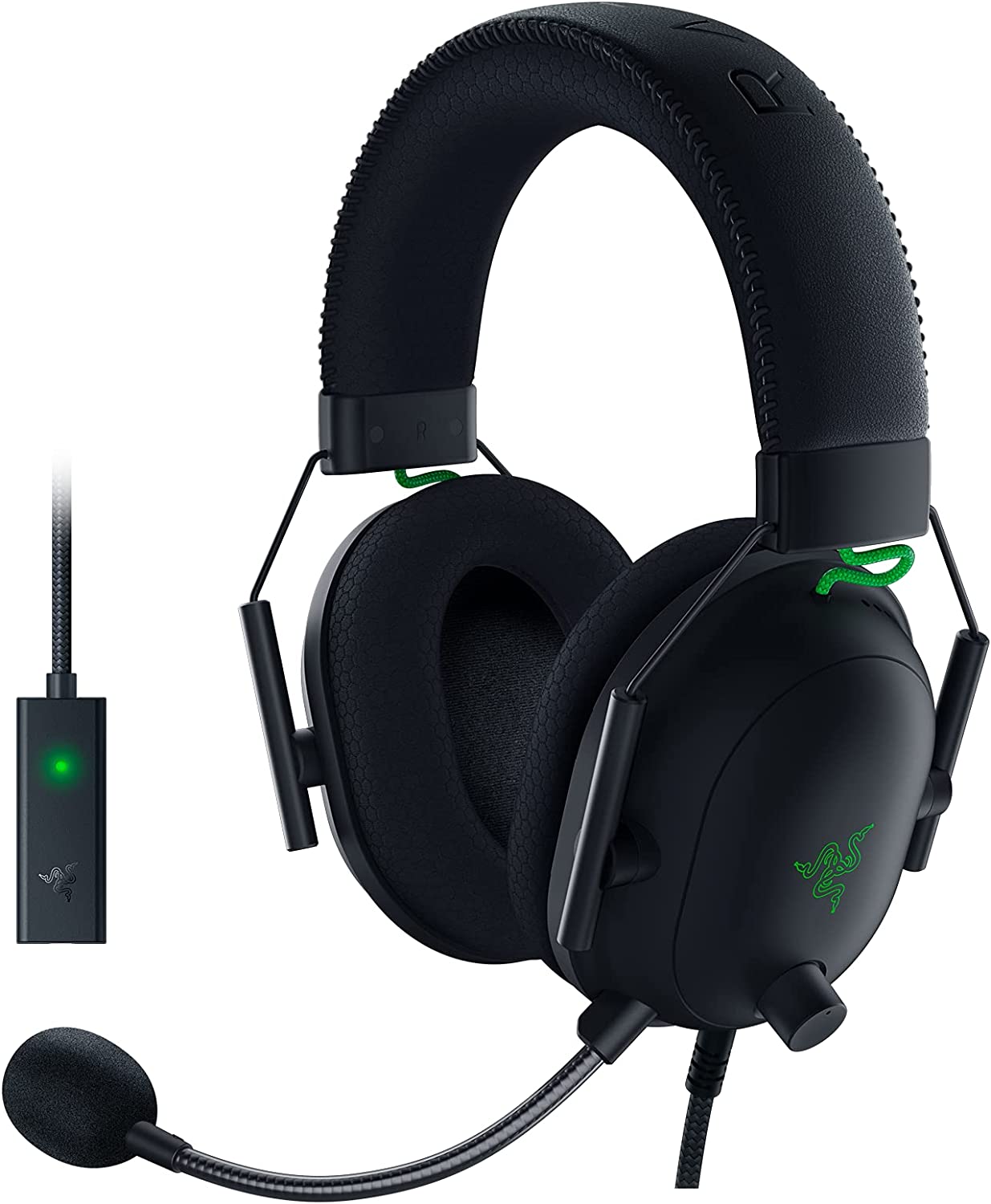
The BlackShark V2 exists for players who want the best possible audio processing in a wired headset at this price tier. The THX Spatial Audio license, combined with the TriForce Titanium 50mm drivers, is the kind of specification combination that produces genuinely different results in games designed around directional audio — not marginally better, noticeably better.
THX Spatial Audio, when it's working correctly, processes positional cues in a way that standard 7.1 emulation doesn't match. It's calibrated against reference cinema standards rather than just mathematically redistributing stereo channels. In practice, during an FPS session, the difference is audible — footstep positions are more precise, audio sources in front of and behind you are more distinguishable. The kind of precision that, once you've experienced it, makes stereo headsets feel like a downgrade.
The TriForce Titanium 50mm drivers bring the same advantage as the Kraken's 50mm format: genuine bass depth, clear mids, and spatial headroom for a wide soundstage. Razer Synapse 3 allows individual tuning of the three driver sections, EQ adjustment, and advanced mic processing — more customisation here than any other headset on this list.
The detachable HyperClear cardioid mic produces clean, focused voice pickup with solid background noise rejection. Detaches easily when not needed. Razer Synapse gives you noise gate and additional voice tweaking options that the Barracuda X and Kraken don't offer.
The significant limitations: THX Spatial Audio requires a USB connection and Windows 10/11 64-bit — it does not work on Xbox One, Xbox Series X, or via the 3.5mm connection. The controls layout on the headset has been criticised for being unintuitive during active gameplay — buttons in awkward positions that require concentration to find by feel. And the USB audio card included in the box is not compatible with Xbox platforms.
Pros
- TriForce Titanium 50mm drivers with individual high, mid, and low tuning
- THX Spatial Audio license included — industry-leading surround sound simulation
- Detachable HyperClear cardioid mic with Synapse voice tweaking
- Full EQ customisation via Razer Synapse 3
- Cooling gel-infused oval ear cushions — same formula as the Kraken
- Lightweight frame despite the premium driver hardware
Cons
- THX Spatial Audio is Windows 10/11 64-bit only — no Xbox compatibility
- USB audio card incompatible with Xbox One and Xbox Series X
- On-headset controls criticised as unintuitive and difficult to use mid-game
- Wired only — no wireless option in the base V2 model
- Synapse software dependency for full feature access
Our Verdict: The BlackShark V2 is the right choice if you game on a Windows PC and care specifically about the quality of your spatial audio. The THX implementation is meaningfully better than standard 7.1 emulation, the drivers are excellent, and the mic quality with Synapse processing is among the best on this list. The Xbox incompatibility and the fiddly controls are real compromises — know your platform before you buy.
Bose QuietComfort 35 II Gaming Headset — Best Noise Cancellation
Rating: 4.0/5
Product information
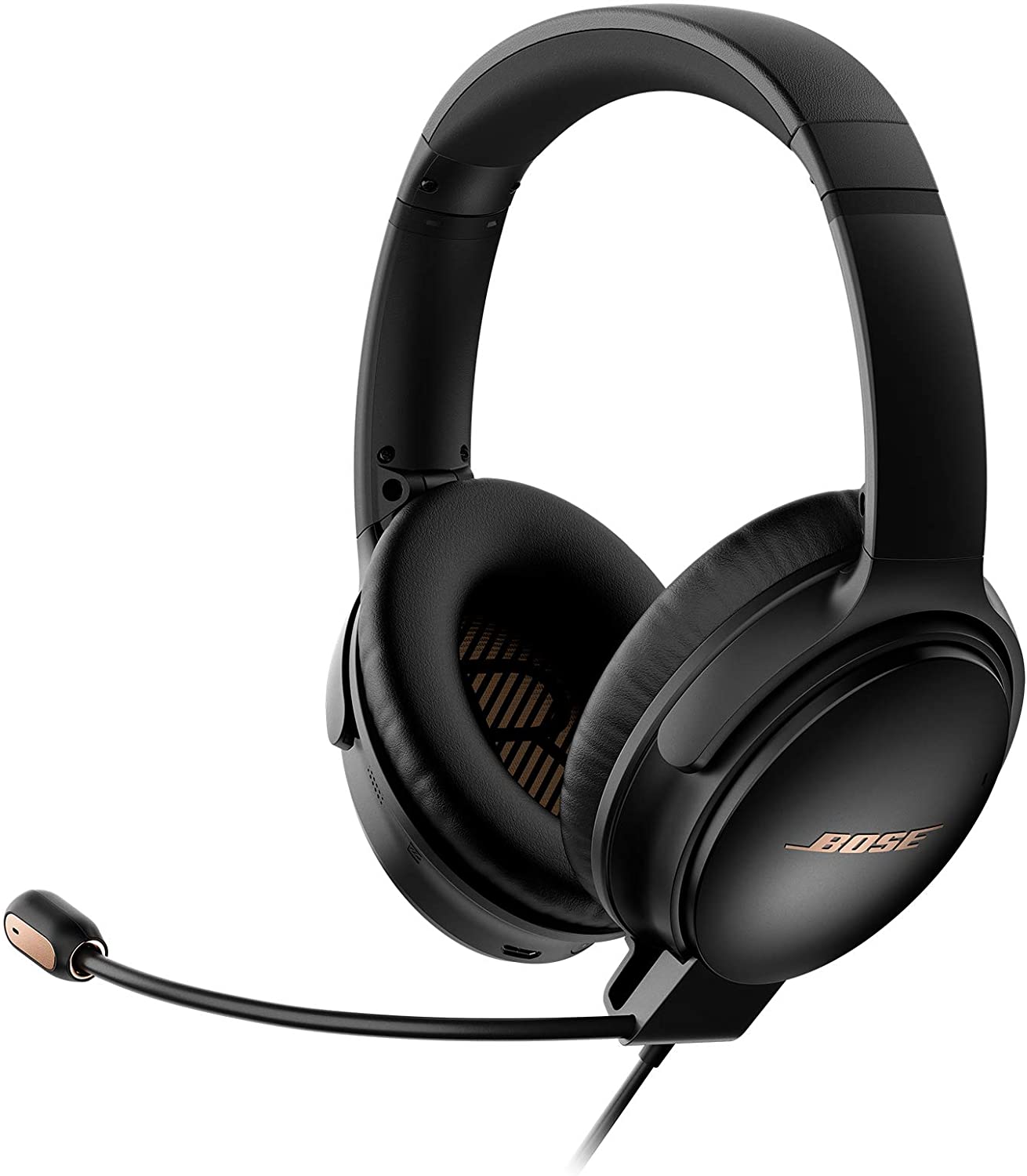
Here's an unusual entry. The Bose QuietComfort 35 II is not, in its original form, a gaming headset. It's one of the most celebrated noise-cancelling headphones in the world, which Bose has adapted for gaming via a detachable boom mic module and a dedicated PC controller. The result is something genuinely strange — a headset that is, in certain measurable ways, better than everything else on this list, and in other measurable ways, less practical.
The noise cancellation is world-class. This isn't marketing language applied loosely — the QC35 II is the reference benchmark against which other ANC headsets are measured. Three levels of cancellation (accessible via button), the ability to reduce ambient noise to near-nothing in reasonably loud environments, and enough isolation that you stop monitoring the outside world entirely. In a house with children, flatmates, or a particularly present street, this is a material quality-of-life difference.
The sound quality — the underlying acoustic performance of the drivers before any gaming-specific processing — is excellent. Rich mids, controlled bass, clear highs, a soundstage that feels natural rather than artificially widened. Bose builds headphones with a specific warmth to the low-mids that rewards music and atmospheric games more than clinical studio monitors would.
The boom mic, detached and reattached via the 2.5mm gaming module, is Discord and TeamSpeak certified — voice clarity during calls and team comms is genuinely good. The PC desktop controller gives you a hardware volume knob and four levels of mic monitoring (hearing your own voice), which prevents the unconscious shouting that comes from not being able to hear yourself.
The compromise that matters: the QC35 II cannot be used wirelessly for gaming. In-game audio requires the wired 2.5mm gaming cable — the wireless Bluetooth connection is for music and calls only. The gaming cable is short, which positions it firmly as a desktop headset rather than a couch gaming option. And there is no spatial audio processing — no surround simulation, nothing beyond clean stereo.
Pros
- World-class active noise cancellation — the reference standard in consumer ANC
- Bose acoustic quality: warm, detailed, naturally sounding headphones
- Detachable boom mic with Discord/TeamSpeak certification
- PC controller with hardware volume knob and 4-level mic monitoring
- 20-hour battery (ANC wireless), lightweight and comfortable for marathon sessions
- Universally compatible via 3.5mm wired connection
Cons
- Cannot be used wirelessly for gaming — Bluetooth is music/calls only
- Short gaming cable — better suited to desktop than console or couch gaming
- No spatial audio, no surround sound simulation
- Limited controls customisation via app
- The volume controller must be placed within 6 inches of the desk edge for full functionality
- Premium price for a headset that requires a wired connection in gaming contexts
Our Verdict: The Bose QC35 II Gaming is the right headset if you game at a desk in a noisy environment, and the noise cancellation is the primary requirement. The audio quality is excellent, the comfort is outstanding, and the mic is professional-grade. But it's a niche choice — if you want wireless gaming or spatial audio processing, look elsewhere. For the focused use case it's built for, though, nothing else comes close.
FAQs: Gaming Headsets
Why do headphones seem to sound better than speakers?
The perception that headphones sound better than speakers can be attributed to several factors that contribute to a more personalized and immersive listening experience. Some of the key reasons why headphones may seem to deliver superior audio quality include:
Direct sound delivery: Headphones deliver sound directly into your ears, eliminating the impact of room acoustics and creating a more intimate listening experience. This direct sound delivery results in clearer audio and minimal distortion, allowing you to hear every detail of your music or game.
Noise isolation: Most headphones, especially closed-back and noise-canceling models, provide a higher degree of noise isolation compared to speakers. By reducing ambient noise, headphones allow you to focus entirely on the audio without interference from external sounds, enhancing your overall listening experience.
Enhanced stereo imaging: Headphones create a distinct left and right channel separation, which results in an accurate and precise stereo image. This allows you to pinpoint the location of individual instruments or sound effects within the audio mix, providing a more immersive and realistic listening experience.
Personalized soundstage: While speakers project sound into a room, creating a shared listening environment, headphones create a personalized soundstage that surrounds your head. This unique soundstage can make you feel more connected to the music or game, contributing to the perception of superior audio quality.
Consistent audio quality: The performance of speakers can be affected by various factors, such as room size, shape, and furnishings. In contrast, headphones offer a consistent audio quality regardless of your surroundings, ensuring a reliable and enjoyable listening experience.
Although headphones may seem to deliver better sound quality due to these factors, it's important to remember that personal preferences and specific use cases play a significant role in determining the ideal audio solution. Both headphones and speakers have their unique advantages, and the choice between them ultimately depends on your listening priorities and desired audio experience.
What headset should I buy in 2026?
The gaming headsets we reviewed in this blog post are the best we could find on Amazon.
After reading the reviews, decide which way to go, wired or wireless, and then you can't go wrong by selecting the one that you like best.
What headsets do pro gamers use?
Professional players across esports titles tend to favour headsets that prioritise low latency, precise positional audio, and mic clarity over premium features like ANC or wireless. Commonly used models include the Razer Kraken, Razer BlackShark V2 Pro, Astro A10 Gen 2, and Logitech G Pro X. The specific choice often depends on tournament platform requirements and brand sponsorship arrangements rather than purely objective performance metrics.
Are good-quality headphones worth it for gaming?
Yes — specifically because of three things that cheaper headsets get wrong: directional audio accuracy, mic clarity in team communication, and long-session comfort. All three affect gameplay outcomes in ways that matter. Positional audio tells you where enemies are. A clear mic makes team coordination functional rather than frustrating. Comfort determines how long you can maintain focus before physical discomfort becomes a distraction.
Are noise-cancelling headphones better for gaming?
It depends on your environment. In a quiet room, ANC adds processing overhead and battery drain without meaningful benefit. In a noisy household, shared apartment, or open-plan office, ANC is the difference between being immersed in the game and being constantly pulled back to the real world. If noise is your primary problem, the Bose QC35 II Gaming is in a different category from anything else on this list for ANC quality.
Wired or wireless for gaming?
For competitive play where every millisecond is scrutinised, wired remains the theoretical maximum. In practical testing, the difference is imperceptible to most humans. For casual to mid-level competitive play: premium 2.4GHz wireless (LIGHTSPEED, HyperSpeed, or USB-C dongle) is indistinguishable from wired in real-world conditions. Bluetooth is not recommended for gaming due to higher inherent latency.
How important is battery life on a wireless gaming headset?
Very. Anything under 20 hours becomes a management burden — you'll start a long session low more than once. 20–30 hours is the practical minimum. The HyperX Cloud Alpha Wireless's 300-hour battery life is extraordinary and removes battery management entirely from the equation. For most players, 20 hours is sufficient if you charge after long sessions.
Other pages that you may find interesting.
 Neil Fajardo
 Neil Fajardo
 Neil Fajardo