
Quick Answer: The best wireless gaming mouse for most players is the Logitech G502 Lightspeed — consistent sensor, adjustable weights, enormous range of programmable inputs, and latency low enough that you'll stop noticing it's wireless within the first hour. Budget pick: Logitech G305 Lightspeed, which performs above its price point in ways that should embarrass more expensive mice. For MMO players with a side-button obsession: Logitech G604 Lightspeed. All three use Logitech's LIGHTSPEED 2.4GHz receiver — faster than Bluetooth, more reliable than your internet connection.
There's a specific kind of frustration that only gamers understand. You're mid-flick — perfect timing, perfect angle — and then the cord catches. Drags. Your crosshair drifts a millimetre. You miss. You die. You stare at the respawn screen with a quiet, simmering fury that no one who hasn't experienced it will ever fully appreciate.
I've been there. More times than I'd like to admit.
The shift to wireless gaming mice felt, for years, like a compromise — like trading raw performance for the luxury of not having a wire. The early wireless mice were slower, heavier, and more likely to drop signal at the worst possible moment. So the serious players stayed wired. The casual ones went wireless. And those two camps judged each other quietly from across the table at LAN events.
That divide doesn't exist anymore. Not really.
The technology caught up — and then it overtook. Logitech's LIGHTSPEED protocol and Razer's HyperSpeed wireless both deliver sub-millisecond latency that's, technically, faster than most wired connections. The sensors are identical to their wired counterparts. The battery life on some of these runs to nine months on a single AA battery, which is either impressive engineering or a kind of low-level witchcraft. Maybe both.
What still exists is the decision paralysis. Because once you accept that wireless gaming mice are genuinely good, you're immediately confronted with a shelf full of options, each screaming about their DPI ceiling and RGB zones and polling rates, and it all starts to blur.
So, five mice. Tested. Ranked. No fluff.
Why the Wire Actually Matters (And Then Doesn't)
Let's settle the latency question first, because it still comes up in every forum argument about wireless mice, and it deserves a clean answer.
Wired mice have a theoretical latency advantage — data travels through copper, instantly, no radio frequency handshake required. That advantage is measured, in testing, at somewhere between 0.5 and 2 milliseconds in real-world conditions. The human reaction time floor is approximately 150–200 milliseconds. You cannot perceive a 1-millisecond difference. Your nervous system isn't built for it.
What you can perceive — and what genuinely affects play — is cable drag. The physical resistance of a cord catching on your desk edge, bunching under your wrist, or developing a spring memory from being coiled in a box. That's real. That's measurable in muscle memory and in outcomes. And wireless mice eliminate it.
The remaining genuine downsides of wireless are two: batteries and cost. Batteries die — usually not mid-game if you're paying attention, but occasionally mid-game if you're not. And wireless mice cost more, full stop. The technology in the receiver, the power management circuitry, the charging infrastructure — it all adds up. You're paying for engineering, not marketing.
If neither of those bothers you, there's no reason left to buy a wired mouse. At all.
What to Actually Look for Before You Buy
Sensor type. Optical. Almost always optical. Laser sensors were the competition once — higher sensitivity, worked on more surfaces. But optical sensors have closed every gap and then some. Modern optical sensors track on glass, wood, cloth, and whatever miscellaneous desk surface you've accumulated. Laser sensors still exist. You probably don't need one.
DPI range. DPI (dots per inch) is how far your cursor moves per inch of physical mouse movement. High DPI isn't inherently better — it depends entirely on your monitor resolution, your sensitivity settings, and how you play. FPS players tend to run lower DPI for precision. MOBA and MMO players often go higher. What matters isn't the ceiling but the adjustability — you want to fine-tune in real increments, not jump between four preset options.
Grip style. Palm grip (whole hand rests on the mouse), claw grip (fingers arch over the buttons), fingertip grip (only fingertips touch). This determines what shape works for you more than any spec does. A small, lightweight mouse like the G305 suits claw and fingertip grips. A larger, heavier mouse like the G502 suits a palm grip. If you buy the wrong shape for your grip, no amount of sensor performance will fix the discomfort.
Button count. FPS: Six buttons are plenty. MMO: You want more — the G604's six side buttons are a floor, not a ceiling, for serious MMO players. The G-Shift feature on Logitech mice effectively doubles your button count through a modifier layer, which is clever and worth understanding before you dismiss a mouse for having "only" six programmable inputs.
Battery type. Rechargeable via USB-C (DeathAdder V2 Pro, Corsair Dark Core) versus AA/AAA replaceable (G502, G305, G604). Neither is objectively better — rechargeable is convenient until you forget to charge it; replaceable means you're always one battery swap from full power. The G305 runs on one AA battery for up to nine months. Nine months. Think about that.
At a Glance — 2026 Comparison Table
| # | Product | Sensor / DPI | Connectivity | Battery | Best For | Rating |
|---|---|---|---|---|---|---|
1 | Logitech G502 Lightspeed | HERO 25K optical | 2.4GHz USB + wired | Rechargeable / AA | All-round gaming, MMO | ★★★★½ — 4.5/5 |
2 | Razer DeathAdder V2 Pro | Focus+ optical, 20K DPI | 2.4GHz HyperSpeed + Bluetooth | Rechargeable | FPS, right-hand ergonomic | ★★★★¼ — 4.3/5 |
3 | Logitech G305 Lightspeed | HERO optical, 200–12,000 DPI | 2.4GHz USB | 1× AA (up to 9 months) | Budget, portable, casual-competitive | ★★★★ — 4.2/5 |
4 | Corsair Dark Core RGB Pro SE | PixArt PMW3391, 18,000 DPI | 2.4GHz USB + Bluetooth + Qi | Rechargeable + Qi wireless | Right-hand palm grip, wireless charging | ★★★★ — 4.1/5 |
5 | Logitech G604 Lightspeed | HERO optical, 100–16,000 DPI | 2.4GHz USB + Bluetooth | 2× AA (up to 5.5 months) | MMO, macro-heavy setups | ★★★★ — 4.0/5 |
The Honest Buying Summary
FPS players who want the best: Razer DeathAdder V2 Pro. The shape is proven, the sensor is exceptional, and 88 grams is light enough to move fast.
FPS players on a budget: Logitech G305 Lightspeed. Don't let the price fool you. The sensor isn't compromised.
All-rounders: Logitech G502 Lightspeed. Bigger, heavier, more featured — but it does everything.
MMO players: Logitech G604 Lightspeed. Built for it.
Wireless charging fans: Corsair Dark Core RGB Pro SE. The only Qi-compatible option on this list, and it earns that distinction.
Final Thoughts
Gaming mice are personal in a way that's hard to explain to non-gamers. The weight distribution. The way the click sounds. Whether the side buttons are raised enough to feel without looking down. Whether the scroll wheel has resistance or free spins. These things live in your hand for hours at a time, and they either become invisible or they become a constant low-grade friction.
The mice on this list have earned their spots because they remove that friction. Not because they have the highest DPI number or the most RGB zones — those are marketing metrics. Because they do what you need, reliably, without getting in the way.
The best wireless gaming mouse isn't always the most expensive one. It's the one that disappears in your hand. The one you stop noticing. That's the whole game — pick the one that gets out of your way fastest, then go play.
Can we help? We've researched for you and found the best Wireless Gaming Mouse on Amazon.
Every day, we read hundreds of reviews and try the highest-rated products we have on our list.
Best Wireless Gaming Mouse - Reviews
Logitech G502 Lightspeed — Best Overall
Rating: 4.5/5
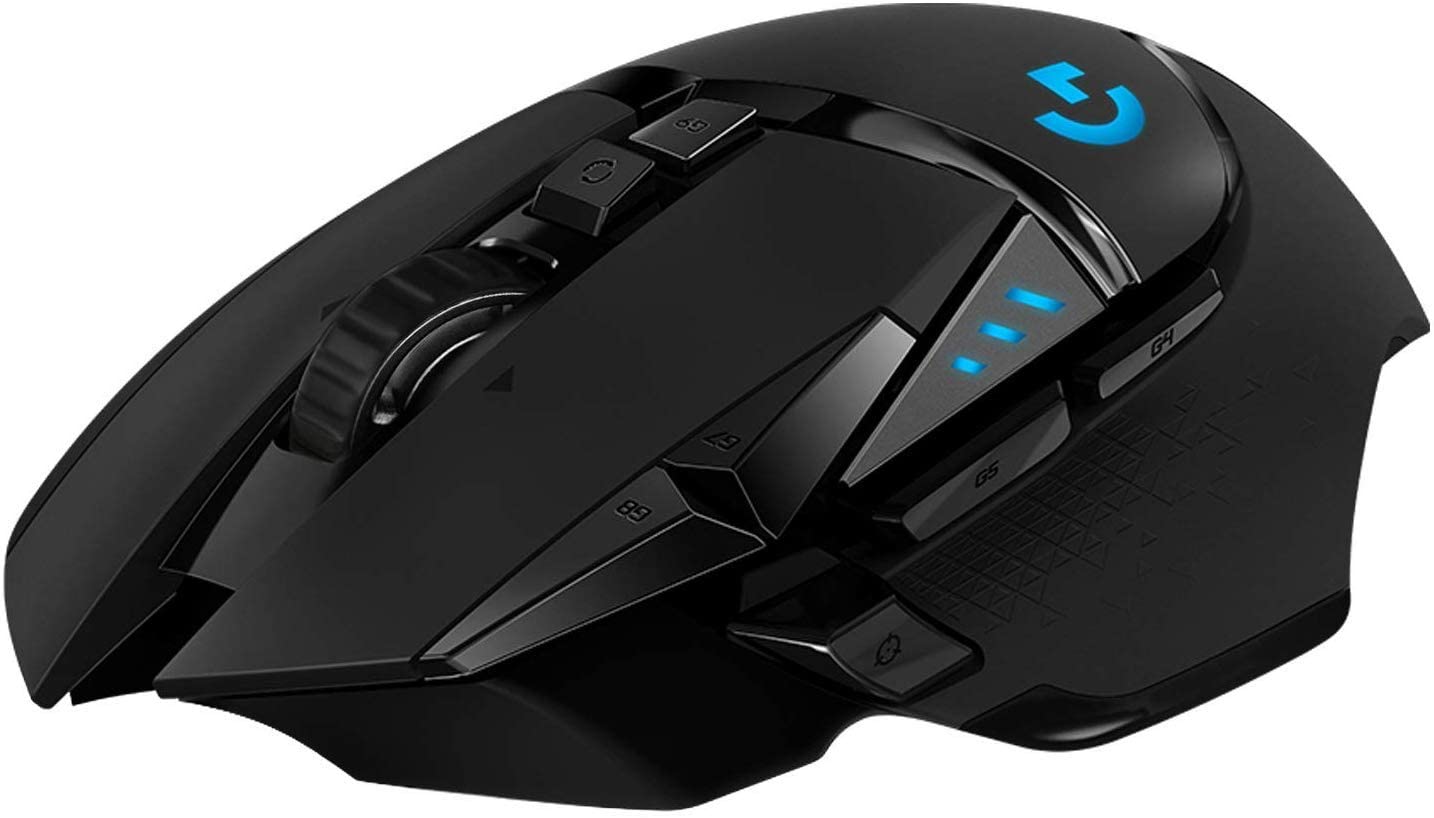
The G502 has been sitting at the top of "best gaming mouse" lists since the wired version launched, and the Lightspeed edition earns that position all over again — this time without the cord.
The HERO 25K sensor is, in practical terms, overkill for most players. The precision ceiling is absurdly high. What matters more in daily use is the consistency — the G502 Lightspeed tracks identically at 200 DPI and at 16,000 DPI, at slow deliberate movements and at fast flick shots. That kind of sensor uniformity is what separates gaming mice that feel good from gaming mice you stop thinking about because they just work.
The adjustable weight system is either the G502's defining feature or a piece of clever marketing, depending on who you ask. Five 3.6g weights, configurable in different positions to shift the balance forward, back, or centre. For palm-grip players, this is genuinely useful — a slightly front-weighted mouse tracks differently from a neutral one, and the ability to tune it to your preference is real. For people who just want to pick up a mouse and play, the whole system can be quietly ignored.
The button layout is generous without becoming cluttered. Two thumb buttons, a sniper button below the thumb rest, a DPI cycle button, and a dedicated tilt-click on the scroll wheel. The G-Shift function gives you a second layer of programmable inputs across every button — useful enough for MMO players that the G502 ends up on that shortlist despite not being designed specifically for it.
Where it loses points, honestly: it's large. People with smaller hands will feel this. And it's heavy by modern gaming mouse standards — even with no weights installed. If you're coming from a lightweight ultralight mouse, the G502 will feel like picking up a brick for the first week.
Pros
- HERO 25K sensor: consistent across the entire DPI range, no jitter at speed
- LIGHTSPEED wireless: latency indistinguishable from wired in normal conditions
- Adjustable weights — genuinely useful for tuning balance to grip preference
- 11 programmable buttons plus G-Shift for a second input layer
- Can be used wired as a fallback — charges while playing
- PowerPlay wireless charging mat compatible (sold separately)
Cons
- Large ergonomic shape — uncomfortable for smaller hands
- One of the heavier gaming mice on this list, even without weights
- Right-hand only design
Our Verdict: The G502 Lightspeed is the Swiss Army knife of wireless gaming mice — it does everything, does it well, and earns its consistently high reviews over and over. If you have medium-to-large hands and want one mouse that handles FPS, MMO, and everyday desktop use without compromise, start and end your search here.
Razer DeathAdder V2 Pro — Best for FPS Players
Rating: 4.3/5
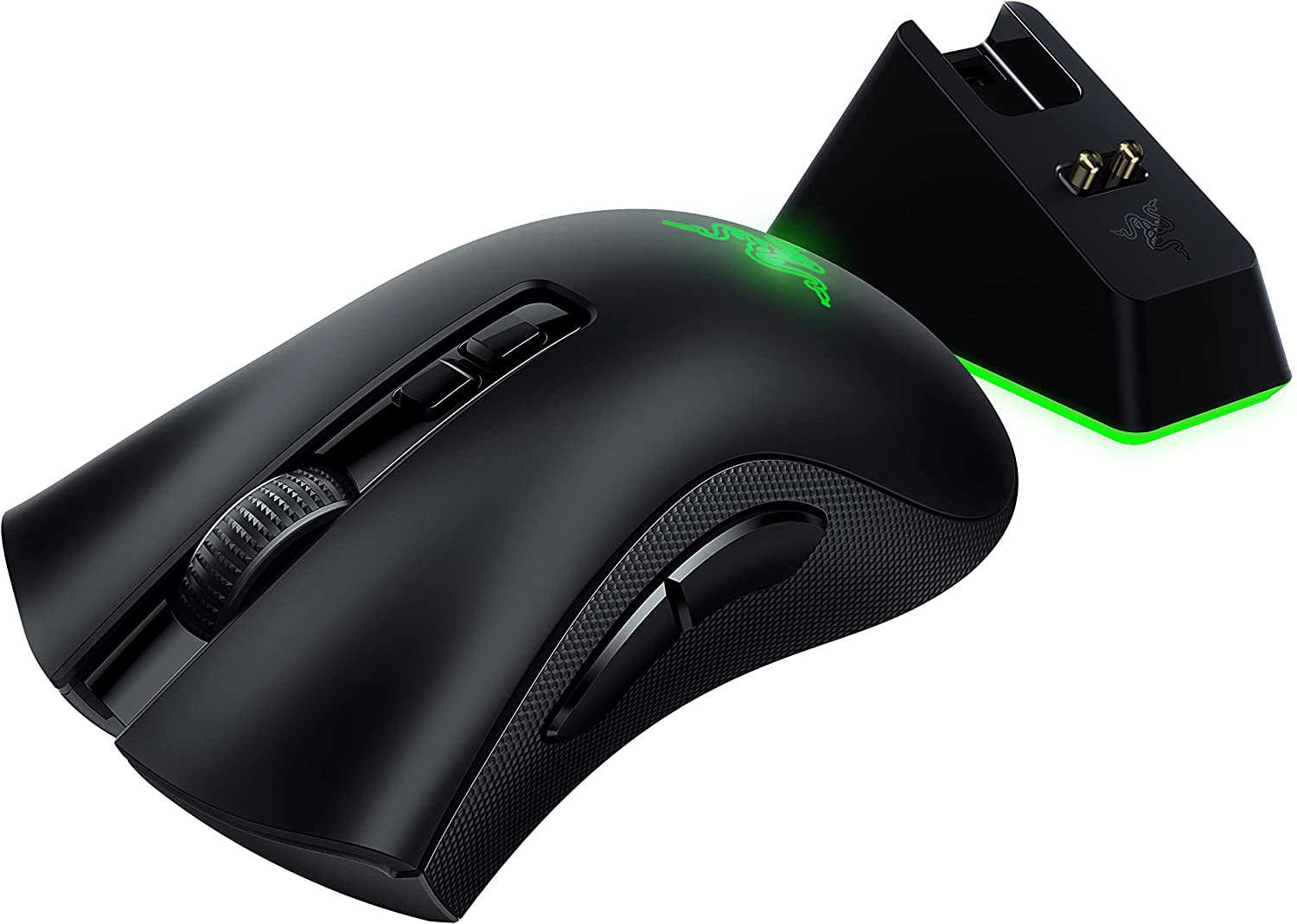
The DeathAdder shape has been around long enough to become a reference point. When reviewers describe the ergonomics of a new mouse, they often compare it to the DeathAdder. That's what being genuinely comfortable for a very wide range of hand sizes and grip styles over two decades does for a product — it becomes the benchmark.
The V2 Pro keeps that shape and adds a wireless connection that handles the jump from wired to 2.4GHz HyperSpeed without sacrificing the click latency that made the wired version a competitive staple. At 88 grams, it's significantly lighter than the G502, which, combined with the low-profile ergonomic hump that suits claw and palm grips equally, makes it genuinely fast to move. Not ultralight territory, but noticeably nimble.
The Focus+ optical sensor is among the most accurate available. Customisable lift-off distance — down to near-zero if you play with low sensitivity and large sweeping motions — and a polling rate that can be tuned in Razer Synapse. The Hypershift feature, which turns any button into a modifier key to create a second layer of programmable inputs, is one of those features that sounds unnecessary until you configure it once.
Two simultaneous device connections — one via HyperSpeed dongle, one via Bluetooth — means the DeathAdder can pair to your gaming PC and your laptop at the same time, switching between them cleanly. That's an underrated feature for anyone who works on multiple machines.
The limitations are honest. No macOS software support — Razer Synapse doesn't run on Mac, which means customisation is locked to Windows users. No infinite scroll or tilt-click on the scroll wheel. And the battery life, at up to 70 hours, is solid but not extraordinary compared to the AA-powered Logitech mice.
Pros
- Industry-benchmark ergonomic shape — suits a wide range of hand sizes and grip styles
- Razer Focus+ sensor: excellent accuracy, customisable lift-off distance
- Lightweight at 88g — fast and comfortable for extended FPS sessions
- Dual wireless: HyperSpeed 2.4GHz and Bluetooth simultaneously
- Hypershift doubles programmable input count
- Premium feet for smooth, consistent glide
Cons
- No software support for macOS
- No weight optimisation options
- The scroll wheel lacks infinite scroll and L/R tilt
- Battery life decent but not exceptional
Our Verdict: The DeathAdder V2 Pro is the mouse for FPS players who want a trusted, proven shape and need their wireless connection to behave like it isn't there. The ergonomics are as good as they've always been — the wireless implementation just removes the last remaining argument for the wired version.
Logitech G305 Lightspeed — Best Value
Rating: 4.2/5
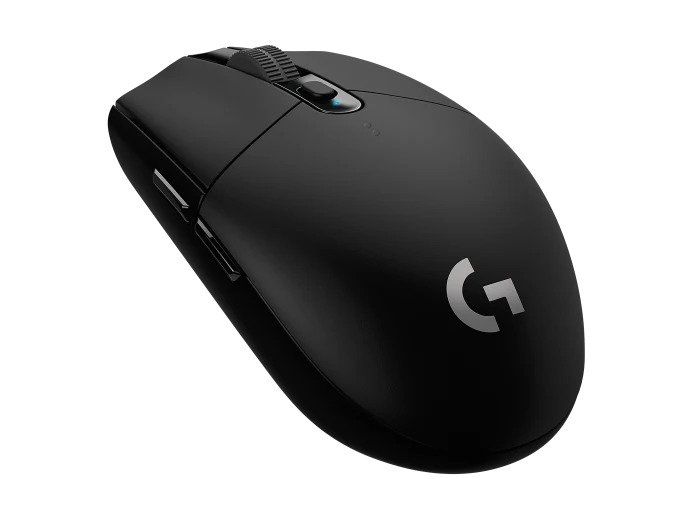
The G305 is the kind of product that makes you slightly suspicious when you first look at the price. That much sensor quality, that much battery life, that reliable a wireless connection — at that cost? It feels like a pricing error. It isn't.
The HERO optical sensor in the G305 is the same sensor family that powers the G502. Scaled back in its top DPI ceiling, yes — but at the 400–1600 DPI range where most competitive FPS players actually operate, there's no meaningful performance gap. The click latency is impressively low. The polling rate is consistent. The sensor doesn't lift or skip on cloth pads or wooden desks.
The nine-month battery life — one AA battery, standard alkaline — is worth pausing on. Recharging anxiety is a real thing with wireless gaming peripherals. The G305 essentially eliminates it. Keep a spare AA in your desk drawer, and you're covered indefinitely. No cable cluttering your desk for overnight charging. No checking battery percentage before a session.
The trade-offs are real and worth stating clearly. The G305 is compact — it won't fit large hands comfortably, and claw or fingertip grip suits it better than palm. It's not ultralight in the strictest sense, and it doesn't have the adjustable weight system or the side-button count of the G502. The plastic shell feels cost-appropriate — functional but not premium.
What it does is remove every reason to accept a wired mouse at this price point. Because there isn't one.
Pros
- HERO optical sensor — same family as the G502, genuinely excellent for the price
- Nine-month battery life on a single AA battery
- LIGHTSPEED 2.4GHz — same low-latency wireless as Logitech's premium mice
- Six programmable buttons
- Compact size suits travel, laptop setups, and smaller desks
- Outstanding value for competitive gaming performance
Cons
- Small form factor — uncomfortable for large hands
- No RGB backlighting
- No Bluetooth — LIGHTSPEED dongle only
- Can feel heavy relative to ultralight competitors despite its size
- No weight optimisation
Our Verdict: The G305 is the answer to "I want a wireless gaming mouse, and I don't want to spend a lot." It doesn't compromise on the things that matter — sensor quality, connection reliability, battery life — and it only compromises on the things that are nice rather than necessary. If you have medium or smaller hands, this is the no-regret purchase.
Corsair Dark Core RGB Pro SE — Best for Wireless Charging
Rating: 4.1/5
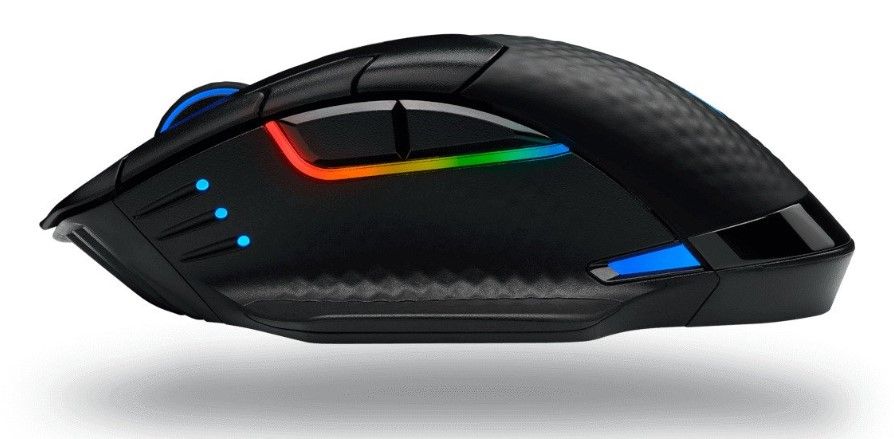
The Corsair Dark Core RGB Pro SE is the only mouse on this list that offers Qi wireless charging — the same standard your phone uses. Drop it on a compatible charging pad (Corsair's own MM1000, or any standard Qi surface), and it charges without a cable, without interrupting your session if you're using Bluetooth simultaneously. That's a genuinely useful feature that sounds like marketing until you've used it and can't go back.
The sensor hits a max of 18,000 DPI in one-DPI increments — a level of precision adjustment that most players will never meaningfully use, but which represents genuine engineering headroom. The polling rate ceiling reaches 2000Hz, which is double the standard 1000Hz of most gaming mice. Whether that translates to perceptible improvement in normal gaming conditions is debated — but it's there.
The design is explicitly a right-handed palm grip. Large, substantial, contoured — it wraps around the hand in a way that feels deliberate rather than generic. For people who game with a palm grip for hours at a time, that kind of intentional shape design matters more than almost any spec on the box.
The sensor consistency issue is the honest caveat here. Multiple reviews note that the sensor doesn't always perform at the exact set CPI, particularly at lower settings. For most casual-to-competitive players, this won't manifest as a noticeable problem — but it's worth flagging because it should not be happening on a mouse at this price point.
Pros
- Qi wireless charging — charge on any compatible pad, no cable required
- Three connectivity options: 2.4GHz USB, Bluetooth, and Qi simultaneously
- 2000Hz max polling rate — highest on this list
- Very comfortable right-handed palm grip for extended sessions
- The USB receiver is stored inside the mouse body for travel
- Long battery life with wireless charging as a fallback
Cons
- Sensor inconsistency at set CPI levels — documented across multiple reviews
- Heavy at 133g, no weight optimisation
- Right-hand only design
- Requires iCUE software for full customisation
Our Verdict: The Dark Core RGB Pro SE earns its place on this list specifically for the Qi charging and the triple-connectivity setup. If you've ever wanted your gaming mouse to charge the same way your phone does — no cable, no dock, just a pad — this is the one that does it well. The sensor inconsistency is a genuine knock at the price point, but for most players it won't surface in meaningful ways.
Logitech G604 Lightspeed — Best for MMO Players
Rating: 4.0/5
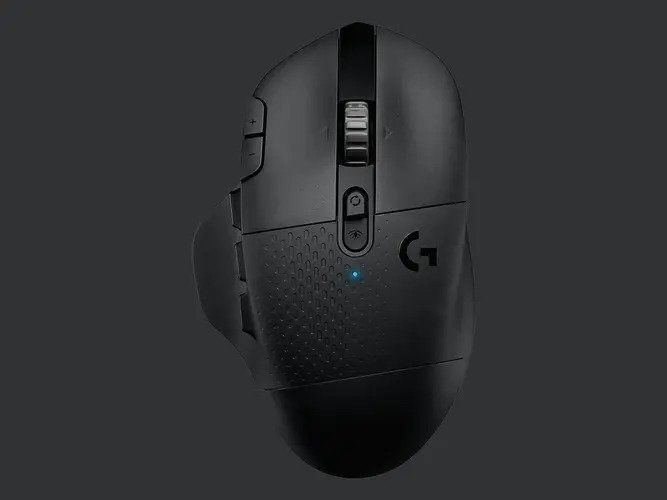
MMO players have specific needs that most gaming mice aren't built for. Dozens of abilities, cooldowns, situational commands, rotation macros — managing that through keyboard hotkeys alone means contorting your left hand into positions that look uncomfortable because they are. The G604 is built for the right hand to carry more of that load.
Six side buttons are a significant count — not maximum by dedicated MMO mouse standards, but enough for the vast majority of players who don't need a numpad strapped to their thumb. The G-Shift function turns any button into a modifier, which in practice doubles the total available inputs. With G-Shift factored in, you're working with 15 distinct programmable commands accessible from the mouse hand alone. That changes how you configure your ability bars.
The G604 connects via LIGHTSPEED 2.4GHz or Bluetooth — both simultaneously available via button toggle. Two AA batteries power it for up to 5.5 months; the receiver is stored inside the mouse body, and the ergonomic shape is designed for right-handed palm and claw grips on medium-to-large hands.
The honest limitations: the G604 cannot be used wired at all — no fallback if your batteries die in the middle of a raid. The long body design that fits large hands comfortably is actively uncomfortable for smaller hands and fingertip grip. And six side buttons, while significant, won't satisfy players coming from 12-button dedicated MMO mice.
Pros
- 15 programmable inputs, including 6 side buttons plus G-Shift modifier
- LIGHTSPEED 2.4GHz + Bluetooth — dual connectivity with receiver stored inside
- Up to 5.5 months on two AA batteries — excellent battery longevity
- HERO optical sensor — consistent, low-latency performance
- Excellent software with deep customisation in Logitech G HUB
- Very comfortable for large hands in palm or claw grip
Cons
- Cannot be used with a wired — no charging cable fallback
- Large and heavy — not suited to small hands or fingertip grip
- Six side buttons insufficient for players coming from dedicated MMO mice
- The weight of the 2× AA battery adds to the already substantial 135g
Our Verdict: The G604 is a purpose-built tool for a specific kind of player — one who runs complex MMO rotations and wants the right hand to share the command load. For that player, it over-delivers. For everyone else, the shape, weight, and MMO-first design philosophy may feel like a poor fit. Know your use case before you buy.
FAQs: Wireless Gaming Mouse
Are wireless gaming mice worth it in 2026?
Yes — without reservation. The latency gap between wired and wireless has effectively closed for all practical gaming purposes. LIGHTSPEED and HyperSpeed wireless protocols operate at sub-millisecond latency that no human can perceive. The only remaining trade-offs are battery management and cost, both of which are manageable at every price point on this list.
What's the biggest advantage of a wireless gaming mouse over a wired one?
Freedom of movement — specifically the absence of cable drag, which creates micro-resistance during fast flick shots and tracking movements. This is a measurable and perceptible advantage in FPS games where precision mouse movement is directly tied to aiming accuracy.
Do professional players use wireless gaming mice?
Increasingly yes. Several top-tier competitive players have switched to wireless mice as the technology has matured, particularly after Logitech's LIGHTSPEED protocol demonstrated consistent sub-1ms latency in controlled testing. The stigma around wireless in competitive play has largely dissolved.
What DPI should I use for gaming?
It depends on your monitor resolution, game genre, and personal sensitivity preference — not on what sounds impressive. Most competitive FPS players operate between 400 and 1600 DPI with in-game sensitivity adjustments. Higher DPI ceilings matter for feature flexibility, not for the number you'll actually use day to day.
How do I stop losing the USB receiver dongle?
Buy a mouse that stores the receiver inside the body — the G502, G604, and Dark Core RGB Pro SE all do this. Problem solved before it starts.
Other pages that you may find interesting.
 Neil Fajardo
 Neil Fajardo
 Neil Fajardo