
Quick Answer: The best wireless keyboard for most people is the Logitech ERGO K860 — its curved ergonomic layout, negative-tilt feet, and Bluetooth + USB receiver dual connectivity make it a strong all-rounder for everyday typing. For gaming, the Razer BlackWidow V3 Pro is the step up worth paying for. Budget pick: the Logitech K380 connects to three devices simultaneously and fits in a tote bag. Leave on for 15+ hours, recharge via USB-C where available, and always — always — check switch type before buying.
Let's get something out of the way first: the laptop keyboard is a lie. A beautiful, convenient, pocket-sized lie. It makes you feel productive while your wrists quietly stage a protest. Your shoulders round. Your neck cranes. And somewhere around hour three of a work session, your fingers start making mistakes that aren't really about speed — they're about the keyboard fighting you back.
I typed on a built-in laptop keyboard for years and genuinely thought that was just... what typing felt like. Like it was supposed to be a little painful. A little awkward. Like wearing shoes one size too small and convincing yourself they'll break in.
They won't break in.
A wireless keyboard changed that for me in ways I didn't expect. Not because it was more expensive or had fancy RGB lighting — it just let me sit correctly. Type naturally. Move the keyboard to where my hands wanted to be instead of bending my body around where the keyboard was. That's it. That's the whole revelation. Sometimes, the solutions to the annoying things are embarrassingly mundane.
So What Actually Is a Wireless Keyboard?
No cords. That's the headline. But the mechanism behind it is worth understanding before you buy, because there are two flavours and they behave differently.
Bluetooth keyboards connect to your device directly — no extra hardware needed. Works with virtually everything: Mac, PC, iPad, Android, and even some smart TVs. The trade-off is a very slight input latency and occasional pairing hiccups when you switch between devices.
RF (Radio Frequency) keyboards use a small USB dongle that plugs into your computer. Faster response, more stable connection — but you're using a USB port, and switching between devices is clunky compared to Bluetooth.
Most modern wireless keyboards offer both. Which is exactly what you want. Bluetooth for your phone and tablet, RF dongle for your main machine when you're gaming or need zero lag on every keystroke.
Infrared keyboards exist, too. Don't buy one. That technology peaked in 2004 and has been coasting ever since.
Why Switch? (The Honest Version)
Comfort is the main one. And not in a vague, marketing-copy way. An external keyboard — wireless or wired — lets you position your hands at the angle your wrists actually prefer, not the angle a laptop hinge dictates. Add a palm rest and a proper desk setup, and the difference in how you feel after four hours of typing is measurable. Less tension in the forearms. Less ache at the base of the thumbs.
Productivity. Counterintuitive, but bigger keys with proper spacing do genuinely reduce typos. Which means less backspacing. Which means faster output. I once tracked my error rate for a week on my laptop keyboard versus a full-size external — the external won by a margin embarrassing enough that I won't share the numbers here.
Portability. Some wireless keyboards weigh less than a notepad. The Logitech K380, for instance, could get lost in a medium-sized tote bag. Writers who work from coffee shops, airport lounges, and coworking spaces: a compact wireless keyboard paired with your phone or tablet is genuinely a functional workstation. Not a compromise. An actual workstation.
Multi-device pairing. Type on your PC, press one button, and now you're typing on your iPad. Press it again, phone. This sounds like a minor convenience until the moment you actually need it — and then it feels like a superpower you can't believe you lived without.
Desk clarity. One wire at most (for charging). Compare that to the tangled tributary system most desks become after a few years of USB everything. Clean desk, clean mind — there's actual psychology behind this, not just minimalist aesthetics.
At a Glance — 2026 Comparison Table
| # | Product | Type | Connectivity | Battery | Best For | Rating |
|---|---|---|---|---|---|---|
1 | Logitech ERGO K860 | Ergonomic, full-size | Bluetooth + USB receiver | 2 AA batteries (up to 2 yrs) | Everyday typing, wrist comfort | ★★★★½ — 4.5/5 |
2 | Razer BlackWidow V3 Pro | Mechanical, full-size | Bluetooth + 2.4GHz USB | Up to 200 hrs | Gaming, fast typists | ★★★★¼ — 4.3/5 |
3 | Logitech K380 | Membrane, compact | Bluetooth (3 devices) | 2 AAA batteries (up to 2 yrs) | Portability, multi-device | ★★★★ — 4.2/5 |
4 | Razer Pro Type Ultra | Mechanical, full-size | Bluetooth + 2.4GHz USB | Up to 214 hrs | Office, professional use | ★★★★ — 4.1/5 |
5 | ANNE PRO 2 (Obinslab) | Mechanical, compact 60% | Bluetooth (4 devices) + USB-C | Rechargeable, ~8 hrs wireless | Mechanical enthusiasts, desk space savers | ★★★★ — 4.0/5 |
How to Choose the Right Wireless Keyboard
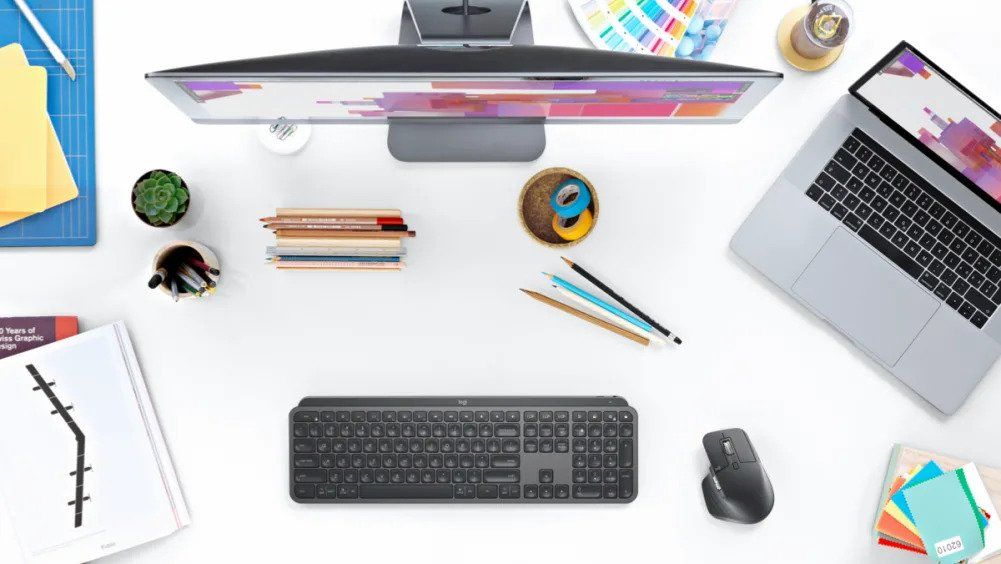
Size first. This is the decision that narrows everything else. Full-size keyboards (100%) include a numpad and are comfortable for extended typing sessions, but take up significant desk space. Tenkeyless (TKL, 80%) drops the numpad and gains portability without sacrificing the function row or arrow cluster. Compact (75%, 65%, 60%) keep shrinking — the 60% boards like the ANNE PRO 2 are genuinely small but require learning function layers. Know your desk, know your habits.
Switch type. This only applies if you're buying a mechanical keyboard — and you should at least consider one. Membrane keyboards (Logitech K380, ERGO K860) are quiet and low-maintenance. Mechanical keyboards offer tactile feedback that makes a real difference to typing speed and accuracy once you adjust. Linear switches (Razer Yellow) are smooth and quiet. Tactile switches (Gateron Brown) give a bump without noise. Clicky switches (Razer Green) give a bump and an audible click — satisfying for the typist, annoying for everyone nearby.
Battery life. Don't underestimate how quickly a short battery life becomes a frustration. The Logitech K380 and ERGO K860 run on AA or AAA batteries lasting up to two years — essentially zero maintenance. Rechargeable keyboards like the ANNE PRO 2 are more convenient in one sense, but need charging every few days of heavy use. The Razer Pro Type Ultra's 214-hour rechargeable battery strikes a good balance.
Connectivity. Check what your devices support. A tablet with no USB-A port can't use an RF dongle. A USB-A-only PC can't pair via Bluetooth without a dongle of its own. Most modern keyboards support both, but verify before you commit.
Price. The gap between a $30 wireless keyboard and a $150 one is real — build quality, switch quality, connectivity reliability, and software support all differ. But there's a comfortable middle ground around $50–$80 where most people's needs are fully met. The Logitech K380 at the low end and the ERGO K860 at the mid-to-high end represent that range well.
Final Thoughts
Here's what nobody tells you when you're comparing specs and reading reviews: the best wireless keyboard isn't necessarily the most technically impressive one. It's the one you actually enjoy sitting down to use.
I've been through enough keyboards to know that the fancy ones sometimes disappoint and the unglamorous ones sometimes surprise you. The Logitech ERGO K860 isn't exciting — it's beige ergonomics, sensible engineering, and zero aesthetic personality. But six months in, your wrists will be less angry, and you'll understand why it keeps topping these lists. The Razer BlackWidow V3 Pro, on the other hand, is genuinely exciting — in a loud, clicky, RGB-lit way that either speaks to you or absolutely doesn't.
The K380 remains one of those quietly brilliant products that does exactly what it promises without drama. The ANNE PRO 2 is for people who want to go deeper into the hobby. The Pro Type Ultra is for the Razer loyalists who need something boardroom-adjacent.
But all five of them share the thing that matters: no cord. Your desk gets its dignity back. Your posture gets a fighting chance. And you stop typing like someone who accepted discomfort as a permanent condition of the job.
Go wireless. Your hands will thank you eventually — even if they need a few days to adjust first.
Can we help? We've researched you and found the Best Wireless Keyboard on Amazon. Every day, we read hundreds of reviews and try the highest-rated products we have on our list.
Best Wireless Keyboard - Reviews
Logitech ERGO K860 — Best Overall for Everyday Typing
Rating: 4.5/5
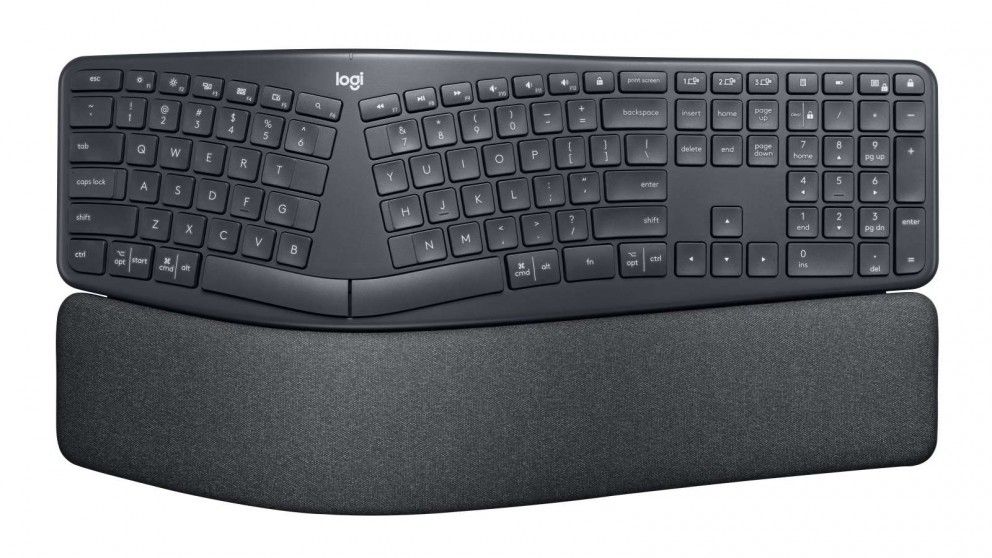
Here's the thing about ergonomic keyboards — they look weird. The split curve, the wave shape, the way the keys tilt away from you instead of toward you. The first time you see one, your brain says, "That can't be right." Your wrists, once they adjust, disagree.
The Logitech ERGO K860 has been the benchmark for ergonomic wireless keyboards for a few years now, and it holds that position because it genuinely does what it promises. The curved split layout reduces ulnar deviation, which is the angle your wrists make when typing on a flat keyboard, the position that causes most repetitive strain. The negative tilt (wrists angled away from you, rather than propped up) is the part that takes getting used to, but it's actually the correct position. Ask any ergonomics specialist, and they'll confirm it. Your wrists just need a week or two to stop complaining about the change.
The keys themselves are scissor switches — the same type you'd find on a premium laptop. Quiet. Low-travel. Nothing like the satisfying clack of a mechanical keyboard, but genuinely pleasant for long typing sessions in shared spaces. The board is solid, built heavier than most wireless keyboards, and includes adjustable feet for two height positions.
Connectivity is excellent. Bluetooth for your laptop and mobile, Logitech's Unifying USB receiver for the main machine. Switches between devices with ease. Battery life is exceptional — two AA batteries rated for up to two years of average use, which means you're essentially never charging this thing.
Two honest caveats. The size: this is a large keyboard. It will dominate a small desk. A subset of long-term users (within a year of use) have reported input lag and stuck key behaviour — a hardware fault that seems to affect a specific batch rather than the design broadly, but worth noting before you buy.
Pros
- Curved ergonomic layout genuinely reduces wrist strain with consistent use
- Negative-tilt feet support correct typing posture
- Quiet scissor switches — suitable for offices, libraries, shared spaces
- Up to 2-year battery life — essentially maintenance-free
- Dual connectivity: Bluetooth + Unifying USB receiver
Cons
- Large and heavy — not a portable keyboard
- No backlighting — challenging in dim environments
- Some users have reported input lag and stuck keys within the first year
- The curved layout takes a real adjustment period (1–2 weeks)
Our Verdict: The ERGO K860 is the keyboard for people who have started to feel typing in their wrists and want to stop the damage before it becomes a problem. It's not glamorous, doesn't light up, won't impress anyone at a LAN party — but for pure typing health over long sessions, nothing on this list comes close.
Razer BlackWidow V3 Pro — Best for Gaming
Rating: 4.3/5
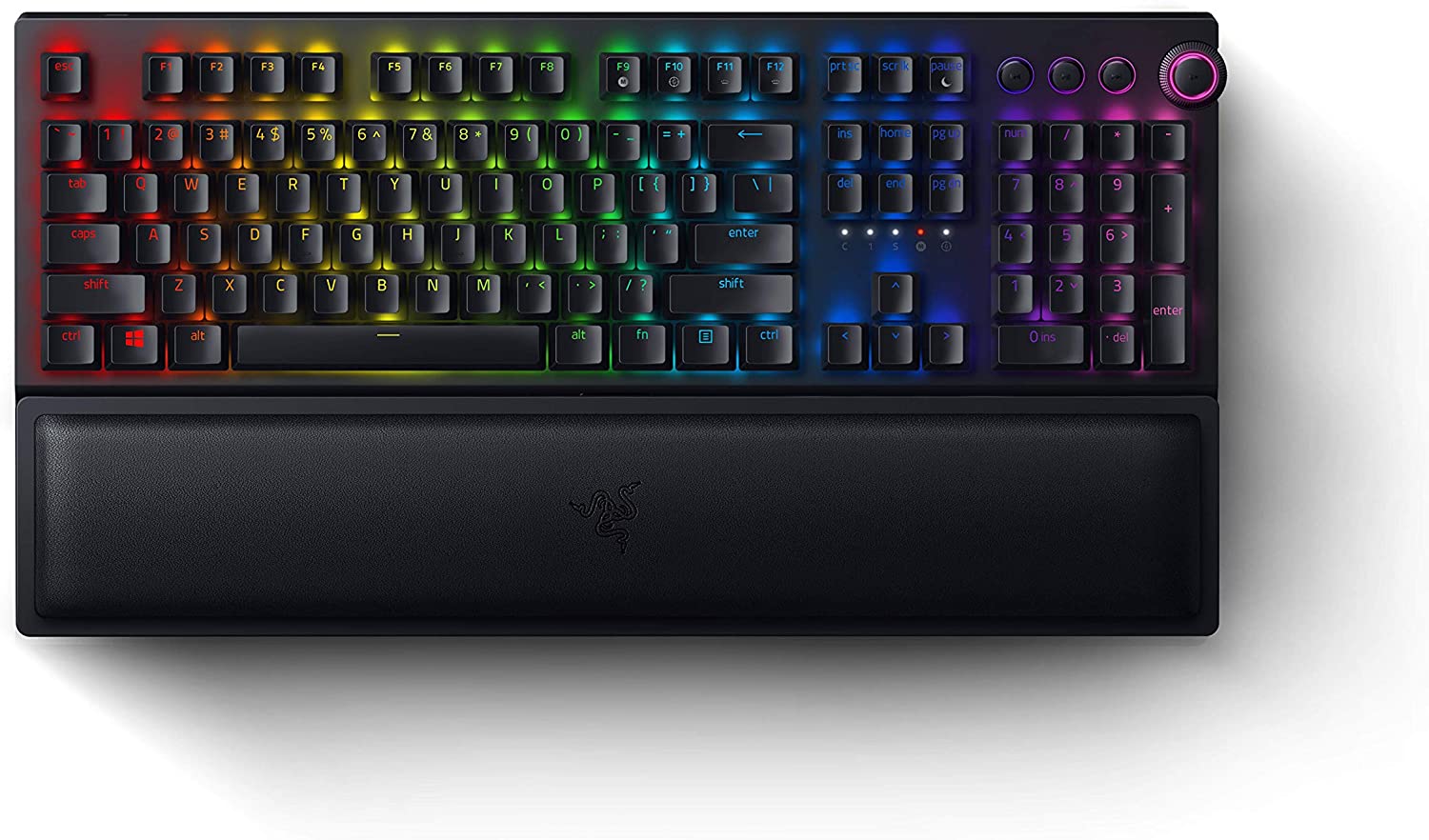
Right. This one is not cheap. The Razer BlackWidow V3 Pro sits at the premium end of the wireless gaming keyboard market, and it knows it. Chrome trim, per-key RGB lighting, tactile clicky Green switches, a wrist rest — this keyboard arrives with the energy of something that wants you to know it costs more than most people's grocery shop.
Whether that premium is justified depends entirely on what you're using it for. For gaming? Yes, absolutely. The 2.4GHz HyperSpeed wireless connection has latency so low it's essentially indistinguishable from a wired connection. The Razer Green switches are loud and deeply satisfying — each keypress delivers a tactile bump and an audible click that rewards fast, confident typing in a way soft-touch keyboards never will. And the full-size layout with a dedicated numpad means you're not compromising on any functionality.
The wrist rest is a genuine touch. It's soft rubber, removable, and comfortable for extended sessions in a way that the hard plastic rests bundled with other keyboards never are. There's also onboard memory for macro storage, so your custom key profiles travel with the keyboard rather than living in software.
The issues are real, though. Reports of connection loss are scattered across recent reviews, and some users have received units with keys that stick or feel inconsistent — a quality control problem rather than a design flaw, but frustrating at this price point. And a few reviewers note that this keyboard has gaming DNA at its core and may not suit people looking for a quiet professional tool.
Pros
- HyperSpeed 2.4GHz wireless — gaming-grade low latency
- Razer Green mechanical switches: tactile, clicky, deeply satisfying
- Per-key RGB backlighting with Razer Chroma integration
- Comfortable, removable rubber wrist rest included
- Onboard macro storage — profiles stay on the keyboard, not the software
Cons
- Premium price — the most expensive keyboard on this list
- Razer Green switches are loud — not suitable for shared or quiet environments
- Some units have reported connection loss and sticky keys (QC inconsistency)
- Full-size layout makes it impractical for portable use
Our Verdict: The BlackWidow V3 Pro earns its price tag for gamers and fast mechanical typists. The wireless performance is genuinely close to wired — that's not marketing language, that's measurable latency. If you're primarily gaming and want a premium wireless keyboard that doesn't apologise for being loud, this is it. If you work in an open office, consider literally anything else.
Logitech K380 — Best Budget & Most Portable
Rating: 4.2/5
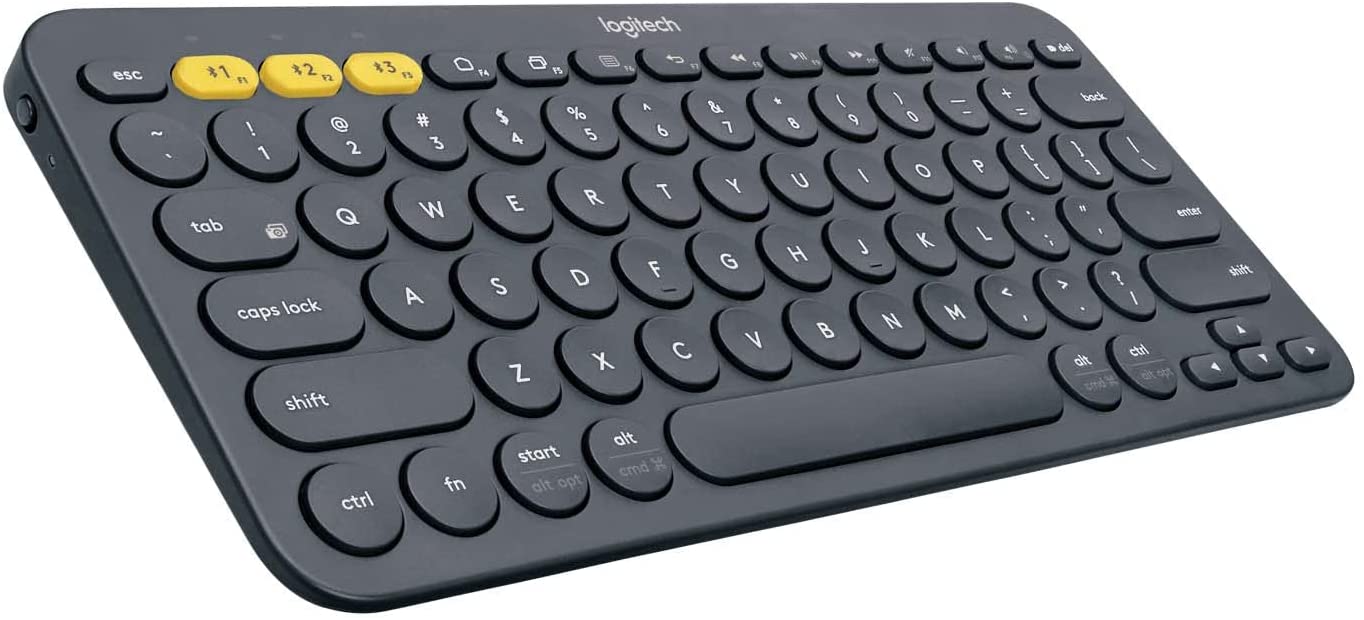
The Logitech K380 is the keyboard that defies expectations for its price. Compact. Light. Pairs with three devices at once. Switches between them with a dedicated button press. Two-year battery life. Universal compatibility — Mac, PC, iPad, Android, Chromebook, in any combination.
It is not the most exciting keyboard on this list. The keys are round rather than rectangular (Logitech's signature K380 aesthetic), which either charms you immediately or feels slightly off — there's genuinely no middle ground on this. The membrane keys are quiet but lack the tactile feedback of mechanical switches. There's no backlighting, which makes it a poor choice for dim environments. And the typing experience, while comfortable for its size, won't replace a full-size keyboard for long documents.
But here's where the K380 earns its place: versatility. For someone who writes on a desktop, an iPad, and a phone throughout the day, this keyboard handles all three without drama. The three-device pairing with physical Easy-Switch buttons is simple and fast. The compact size means it genuinely fits in a bag without taking up meaningful space.
The main complaint in recent reviews centres on the space bar — reports of loose, rattly, or inconsistent space bar feel are common enough to flag. And there's a noted quirk on startup: give it a few seconds before you start typing, or the first few characters may be swallowed during connection establishment.
Pros
- Connects to up to 3 devices simultaneously — instant switching between them
- Extremely compact and lightweight — genuinely portable
- Up to 2-year battery life on 2 AAA batteries
- Universal Bluetooth compatibility across all major operating systems
- Accessible price point — excellent value for multi-device users
Cons
- No backlighting — poor in dim environments
- Membrane keys lack tactile feedback
- The space bar can feel loose or inconsistent on some units
- Small size means no numpad and reduced key spacing for fast typists
Our Verdict: The K380 is the answer when the question is "what's the most versatile keyboard for the least money." If you routinely work across two or three devices, the three-device pairing alone justifies the purchase. It won't replace a proper full-size keyboard for serious writing sessions, but as a second keyboard — or a dedicated portable — it's hard to beat.
Razer Pro Type Ultra — Best for Office Use
Rating: 4.1/5
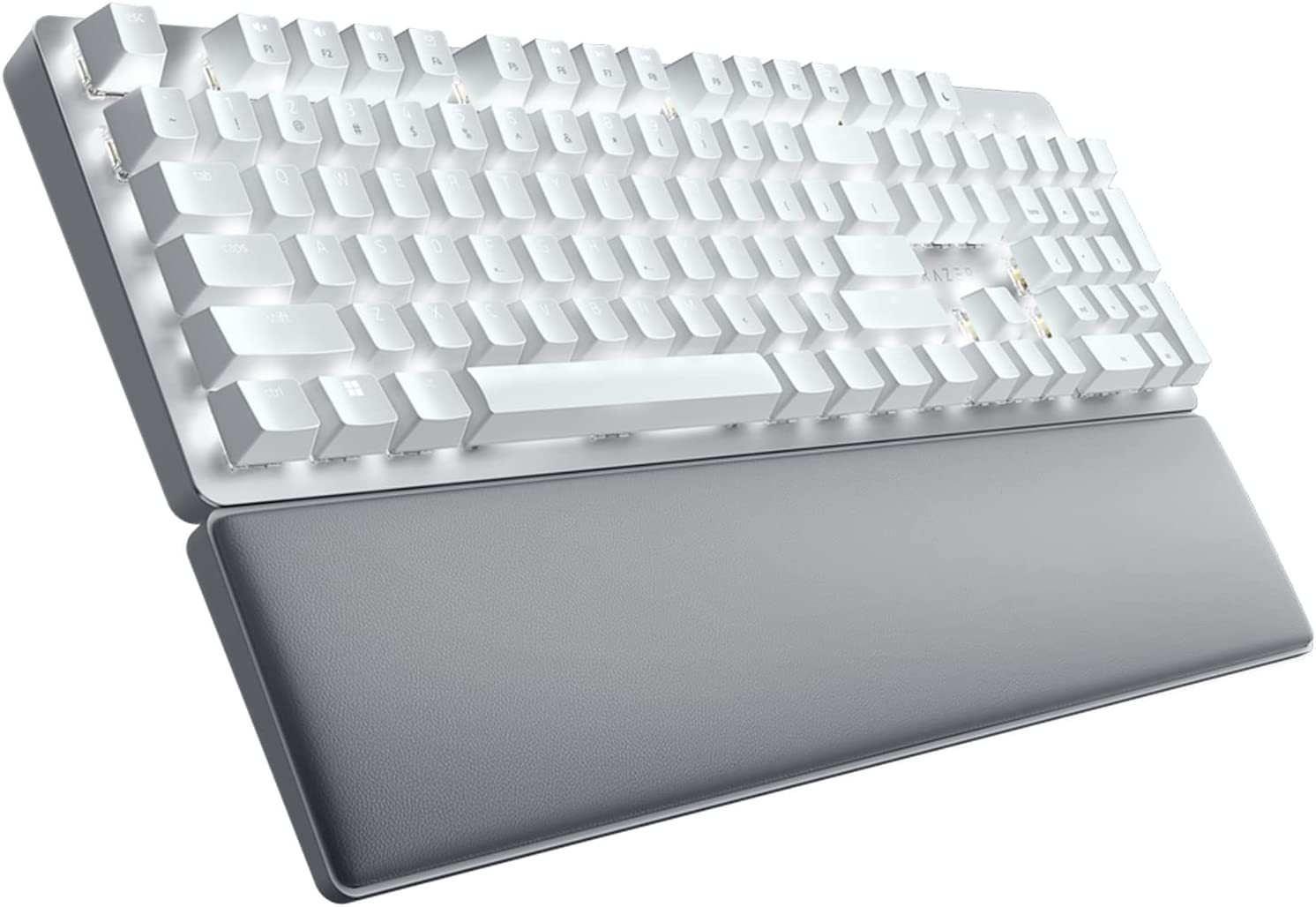
The Pro Type Ultra is Razer's attempt to make a keyboard that looks like it belongs in a glass-and-steel office rather than a gaming den. White colourway, clean lines, no RGB — just a restrained white backlight in three adjustable levels. It largely succeeds, though the gaming DNA underneath isn't entirely hidden.
The Razer Yellow linear switches are the right call for an office keyboard. Linear means smooth, consistent keystroke without the clicky bump of Razer's Green or Orange switches — much quieter, much better suited to shared environments. The 50-million-keystroke rating speaks to durability. And the Razer Synapse software gives you macro customisation and profile management that most office keyboards simply don't offer.
Battery life is the standout number here: up to 214 hours on a charge. That's more than eight full days of continuous typing, which in practice means charging once every few weeks.
The complaints worth paying attention to: the absence of an F-Lock key bothers some users — the F-row defaults to multimedia functions and needs Synapse software to change. And a recurring theme in reviews is that this keyboard straddles the gaming/professional divide in a way that doesn't fully satisfy either camp. It's promoted as professional, but the software, the branding, and some design choices lean towards gaming. That's not a dealbreaker — but know what you're buying.
Pros
- Razer Yellow linear switches — quiet and smooth, suitable for office environments
- Up to 214 hours of battery life — minimal charging frequency
- Clean, professional aesthetic with restrained white backlight
- Razer Synapse software for macro and profile customisation
- Dual wireless: Bluetooth and 2.4GHz USB
Cons
- No F-Lock key — F-row defaults to multimedia, requires Synapse to reconfigure
- Software dependency for full customisation
- Premium-positioned price for a keyboard that doesn't fully commit to either gaming or professional use
- Some users feel the "professional" marketing overstates the product's positioning
Our Verdict: The Pro Type Ultra is a capable keyboard for office use — quiet switches, long battery, good connectivity. It's slightly awkward about what it wants to be, and the Synapse software dependency for F-key customisation is a genuine inconvenience. But for a Razer buyer who wants something that doesn't look like it was designed for a teenage gamer's bedroom, this is the option.
ANNE PRO 2 (Obinslab) — Best for Mechanical Switch Enthusiasts
Rating: 4.0/5
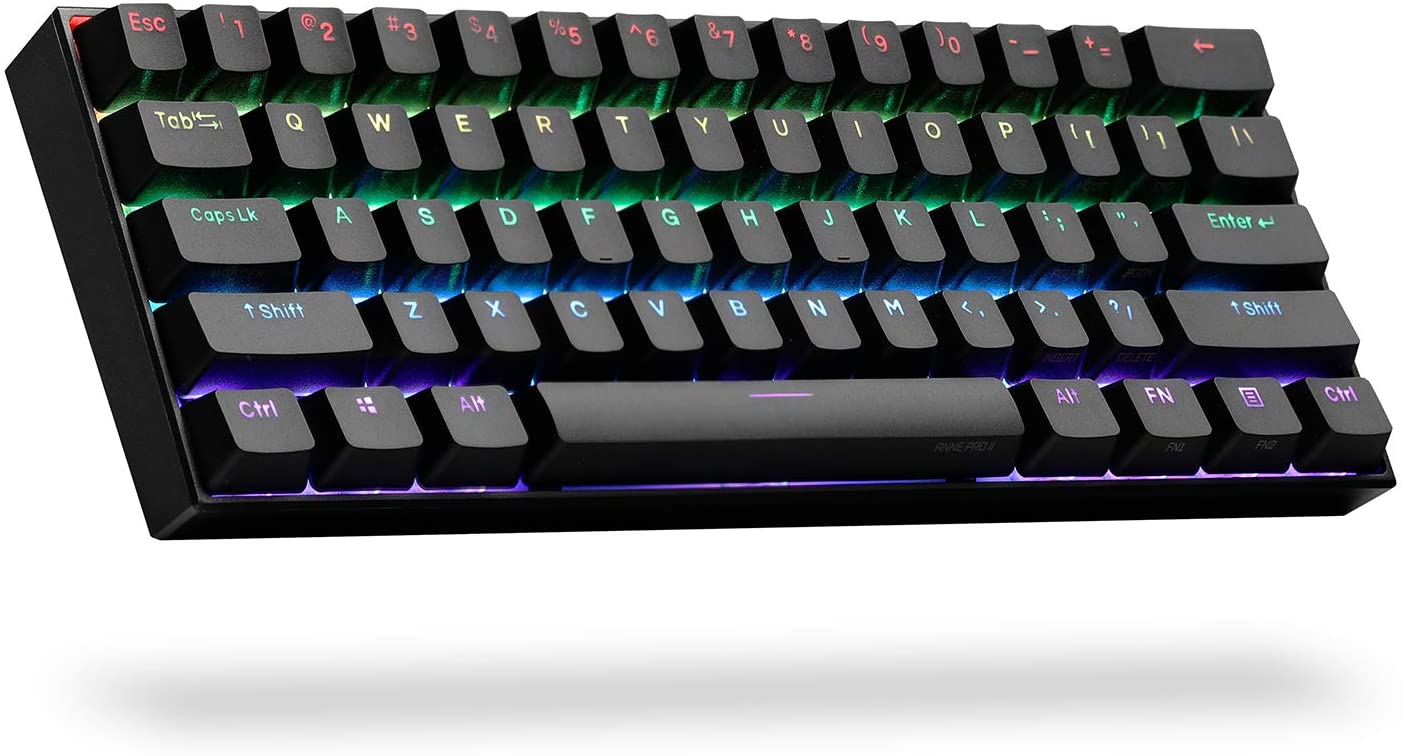
Sixty percent of keyboards are a specific kind of rabbit hole. Once you understand that most of the keys you rarely use — numpad, function row, arrow cluster, navigation block — can be accessed via a function layer on a smaller keyboard, you start to question why you've been carrying around 40% more keyboard this whole time. The ANNE PRO 2 is where most people fall into that rabbit hole.
The Gateron Brown switches at the heart of this board are a good starter mechanical switch: tactile bump on actuation without the loud audible click of Blue or Green switches. You feel the keypress. You don't announce it to everyone within six metres. It's a satisfying compromise that works for both typing and gaming without being exceptional at either.
What the ANNE PRO 2 does uniquely well is Bluetooth flexibility. Four-device pairing — more than any other keyboard on this list — with dedicated hardware buttons to toggle between them. USB-C charging means no proprietary cables and easy charging from any modern power brick or laptop port. Full per-key RGB in a compact form factor makes it probably the most feature-dense keyboard at its price point.
The limitations are real, though. Eight hours of wireless battery life sounds fine until you forget to charge it and lose power mid-project. The compact 60% layout has a learning curve — F-keys, arrow keys, and the delete/page navigation cluster all live on function layers that require memorising. Some Mac users have reported Bluetooth and CapsLock LED issues. And there are reports of USB stack crashes in wired mode, which undermines the reliability argument for a keyboard at this price point.
Pros
- 60% compact layout — dramatically smaller desk footprint
- Gateron Brown switches: tactile without being loud
- Pairs with up to 4 devices via Bluetooth
- USB-C charging — universal and convenient
- Per-key RGB in a compact form factor
- Strong value for a feature-rich mechanical keyboard
Cons
- 8-hour wireless battery life — significantly shorter than competitors
- 60% layout requires learning function layers for F-keys and navigation
- USB stack crashes reported in wired mode
- Some Mac-specific Bluetooth and LED issues
- No wrist rest and limited height adjustment options
Our Verdict: The ANNE PRO 2 is for people who want a mechanical typing experience without giving half their desk to a full-size keyboard, and who don't mind investing an hour learning the function layer. If that sounds like you, it over-delivers for the price. If you want reliability above all else, the shorter battery life and connectivity reports give pause.
FAQs: Wireless Keyboards
Are Bluetooth keyboards the same as wireless keyboards?
Not exactly. "Wireless keyboard" is the broader category — it includes both Bluetooth and RF (radio frequency) keyboards. Bluetooth connects directly to your device without extra hardware, but has slightly higher latency. RF keyboards use a small USB dongle for a faster, more stable connection. Most premium wireless keyboards now offer both options.
What's the most important thing to look for in a mechanical keyboard?
Key switches. They determine how the keyboard feels, sounds, and responds. Linear switches (like Razer Yellow) are smooth and quiet — good for typing and gaming. Tactile switches (like Gateron Brown or Cherry MX Brown) have a bump at actuation — popular for typists. Clicky switches (like Razer Green or Cherry MX Blue) have both a bump and an audible click — deeply satisfying for solo use, disruptive in shared spaces.
Why won't my laptop recognise my wireless keyboard?
The most common culprits, in order: dead or low batteries, a Bluetooth connection that needs re-pairing, a USB receiver not fully seated in the port, or outdated device drivers. Replace the batteries first — this solves it more often than it should. If re-pairing doesn't work, visit the keyboard manufacturer's website for the latest driver. Restart your laptop before assuming the keyboard is faulty.
Do all wireless keyboards need Bluetooth?
No. RF (radio frequency) keyboards use a USB dongle rather than Bluetooth. They typically offer lower latency and a more stable connection than Bluetooth, which is why gaming keyboards often prefer RF despite the USB port requirement. The trade-off is the dongle itself — one USB port occupied, and less device flexibility.
What keyboard size should I choose?
Full-size (100%) if you use a numpad and have desk space to spare. Tenkeyless (80%) if you want a clean layout without the numpad. Compact (75% or 60%) if portability and desk space are the priority. Start with tenkeyless if you're unsure — it's the easiest transition from a standard laptop keyboard.
Other pages that you may find interesting.
 Neil Fajardo
 Neil Fajardo
 Neil Fajardo