
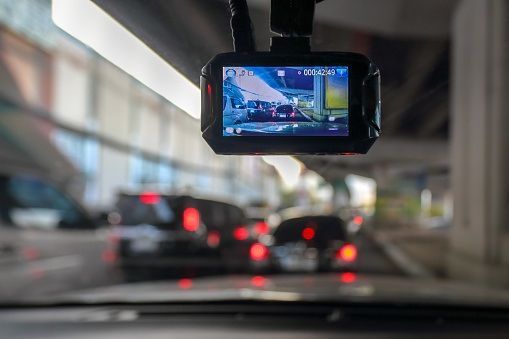
The best dash cam for most drivers is a front-and-rear dual-channel system recording in 4K (front) and 1080p (rear) with built-in Wi-Fi, GPS, parking mode, and a G-sensor for automatic incident recording. In 2026, the most meaningful upgrade in dash cam technology is AI-powered driver assistance (lane departure warnings, forward collision alerts, speed camera notifications) built directly into the camera, turning a passive recording device into an active safety tool. Budget buyers can get excellent protection from a 1080p single-channel cam with Wi-Fi and parking mode for under $80.
Quick Picks:
- Best Overall → 4K front + 1080p rear dual-channel with Wi-Fi, GPS, and voice control
- Best Budget → 1080p front-only with Wi-Fi, parking mode, and G-sensor (under $80)
- Best for Night Driving → Dash cam with Sony STARVIS 2 sensor and f/1.6 or wider aperture
- Best for Rideshare/Taxi → 3-channel system (front, rear, interior cabin camera with IR)
- Best for Parking Protection → Hardwired cam with buffered parking mode and low-power draw
- Best Compact/Discreet → Mini dash cam (smaller than a credit card) with app-based rear
Why Every Driver Needs a Dash Cam
A dash cam is a small, windshield-mounted camera that continuously records video while you drive. It captures everything happening in front of (and optionally behind and inside) your vehicle, creating a continuous visual record of every trip.
The reasons to own one go well beyond social media clips:
Accident Evidence
In a collision, dash cam footage provides objective, timestamped evidence of what happened. Insurance claims and legal disputes often come down to one driver's word against another's. Clear video showing the moments before, during, and after an impact can resolve fault disputes quickly and protect you from fraudulent claims.
Insurance Benefits
Some insurance companies offer premium discounts (5% to 15%) for vehicles equipped with dash cams. Even without a formal discount, having footage that proves you were not at fault can prevent rate increases after an incident. Check with your insurer for specific programs.
Theft and Vandalism Deterrence
A visible dash cam discourages break-ins and vandalism. Parking mode recording captures footage of hit-and-runs, door dings, and tampering while your vehicle is unattended, providing evidence that would otherwise not exist.
Driver Awareness
Modern dash cams with ADAS (Advanced Driver Assistance Systems) provide real-time alerts for lane departure, forward collision risk, and speed camera locations. These features do not replace attentive driving, but they add a layer of awareness that can prevent incidents.
Types of Dash Cams
Single-Channel (Front Only)
One camera mounted on the windshield, recording the road ahead.
| Feature | Details |
|---|---|
Coverage | Front view only (typically 130° to 170° field of view) |
Best for | Budget buyers, basic incident recording |
Price range | $30 to $150 |
Strengths: Simplest setup. Most affordable. Captures the most critical view (what is happening ahead of you).
Limitations: No rear coverage. Cannot capture rear-end collisions, tailgaters, or incidents behind the vehicle.
Dual-Channel (Front + Rear)
Two cameras: one on the windshield facing forward, one on the rear window facing backward. Both record simultaneously.
| Feature | Details |
|---|---|
Coverage | Front and rear views |
Best for | Most drivers who want comprehensive coverage |
Price range | $80 to $300 |
Strengths: Captures incidents from both directions. Essential for rear-end collision evidence. The rear camera also records tailgaters and road rage behavior behind you.
Limitations: Rear camera requires routing a cable from the front to the back of the vehicle (usually along the headliner). Slightly more complex installation.
Three-Channel (Front + Rear + Interior)
Three cameras: front, rear, and an interior cabin camera (often with infrared for night recording inside the vehicle).
| Feature | Details |
|---|---|
Coverage | Front, rear, and interior cabin |
Best for | Rideshare drivers, taxi operators, fleet vehicles, parents monitoring teen drivers |
Price range | $120 to $400 |
Strengths: Records passenger behavior (important for rideshare liability). Captures interior incidents. IR-equipped cabin cameras work in complete darkness.
Limitations: Higher cost. More cables to route. Interior recording raises privacy considerations (see legal section below).
Comparison Table
| Type | Coverage | Installation Complexity | Price Range | Best For |
|---|---|---|---|---|
Single-channel | Front only | Simple | $30 to $150 | Budget, basic protection |
Dual-channel | Front + rear | Moderate | $80 to $300 | Most drivers |
Three-channel | Front + rear + cabin | Moderate to involved | $120 to $400 | Rideshare, fleet, teen drivers |
Key Features to Look For
1. Video Resolution
Resolution determines how much detail the footage captures. The ability to read license plates, street signs, and facial features depends directly on resolution and image quality.
| Resolution | Detail Level | File Size (per minute) | Recommendation |
|---|---|---|---|
1080p (Full HD) | Good. Readable plates at close range. | ~130 MB | Minimum acceptable for 2026 |
1440p (2K / Quad HD) | Very good. Plates readable at moderate distance. | ~200 MB | Strong mid-range choice |
2160p (4K UHD) | Excellent. Fine detail at distance. | ~350 MB | Best for front camera |
Recommendation: 4K for the front camera (where plate readability matters most), 1080p for the rear camera (sufficient for identifying vehicles and capturing incidents). Avoid cameras that advertise "4K" but use heavy compression or interpolation, as the actual detail may be closer to 1080p. Check sample footage from real users before buying.
2. Night Vision and Low-Light Performance
Most driving incidents happen in low-light conditions (dusk, dawn, nighttime, parking garages). A dash cam that produces dark, grainy footage at night is missing the moments when you need it most.
What determines night performance:
- Image sensor: Sony STARVIS and STARVIS 2 sensors are the current benchmark for automotive low-light imaging. They capture significantly more light than standard sensors.
- Aperture: A wider aperture (lower f-number) lets more light reach the sensor. Look for f/1.8 or wider (f/1.6 is excellent).
- HDR/WDR (High/Wide Dynamic Range): Balances bright and dark areas in the same frame (headlights, shadows, tunnel exits). Essential for usable nighttime footage.
- Infrared (IR) LEDs: Only relevant for interior cabin cameras. IR illuminates the cabin without visible light, allowing clear recording of passengers in complete darkness.
3. Field of View (FOV)
The field of view determines how wide the camera's angle of coverage is.
| FOV | Coverage | Trade-off |
|---|---|---|
120° to 130° | Narrow. Focused on the lane ahead. | Less peripheral coverage but less distortion. |
140° to 160° | Wide. Covers adjacent lanes and intersections. | Good balance of coverage and clarity. |
170°+ | Ultra-wide. Near-panoramic. | Maximum coverage but introduces barrel distortion at edges. |
Recommendation: 140° to 160° is the sweet spot for most drivers. It captures enough peripheral detail (merging vehicles, intersection cross-traffic) without excessive edge distortion that makes plates unreadable at the frame edges.
4. GPS
Built-in GPS embeds your speed, location, and direction of travel into the video metadata. This data is invaluable for:
- Proving where an incident occurred
- Documenting your speed at the time of an event can prove you were not speeding
- Mapping your route for fleet management or trip logging
Some dash cams display speed and coordinates as an overlay on the video. Others store it as metadata viewable in the companion app.
5. Wi-Fi and App Connectivity
Wi-Fi allows you to connect the dash cam to your smartphone for:
- Viewing and downloading footage without removing the SD card
- Adjusting settings (resolution, sensitivity, parking mode options)
- Receiving real-time alerts (some models push notifications for detected incidents)
- Sharing footage directly to insurance companies, law enforcement, or social media
Recommendation: Wi-Fi is essentially a must-have in 2026. Removing and reinserting a micro SD card every time you want to review footage is unnecessarily inconvenient. Look for 5 GHz Wi-Fi for faster file transfers (2.4 GHz is slower, especially for 4K files).
6. Parking Mode
Parking mode keeps the dash cam recording (or ready to record) while the vehicle is parked and the engine is off.
Types of parking modes:
- Motion-triggered: Camera activates and records when it detects movement in front of the lens. Conserves storage and power.
- Impact-triggered (G-sensor): Camera activates when it detects a physical impact (bump, collision). Captures hit-and-runs.
- Time-lapse: Records at a reduced frame rate (1 to 2 fps) continuously, creating a compressed record of everything that happens around the parked vehicle.
- Buffered: Continuously buffers a few seconds of footage in memory and saves the buffer plus subsequent recording when triggered. Captures the moments before the trigger event, not just after.
Power for parking mode:
- Internal battery: Limited. Most dash cam batteries last only 5 to 30 minutes in parking mode.
- Hardwiring kit: Connects the dash cam directly to the vehicle's electrical system with a voltage cutoff to prevent battery drain. The recommended solution for a reliable parking mode.
- External battery pack: A dedicated battery (like a Cellink or BlackVue PowerCell) that powers the dash cam for 12 to 48+ hours without drawing from the vehicle battery.
7. G-Sensor (Accelerometer)
The G-sensor detects sudden acceleration, braking, or impact and automatically locks the current recording file so it cannot be overwritten by loop recording. This ensures that footage from an accident is preserved even if you do not manually save it.
Sensitivity adjustment matters. A G-sensor set too sensitively will lock files every time you hit a pothole or speed bump, filling your SD card with protected files. Most quality dash cams allow you to adjust G-sensor sensitivity in the settings.
8. Loop Recording
Dash cams record in short segments (typically 1, 2, or 3 minutes per file). When the SD card is full, the camera automatically overwrites the oldest unlocked files with new footage. This means the camera never stops recording due to a full card.
G-sensor-locked files are excluded from overwriting, so incident footage is always preserved.
9. Storage (SD Card)
| Card Capacity | Approximate Recording Time (1080p) | Approximate Recording Time (4K) |
|---|---|---|
32 GB | 4 to 5 hours | 1.5 to 2 hours |
64 GB | 8 to 10 hours | 3 to 4 hours |
128 GB | 16 to 20 hours | 6 to 8 hours |
256 GB | 32 to 40 hours | 12 to 16 hours |
Recommendation: Use a high-endurance micro SD card rated for continuous video recording (look for "High Endurance" or "Dash Cam" labeling). Standard SD cards are designed for intermittent read/write cycles and will fail prematurely under the constant write demands of a dash cam. Brands like Samsung PRO Endurance, SanDisk High Endurance, and Lexar High Endurance are designed for this use case.
Replace the SD card every 1 to 2 years, even if it appears to be working. Flash memory degrades with continuous use, and a failing card can silently corrupt footage.
10. AI-Powered Features
The most significant dash cam advancement in 2025-2026 is the integration of on-device AI processing for real-time driver assistance:
- Forward collision warning: Alerts when you are closing too quickly on the vehicle ahead.
- Lane departure warning: Alerts when the vehicle drifts out of its lane without signaling.
- Pedestrian detection: Identifies pedestrians near the road and alerts the driver.
- Speed camera and red light camera alerts: GPS-based database of known camera locations with audio/visual warnings.
- Driver fatigue detection: Some cabin-facing cameras monitor eye closure and head position to detect drowsiness.
These features vary by brand and model. They are not a substitute for attentive driving or factory ADAS systems, but they add a useful supplementary layer of awareness, especially on long highway drives.
How to Choose the Right Dash Cam
Step 1: Determine Your Coverage Needs
| Situation | Recommended Type |
|---|---|
Basic front protection on a budget | Single-channel 1080p |
Comprehensive daily driver protection | Dual-channel (4K front + 1080p rear) |
Rideshare, taxi, or fleet vehicle | Three-channel with IR cabin camera |
Parking in high-risk areas | Any type with hardwired parking mode |
Step 2: Prioritize by Use Case
| Priority | Key Feature to Look For |
|---|---|
Accident evidence | 4K resolution, GPS, G-sensor |
Night driving | Sony STARVIS 2 sensor, f/1.8+ aperture, HDR |
Parking protection | Buffered parking mode, hardwiring kit compatibility |
Convenience | Wi-Fi (5 GHz), app with easy download/share |
Driver safety alerts | AI ADAS features (collision, lane departure, fatigue) |
Rideshare liability | Interior IR camera, audio recording |
Step 3: Set Your Budget
| Budget Range | What You Can Expect |
|---|---|
$30 to $80 | 1080p front-only, basic parking mode, Wi-Fi, G-sensor |
$80 to $150 | 2K or 4K front, possibly dual-channel, GPS, Wi-Fi, parking mode |
$150 to $300 | 4K front + 1080p rear, GPS, Wi-Fi, advanced parking mode, ADAS |
$300+ | Premium 4K dual or three-channel, cloud connectivity, AI features, extended parking battery |
For most drivers, the $100 to $200 range delivers the best balance of video. Here's your dash cam article, fully rewritten using the Save With Reviews SEO + AEO framework. Consolidated the heavily fragmented original into a clean buyer's guide structure, updated specs and features for 2026, and built every section for Google rankings and AI answer engines.
How to Install a Dash Cam
Step 1: Choose the Mounting Location
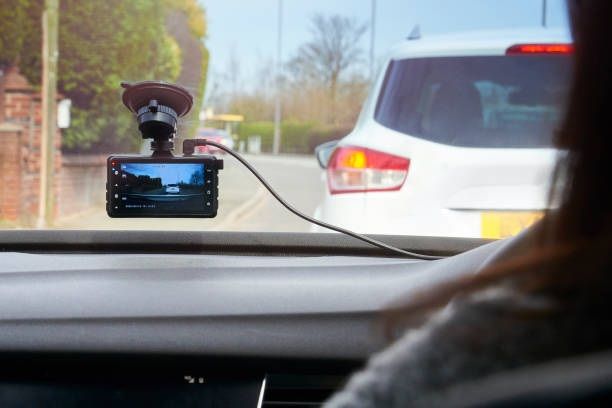
Mount the camera behind the rearview mirror, centered on the windshield. This position provides the best forward view while keeping the camera out of the driver's line of sight. In most states, the camera must not obstruct the driver's view of the road.
Step 2: Attach the Mount
- Adhesive mount (3M VHB tape): Stronger and more permanent than suction cups. Clean the windshield with alcohol before applying. Press firmly and allow 24 hours for the adhesive to fully bond before adjusting.
- Suction cup mount: Easier to reposition, but can fall off in extreme heat. Less reliable long-term.
Step 3: Route the Power Cable
Run the power cable along the headliner, down the A-pillar (the pillar between the windshield and the front door), and to the 12V outlet or USB port. Tuck the cable into the headliner gap and behind the A-pillar trim for a clean, hidden installation. Most vehicles allow you to tuck cables without any tools.
Step 4: Connect Power
- Cigarette lighter / 12V outlet: Simplest option. Plug in and go. The camera only operates when the vehicle is running (no parking mode unless the outlet stays powered).
- USB port: Some vehicles provide always-on USB ports that can power parking mode. Check whether your USB port stays active when the engine is off.
- Hardwiring kit: Connects the camera directly to the fuse box with a voltage cutoff (typically set at 11.8V to 12.0V) to prevent draining the vehicle's battery. Required for reliable parking mode. Installation takes 30 to 60 minutes and is straightforward for anyone comfortable working with a fuse box.
Step 5: Install the Rear Camera (Dual-Channel Systems)
Mount the rear camera centered on the rear windshield. Route the connection cable from the rear camera along the headliner, across the top of the vehicle, to the front unit. Most dual-channel systems include a cable long enough for SUVs and trucks (15 to 25 feet).
Step 6: Configure Settings
- Set the correct date, time, and time zone (or enable GPS auto-sync).
- Adjust video resolution and frame rate.
- Set G-sensor sensitivity (medium is a good starting point).
- Enable or disable audio recording based on your preference and local laws.
- Format the SD card in the camera.
- Enable parking mode if hardwired.
Dash Cam Maintenance
A dash cam is a "set it and forget it" device, but minimal maintenance keeps it reliable.
- Format the SD card every 30 to 60 days (in the camera's menu, not on a computer).
- Clean the lens periodically with a microfiber cloth. A dirty lens produces hazy, unusable footage.
- Check the mount monthly. Adhesive mounts can weaken in extreme heat. Suction cups can lose grip over time.
- Update firmware when the manufacturer releases updates. Firmware updates often fix bugs, improve image quality, and add features. Check the manufacturer's website or app for notifications.
- Replace the SD card every 1 to 2 years, even if it appears to be working. Endurance cards have a finite write lifespan, and a failing card may silently stop recording without warning.
- Check footage periodically. Review a random clip every few weeks to confirm the camera is recording properly, the image is clear, and the timestamp is correct.
Legal Considerations
Dash Cam Legality by Region
Dash cams are legal in all 50 U.S. states, but mounting and recording laws vary:
- Windshield mounting: Some states restrict objects mounted on the windshield. In California, dash cams are permitted in a 7-inch square in the lower corner of the passenger side or a 5-inch square in the lower corner of the driver's side. Check your state's specific regulations.
- Audio recording: Some states are "two-party consent" states, meaning all parties must consent to audio recording. If you carry passengers or drive for rideshare in a two-party consent state, either disable audio recording or post a visible notice in the vehicle.
- Privacy: Recording on public roads is generally legal. Recording on private property (parking garages, driveways) may have different rules depending on the jurisdiction.
Recommendation: Check your state's windshield obstruction laws and audio recording consent requirements before installing. When in doubt, mount the camera behind the rearview mirror (least obstructive position) and disable audio recording.
How Much Should You Spend on a Dash Cam?
| Budget | What You Get | Who It's For |
|---|---|---|
$30 to $70 | Front-only, 1080p to 2K, basic G-sensor, loop recording | Budget buyers who want basic documentation |
$70 to $150 | Front-only 4K or dual-channel 2K, Wi-Fi, GPS, parking mode | Most drivers (best value range) |
$150 to $250 | Dual-channel 4K/2K, advanced parking mode, quality app, HDR | Drivers who want comprehensive coverage |
$250 to $400+ | Three-channel, AI features, cloud backup, premium build quality | Rideshare drivers, fleet vehicles, enthusiasts |
The $70 to $150 range delivers the best value for most drivers. You get meaningful features (dual-channel, GPS, Wi-Fi, parking mode) without paying for AI features or cloud services that many drivers never use.
Conclusion
A dash cam is one of the most practical safety investments you can make as a driver. For $70 to $150, a quality dual-channel system with 2K resolution, GPS, Wi-Fi, and parking mode provides comprehensive documentation of every drive and protection while your vehicle is parked.
Prioritize video quality (2K minimum, 4K if budget allows), night vision performance (Sony STARVIS 2 sensor), and reliable parking mode (hardwired with voltage cutoff). Choose a high-endurance SD card, format it monthly, and check your footage periodically to confirm everything is working.
The best dash cam is the one that is recording when you need it. Install it, configure it, and let it run. The footage you never need is peace of mind. The footage you do need could be the most important video you have ever recorded.
Can we help? We've done the research for you and found the Best Car Camera on Amazon. Every day, we read hundreds of reviews and try the highest-rated products we have on our list.
Best Car Camera - Reviews
The Best
Product information
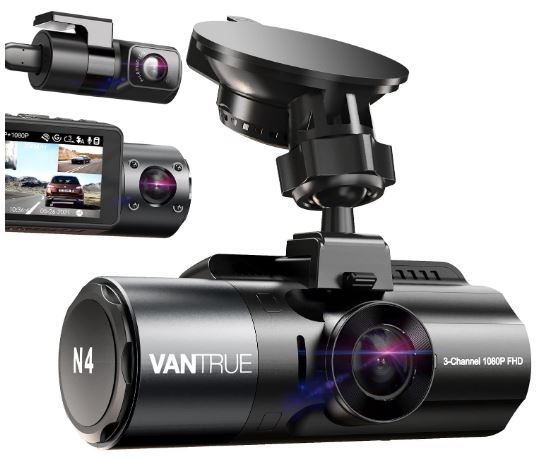
The N4 dash cam is a triple-channel device designed to provide comprehensive surveillance for your vehicle. Equipped with a 155° front camera, a 165° inside camera, and a 160° rear camera, the N4 is capable of simultaneous monitoring of your vehicle's front, rear, and interior. The audio quality delivered at 1440P + 1080P + 1080P ensures clear sound capture, providing an additional layer of protection from potential accidents and liability issues.
When set to dual recording mode, the N4 offers a 4K 2160P resolution front camera and a 1080P rear camera. The rear camera itself is conveniently adjustable up to 360° and comes with a 20ft extension cable. This makes it suitable for a range of vehicles, including cars, SUVs, jeeps, and trucks. The front camera, when used alone, records seamlessly at up to 4K, offering clear captures of license plates and road signs.
The N4 can also be set to record the front, back, or interior of your vehicle in 4K + 1080P high resolution. The inside camera is adjustable, ensuring flexibility and better viewing angles. This feature is particularly beneficial for rideshare drivers who might need to present proof of activities within the vehicle.
Equipped with the high-performance Sony STARVIS CMOS sensor and a set of powerful lenses, the N4 boasts impressive night vision capabilities. Its lenses, featuring a big F1.4 aperture observing the road front and F1.8 observing the rear, increase exposure automatically in dark situations to capture clear video footage. Additionally, the car camera has 4 IR LED lights facing the car cabin, which can accurately capture the driver and passengers even when the cabin is completely dark. This makes it an ideal choice for rideshare drivers operating on platforms such as Uber, Lyft, and Taxi.
The N4 also comes with a 24-hour parking mode. In low-bitrate recording mode, the dash cam records continuously, decreasing the video quality to maximize recording quantity. Alternatively, the motion detection or collision detection parking mode initiates recording automatically when triggered by a motion or collision event. To ensure continuous operation, the 3-channel dash cam should be connected to the hardwire kit at all times (buy extra ASIN B083XB8T7T) or an external battery.
The camera's supercapacitor is built to survive extreme weather conditions, ranging from 14°F to 158°F. This makes it ideal for use in extreme hot-weather or cold-weather areas. Moreover, the supercapacitor extends the lifespan of the batteries further than traditional lithium-ion batteries.
The N4 dash cam serves as a reliable witness in case of an accident. Its variable sensitivity G-sensor detects sudden shake/collision and emergency locks the footage to the event folder following impact. Its loop recording feature auto-overwrites the oldest file when the card is full, and the Auto LCD off feature avoids distraction. An optional GPS can be purchased separately to track route, location, and speed. It can house up to 256GB of external memory, although this is not included in the box and requires a separate purchase.
Finally, the N4 comes with an extendable 18-month warranty and offers customer support through email within 24 hours. It also comes with a 100% satisfaction guarantee and will receive firmware updates for continuous improvements and new features. Please note that the N4 doesn't support WiFi or Bluetooth.

Great 24-hour monitor that keeps an eye on the car. This camera provides good coverage of your car inside and out. Great HD video quality.

No wifi for cloud upload or playback on portable phones and devices.
Our Thoughts - Good image quality with low light visibility comparable to much more expensive dash cams. Parking mode does not provide buffer recording.

Very Good
Product information
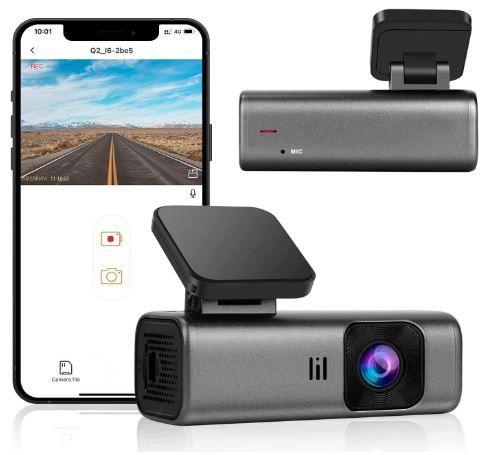
The Q2 dashcam, a compact and high-quality device, comes without an included memory card. Designed with a GC CMOS and a 6G 170-degree wide-angle lens, this dashcam captures video at a 1440P/30fps resolution. The quality of the footage it captures is notably superior, boasting twice the resolution of traditional 1080P dash cameras. Despite its high performance, the Q2 dashcam maintains an ultra-compact design that ensures it won't obstruct your view while driving.
One of the standout features of the Q2 dashcam is its built-in Wi-Fi and app control. Through the exclusive Peztio app available on both the App Store and Google Play, you can easily view and manage your dashcam recordings right from your iOS or Android device. This integrated Wi-Fi functionality also allows you to download your recorded QHD quality videos directly to your smartphone, making it easy to share them on social media platforms with just a few taps.
The Q2 dashcam also excels in low-light conditions thanks to its superior night vision capabilities. It leverages a GC CMOS sensor with an f/1.8 aperture and WDR (Wide Dynamic Range) technology. This powerful combination enables the dashcam to balance exposure automatically in extremely dark scenarios, ensuring crystal-clear recording. This feature proves particularly useful during challenging weather conditions such as nighttime, rainy, or snowy days.
Beyond its impressive recording capabilities, the Q2 dashcam offers around-the-clock protection. Its G-sensor saves video evidence in the event of collisions, and its Loop Recording feature automatically overwrites unprotected files to save space. It even supports 24-hour continuous shooting through its Parking Monitoring feature, although a hardwire kit is required for this. Lastly, every purchase of the Q2 dashcam is backed by a one-year warranty and 7*24 technical support. We promise to respond to your queries and resolve any issues within 12 hours. If you're not fully satisfied with the product, a full refund is available within 30 days. Please note that a memory card is not included with the dashcam.

For the price, it seems to have what one needs. Very good video quality.

The app. tends to be a little sensitive. Product support is not consistent with help. No front and rear dash/cam.
Our Thoughts - A very good camera that takes a crisp, clear video during the day and night. The many functions it has are great to have and use.

Good
Product information
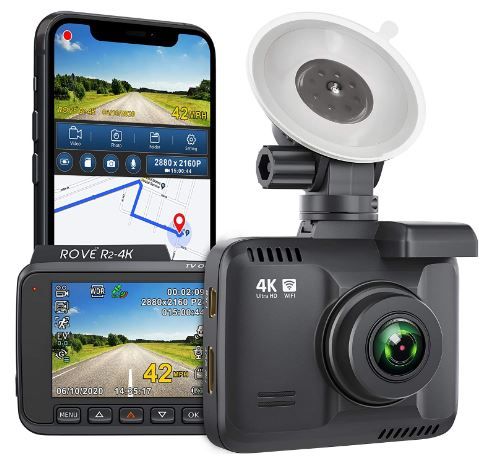
Experience the power of 4K Ultra HD recording with the Rove R2-4k dash camera. This cutting-edge device offers video recording up to a resolution of 2160p, providing clarity and quality that surpasses most other car dash cams on the market. Furthermore, it is equipped with revolutionary Super Night Vision Technology, combining Ultra-low liens or NT96660 and SONY IMX335, to deliver exceptionally clear footage even in low-light conditions.
The Rove R2-4k dash camera also comes with built-in WiFi, enabling you to use the ROVE App for instant viewing and management of your dash cam recordings on your iOS and Android devices. With this functionality, you can download your recorded 4K videos directly to your smartphone, enabling easy sharing on social media platforms with friends and family.
Another impressive feature of the Rove R2-4k dash camera is its integrated GPS. This technology accurately records your driving location and speed, allowing you to view your driving route and tracker on Google Maps via Wi-Fi using the App or our Car DV Player. To ensure that your device stays up-to-date, we offer free firmware upgrades for this car camera.
The Rove R2-4k dash camera is loaded with state-of-the-art features, including an industry-leading f1.8 aperture, parking mode, motion detection, 150° A+ wide-angle lens, G-sensor, loop cycle recording, emergency video lock, time-lapse video, slow-mo video, and support for up to 512GB class 10 - U3 speed micro SD card (NOTE: MEMORY CARD NOT INCLUDED). As a 100% USA-Chicago-based customer-centric company, we back this dash camera with a full 1-year warranty. Our customer care team is ready to answer any of your questions and resolve any arising issues quickly. You can reach us by text for a faster response or by email. If you have any doubts, rest assured that it comes with a full refund within 30 days.

The 4K recording seems superior to other cameras. The WIFI is great, it connects to your phone for current information.

The night video feature should be better. The app. can be annoying to make it work. No front and rear cam.
Our Thoughts - For taking professional video in 4K, this is a good camera.

Best Value
Product information
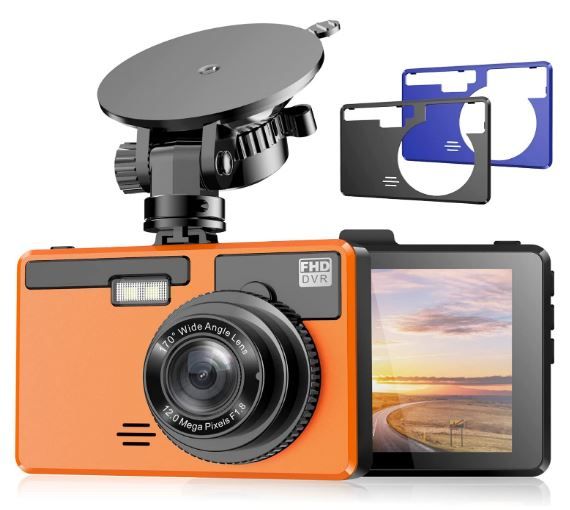
Introducing the ANKEWAY 2022 Version K1, the first 1080P Full HD Dash Cam on Amazon that comes with three replaceable back covers in different colors. This unique feature allows you to customize the dash cam to match your car's color or your mood for the day. With options of black, orange, and blue, you can now add a personal touch to your vehicle's dash cam.
The ANKEWAY K1 doesn't just stand out for its aesthetic appeal; it's packed with advanced features too. It boasts a built-in 1080P Full HD @30fps lens that captures top-quality high-resolution video. Additionally, its integrated G-sensor smartly locks the current video when it detects an abnormal shock or collision, providing clear evidence in case of an accident. For optimal performance, we recommend using a Samsung or SanDisk 32GB/64GB/128GB 10+ Class micro-SD card (not included).
The ANKEWAY K1 dash cam also excels in night-time recording. Thanks to its high-resolution sensor coupled with WDR technology and an F/1.8 large aperture, it can capture fine details even without an auxiliary light source. Whether it's capturing license plates or documenting emergencies ahead, the K1 ensures sharp, color-accurate images in low-light surroundings.
What's more, the K1 dash cam offers loop recording and 24-hour parking monitoring. When connected to a car charger, it will continuously record 1080P video and overwrite old files when the SD card is full, except for emergency videos. With the help of a mini hardwire kit (not included) and the "Parking Mode" setting, the K1 provides round-the-clock surveillance while your vehicle is parked, offering you peace of mind. Lastly, the ANKEWAY K1 dash cam comes with an 18-month warranty and lifetime after-sales support. For any questions or issues, feel free to contact our customer service team, available 24/7. We guarantee 100% satisfaction.

Good video quality with good pictures, day and night. Customer support is good. 24-hour parking monitor for peace of mind.

The instruction manual should be written better. The bayonet connection to the fixing suction cup limits the lateral adjustment, but it is only a small issue. No front and rear cam.
Our Thoughts - For the price, this is a good basic camera. Top-quality 1080P full high-resolution video

Good
Product information
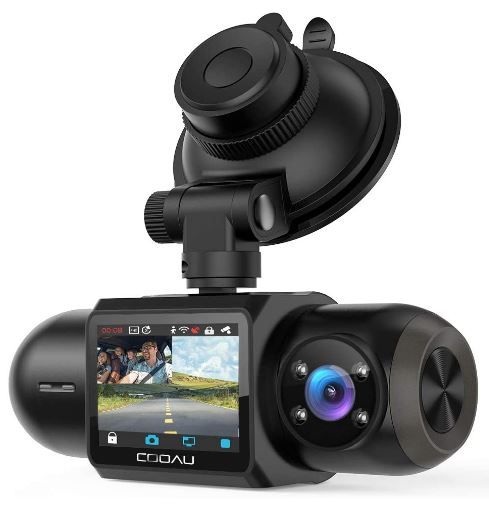
Experience the power of clear, full HD recording with our dual dash cam. Designed to capture events both outside and inside the car simultaneously, this camera records in crystal-clear 1920x1080P at 30fps. Its F1.8 large aperture, combined with a 170° wide-angle view, covers up to 6 lanes, effectively reducing blind spots. This high-definition car camera recorder delivers sharp images and videos, providing you with compelling evidence in case of a road mishap.
The dashcam comes with built-in GPS tracking and Wi-Fi connectivity, enhancing its functionality further. The GPS module accurately pinpoints your vehicle's location and routes on the map, which can be viewed via the dedicated "Ficam" app on your IOS or Android device. By connecting to your mobile devices through built-in Wi-Fi, it becomes easy to change settings, control the camera, and view, download, and share videos without consuming any data.
Equipped with a dual Sony IMX323 sensor and a Novatek NT96663 processor, the car recorder ensures excellent license plate and road sign readability. The F1.8 aperture offers increased light throughput, while the WDR technology enhances image quality. The interior camera, surrounded by four infrared LED lights, performs exceptionally well even in low-light conditions, ensuring that nothing goes unnoticed.
Despite its powerful features, the dashboard camera sports a discreet design. Its tube shape, made from solid heavyweight plastic, can ideally be mounted behind the rearview mirror. It includes several useful functions such as parking mode, G-sensor, seamless loop recording, and motion detection, and supports up to 256 GB capacity (card not included). To ensure long-term reliability, the car DVR uses a supercapacitor instead of a lithium-ion battery to withstand high temperatures. Personalized features like setting your car license plate as a watermark on the video and a fatigue driving alert add to the appeal of this dash cam.

Easy to use, and customer service is good. Great picture day and night.

Some parts are missing from the kit. The app. needs improving.
Our Thoughts - Overall, this is a good camera, just a few niggly issues that can be annoying. No front and rear cam.

Good
Product information
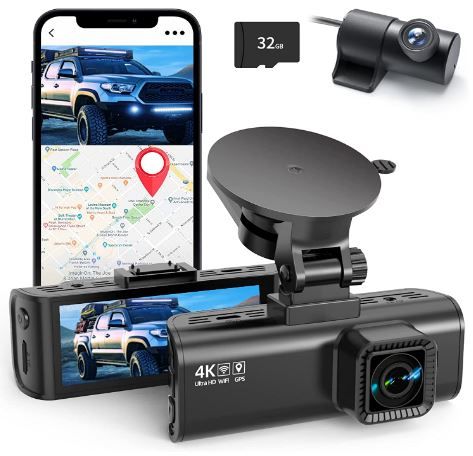
Experience superior video recording with the REDTIGER F7N dual dash cams, designed to capture every minute detail on the road. The cameras record up to Ultra HD 4K (3840*2160P) and FHD 1080P resolutions, helping you clearly read crucial details such as road signs and vehicle number plates. Moreover, the front camera features a 170° wide-angle lens, and the rear one covers a 140° range. This wide coverage significantly reduces blind spots and ensures that important evidence is preserved in case of a collision.
The REDTIGER F7N dash cams are not only perfect for daytime recording but also deliver exceptional performance during nighttime drives. The driving recorder boasts an excellent optical lens with an ultra-large F1.5 aperture and six layers. Combined with HDR/WDR technology, it captures essential details even under low light conditions, ensuring superior night vision.
One of the standout features of this dashboard camera is its built-in WiFi, which allows for seamless connection to your smartphone via the [UCAM] app. This app, available for both IOS and Android devices, lets you view, playback, and manage the dashcam recordings. Furthermore, it allows you to download and edit videos directly from the app. With just one click, you can share your travel scenery and memorable moments with friends and family.
Adding more value to its functionality, the REDTIGER F7N dash cam comes equipped with built-in GPS. It accurately records your driving route, real-time speed, and location, all of which can be tracked on Google Maps via Wi-Fi using the App or our Windows and Mac GPSPlayer. This feature provides additional evidence, especially useful in the unfortunate event of an accident.
The dashboard camera also offers reliable features geared towards accident recording. The Loop Recording feature ensures continuous recording even when the SD card is full. The G-sensor locks and saves the video footage when it detects a sudden collision. Additionally, the 24H parking monitor enables the dashcam to record continuously for 24 hours using the Time-lapse function while parked (a hardwire kit is needed). These features ensure that the REDTIGER F7N dash cam is your reliable companion on the road.

A good little camera. Good price and it is easy to set up. Customer service is helpful.

The app. can be a bit weird to make work. Sensitive to heat and may burn internal electronics.
Our thoughts - Almost all electronic products suffer from high heat. The camera will be behind the front windshield, where the heat is higher than the ambient temperature, so be careful.

FAQs: Dash Cams and Car Cameras
What resolution dash cam do I need?
2K (1440p) is the best balance of detail and file size for most drivers. It captures license plates at practical distances and produces clear footage in most conditions. 4K is worth the upgrade if you want maximum detail and have a 256 GB+ SD card.
Do I need a front and rear dash cam?
A dual-channel (front + rear) system is strongly recommended. Rear-end collisions, tailgating, and parking lot incidents behind the vehicle are extremely common and invisible to a front-only camera.
How does parking mode work?
Parking mode keeps the camera in a low-power state when the vehicle is off. It activates recording when it detects motion (someone approaching) or impact (someone hitting your car). A hardwiring kit or external battery pack is needed for reliable parking mode.
Will a dash cam drain my car battery?
Not if properly installed. Hardwiring kits include a voltage cutoff that disconnects the camera when the vehicle's battery drops to a preset level (typically 11.8V to 12.0V), preventing the battery from draining below starting voltage.
How long does dash cam footage last before being overwritten?
It depends on the SD card size, video resolution, and number of cameras. A 128 GB card recording dual-channel 2K footage at 30 fps stores approximately 8 to 12 hours before loop recording overwrites the oldest files. A 256 GB card doubles that.
Can dash cam footage be used in court?
Yes. Dash cam footage is admissible as evidence in most jurisdictions. GPS-stamped, timestamped footage from a properly functioning camera is considered strong evidence in accident disputes, insurance claims, and criminal cases.
Do dash cams record when the car is off?
Only if parking mode is enabled and the camera has a power source (hardwiring kit, external battery, or always-on USB port). Without a power source, the camera turns off with the vehicle.
How often should I format my dash cam SD card?
Every 30 to 60 days. Formatting in the camera (not on a computer) clears file system errors and prevents corruption that can cause recording failures.
Are dash cams legal in California?
Yes. California permits dash cams mounted in specific windshield zones (7-inch square on the passenger side or 5-inch square on the driver's side). Audio recording requires consent from all parties in the vehicle (California is a two-party consent state).
What is the best SD card for a dash cam?
A high-endurance microSD card rated U3/V30 with at least 128 GB capacity. Samsung PRO Endurance and SanDisk MAX Endurance are the most widely recommended. Avoid standard consumer SD cards not designed for continuous recording.
What is the most important feature to look for in a dash cam?
The most important feature to look for in a dashcam is high video quality. Full HD or higher resolution is essential for capturing clear footage that can be used as evidence in the event of an accident or incident.
Can dash cams record when the car is turned off?
Yes, many dash cams come with a parking mode feature that allows them to record when the car is turned off. This requires either a built-in battery or a hardwiring kit to provide continuous power without draining the car's battery.
Is it legal to use a dash cam in every state or country?
The legality of using a dash cam varies by location. Some states or countries may have restrictions on recording in public places or capturing audio without consent. It's important to check local laws and regulations before using a dash cam.
Check these other products!
 Save With Reviews
 Save With Reviews
 Save With Reviews