
An OBD-II scanner is a small diagnostic tool that plugs into your vehicle's diagnostic port (usually under the dash, driver's side) and reads the trouble codes your car's computer has stored. For most drivers, a midrange consumer scanner ($40 to $120) or a reputable Bluetooth dongle paired with a quality app ($25 to $80) provides everything needed to identify warning lights, avoid unnecessary shop diagnostic fees, and decide whether it's safe to keep driving. Professional-grade scanners ($300+) are built for repair shops—most drivers don't need that level of capability.
Quick Picks:
- Best Overall → Midrange handheld scanner with live data, freeze-frame, and plain-language code descriptions ($60 to $120)
- Best Budget → Basic code reader with screen for under $40
- Best Bluetooth Option → Quality OBD-II dongle paired with a reputable app (one-time purchase, no subscription)
- Best for DIY Mechanics → Scanner with live data, bidirectional controls, and ABS/SRS access ($150 to $300)
- Best Professional Tier → Full-system scanner with manufacturer-specific protocols ($300 to $1,500)
- Best Compact/Glove Box Pick → Small handheld or Bluetooth dongle for emergency use
What Is an OBD-II Scanner and Why Do You Need One?
Every vehicle sold in the United States since 1996 has an OBD-II (On-Board Diagnostics, second generation) port. This 16-pin connector—usually located under the dashboard on the driver's side—gives you direct access to your vehicle's computer.
When a warning light appears on your dashboard, your car's computer has already stored a Diagnostic Trouble Code (DTC) explaining exactly what triggered it. An OBD-II scanner reads that code in seconds.
Why Owning One Makes Sense
1. Avoid Unnecessary Diagnostic Fees Most repair shops charge $100 to $200 just to plug in a scanner and tell you what the code is. A $60 scanner pays for itself on the first use.
2. Know Before You Tow. A check engine light can mean anything from a loose gas cap (free fix) to a failing catalytic converter ($1,500+). Reading the code helps you decide whether to drive to the shop, call a tow truck, or fix it yourself.
3. Verify Repairs After a repair, you can confirm the code is cleared and not returning.
4. Spot Patterns If the same code appears every winter, that's useful information a shop might miss.
5. Walk Into the Shop. Informed, showing up with the specific code (and freeze-frame data) often results in faster, cheaper, and more accurate repairs.
Steady vs. Flashing Check Engine Light: What's the Difference?
| Light Behavior | What It Usually Means | What to Do |
|---|---|---|
Steady/Solid | Emissions-related issue detected. Not immediately dangerous. | Scan within a few days. Safe to drive short distances. |
Flashing | Active misfire or serious issue. Can damage catalytic converter. | Pull over when safe. Do not continue driving. Tow or diagnose immediately. |
Key rule: Solid light = investigate soon. Flashing light = stop driving.
Types of OBD-II Scanners
1. Wired Handheld Scanners
Plug directly into the OBD-II port with a built-in cable and display results on their own screen.
| Feature | Details |
|---|---|
Price range | $20 to $300+ |
Setup | Plug in, turn ignition to "on" position, read codes |
Pros | Self-contained, no phone needed, no app subscriptions |
Cons | Screen size and interface quality vary significantly |
Best for: People who want a simple, reliable tool without depending on a smartphone.
2. Bluetooth / Wi-Fi Dongles
Small adapters that plug into the OBD-II port and transmit data to a phone, tablet, or laptop via an app.
| Feature | Details |
|---|---|
Price range | $15 to $100 (dongle), $0 to $50/year (app) |
Setup | Plug in, pair via Bluetooth/Wi-Fi, open companion app |
Pros | Larger display (your phone), easier data logging, better charts |
Cons | App quality varies, pairing can be finicky, some apps require subscriptions |
Best for: Tech-comfortable users who want live data, logging, and richer features.
3. Professional-Grade Scan Tools
Full-system scanners that access the engine, ABS, airbag, transmission, body modules, and manufacturer-specific systems.
| Feature | Details |
|---|---|
Price range | $300 to $3,000+ |
Setup | Handheld tablet-style device, often with updateable software |
Pros | Complete vehicle diagnostics, bidirectional controls, module coding |
Cons | Expensive, overkill for most drivers, software updates may cost extra |
Best for: Professional mechanics, serious DIY enthusiasts, and people who own multiple vehicles.
Comparison: Which OBD-II Scanner Tier Is Right for You?
| Tier | Price | Capabilities | Best For |
|---|---|---|---|
Basic code reader | $20 to $40 | Reads and clears basic engine codes | Occasional use, glove box backup |
Midrange handheld | $40 to $120 | Codes + live data + freeze frame + plain language | Most drivers |
Advanced consumer | $120 to $300 | Above + ABS/SRS/transmission access | DIY mechanics, multi-car households |
Professional | $300 to $1,500 | All systems + bidirectional + manufacturer protocols | Shops, advanced DIY |
Shop-grade | $1,500+ | Everything + programming + coding | Professional repair facilities |
For most drivers, the $40 to $120 midrange tier delivers the best value. It covers 95% of what you'll ever need without paying for capabilities you won't use.
Key Features to Look For
1. Code Reading and Clearing (Minimum Requirement)
Every OBD-II scanner can read and clear powertrain codes (P0xxx series). This is the baseline. If a scanner can't do this, it's not really a scanner.
2. Plain-Language Code Descriptions
Cheap scanners show you "P0420" and leave you to Google it. Better scanners translate that into:
"P0420 — Catalyst System Efficiency Below Threshold (Bank 1). Common causes: failing catalytic converter, O2 sensor issues, exhaust leak."
This feature alone is worth spending an extra $30.
3. Live Data (Real-Time Sensor Readings)
Live data shows what your sensors are reporting right now:
- RPM
- Engine coolant temperature
- Fuel trims (short-term and long-term)
- Oxygen sensor voltages
- Mass airflow readings
- Throttle position
This is the difference between guessing and diagnosing. A code tells you something went wrong. Live data helps you figure out why.
4. Freeze-Frame Data
When a code triggers, the vehicle's computer captures a snapshot of sensor readings at that exact moment. Freeze-frame data tells you what the engine was doing when the problem occurred—critical for intermittent issues.
5. Readiness Monitors
After clearing codes or disconnecting the battery, your vehicle runs self-tests (emissions readiness monitors). If you're heading for a state inspection or emissions test, these monitors must be "ready" before the car will pass. A good scanner shows the monitor status clearly.
6. Multi-System Access (ABS, SRS, Transmission)
Basic scanners only read engine/emissions codes. If you want to diagnose:
- ABS (anti-lock brakes)
- SRS (airbag system)
- Transmission (TCM codes)
- Body modules (lights, windows, locks)
…you need a scanner that explicitly supports those systems for your specific vehicle. Marketing claims like "works on all cars" often apply only to basic engine codes.
7. Vehicle Compatibility
Check that the scanner supports:
- Your vehicle's make and year (especially important for European vehicles like BMW, Mercedes, VW, which use additional protocols)
- OBD-II protocols your vehicle uses (CAN, ISO, PWM, VPW, KWP2000)
- Hybrid and EV systems, if applicable
Most modern vehicles (2008+) use CAN protocol, which nearly all scanners support. Older vehicles or European models may need specific compatibility.
8. Update Support
Vehicle codes and protocols evolve. A scanner that never receives software updates becomes less useful over time. Reputable brands offer free lifetime updates or reasonable paid updates.
9. Build Quality (Especially the Connector)
The 16-pin OBD-II connector has delicate pins. A bent pin turns your scanner into a "sometimes it works" tool—which is the worst kind. Look for:
- Reinforced connector housing
- Strain relief on the cable (handheld units)
- Protective case or sleeve for storage
10. App Quality (Bluetooth Dongles Only)
If you're buying a Bluetooth scanner, the app is 80% of the experience. Before buying, check:
- Recent app store reviews
- Whether key features are free or behind subscriptions
- iOS and Android compatibility
- Data logging and export options
How to Use an OBD-II Scanner (Step-by-Step)
Reading Codes
- Locate the OBD-II port. Usually under the dashboard on the driver's side, within 2 feet of the steering column.
- Plug in the scanner with the vehicle's ignition off.
- Turn the ignition to "on" (one position before starting the engine). Some scanners require the engine to be running for live data.
- Wait for the scanner to connect. It reads the vehicle's VIN and identifies the protocol.
- Select "Read Codes" from the menu.
- Note any stored or pending codes. Write them down or screenshot them.
- Look up the code meaning (if the scanner doesn't provide it) on a reputable database.
Clearing Codes
- Follow steps 1 through 4 above.
- Select "Clear Codes" or "Erase DTCs."
- Confirm when prompted.
Important: Don't clear codes before the repair is made. Clearing codes erases freeze-frame data and resets readiness monitors, which can make diagnosis harder. And if the underlying problem isn't fixed, the code will return anyway.
Checking Readiness Monitors (Before Emissions Testing)
- Follow steps 1 through 4 above.
- Select "I/M Readiness" or "Emissions Readiness."
- Review which monitors show "Ready" vs. "Not Ready."
- If monitors aren't ready, drive a standard "drive cycle" (varies by manufacturer) to complete them before your emissions test.
Common OBD-II Codes and What They Mean
| Code | Meaning | Common Causes | Severity |
|---|---|---|---|
P0171 / P0174 | System too lean (Bank 1 / Bank 2) | Vacuum leak, dirty MAF sensor, weak fuel pump | Moderate |
P0300 | Random/multiple cylinder misfire | Spark plugs, coils, fuel injectors, vacuum leak | High (especially if flashing CEL) |
P0420 / P0430 | Catalyst efficiency below threshold | Failing catalytic converter, O2 sensors, exhaust leak | Moderate (not immediate) |
P0440 / P0455 | EVAP system leak | Loose or faulty gas cap (most common), cracked hose | Low |
P0128 | Coolant temp below thermostat regulating temp | Stuck-open thermostat | Low to moderate |
P0011 / P0014 | Camshaft timing issue | Low oil, dirty oil, VVT solenoid, timing chain | Moderate to high |
P0101 | MAF sensor performance | Dirty/failing MAF, air intake leak | Moderate |
P0507 | Idle air control system RPM higher than expected | Vacuum leak, throttle body issue | Low to moderate |
Quick reminder: A code tells you which system is reporting a problem, not necessarily which part needs replacement. P0420 doesn't automatically mean "replace the catalytic converter"—it could be a failing O2 sensor or an exhaust leak upstream.
What an OBD-II Scanner Won't Always Do
Managing expectations here is important. Consumer scanners have real limitations:
1. They may not read all vehicle systems. Basic scanners often only read engine/emissions codes. ABS, airbag, transmission, and body module codes require a more capable scanner that explicitly supports those systems on your vehicle.
2. They don't fix anything. A scanner reads codes. It doesn't repair the issue. Clearing a code without fixing the underlying problem just turns the light off temporarily.
3. They may not support manufacturer-specific codes. Codes starting with "P1xxx" (instead of "P0xxx") are manufacturer-specific and require scanners with that manufacturer's protocols.
4. They can't diagnose intermittent issues alone. If the problem isn't happening right now, live data may look normal. Intermittent issues often require extended data logging during a test drive.
5. They can't read codes from modules that the scanner doesn't support. A hybrid battery fault on a Prius, for example, may need a Toyota-specific scanner to access properly.
Top Scanner Recommendations by Use Case
For Occasional Use (Glove Box Backup)
Look for a basic handheld code reader or inexpensive Bluetooth dongle under $40. Prioritize:
- Reliable connector quality
- Plain-language descriptions (if possible)
- Compact size
For Most Drivers (Primary Home Scanner)
Look for a midrange handheld or premium Bluetooth option in the $60 to $120 range with:
- Live data
- Freeze-frame data
- Readiness monitors
- Plain-language code descriptions
- Free lifetime updates
For DIY Mechanics
Look for an advanced scanner in the $150 to $300 range with:
- ABS and SRS access
- Transmission code reading
- Bidirectional controls (activate components for testing)
- Service reset functions (oil light, EPB, etc.)
For Multi-Vehicle Households or Serious Enthusiasts
Look for a professional-grade tablet scanner in the $400 to $1,500 range with:
- All systems on all modules
- Manufacturer-specific protocols
- Module coding and programming
- Long-term software update plans
Common Mistakes to Avoid
- Buy the cheapest scanner you can find. Budget scanners with no updates, poor build quality, or unreliable connectors cause more frustration than they solve.
- Clearing codes before diagnosing. Always read the codes, note the freeze-frame data, and investigate before clearing. Clearing erases the evidence.
- Assuming the code names the broken part. A P0420 (catalyst efficiency) code doesn't necessarily mean the catalytic converter is bad. It could be an O2 sensor, exhaust leak, or misfire upstream.
- Ignoring a flashing check engine light. Flashing = active misfire = potential catalytic converter damage. Do not continue driving.
- Forcing the connector. The 16-pin port has a specific orientation. Never force it. Bent pins permanently damage either the scanner or the vehicle's port.
- Trusting one scan of an intermittent issue. If the code returns, keep scanning. Live data logging during a test drive catches problems that a static scan misses.
- Expecting a consumer scanner to do shop-level diagnostics. Know what your scanner can and can't access before you buy.
How to Take Care of Your OBD-II Scanner
- Store it in a protective case (most come with one). Don't toss it loose in a toolbox with metal tools.
- Keep the connector clean. Dust or debris in the pins causes intermittent connections.
- Update the firmware when updates are released. Manufacturers patch bugs and add vehicle support.
- Replace the batteries (if applicable) before they leak.
- Don't leave Bluetooth dongles plugged in permanently. Some dongles continue drawing power even with the vehicle off, which can drain the battery over time. Unplug when not in use.
Conclusion
An OBD-II scanner is one of the cheapest, most practical tools you can own as a vehicle owner. For $40 to $120, you get the ability to diagnose warning lights, avoid unnecessary shop fees, verify repairs, and walk into any mechanic's shop with the specific information needed for a faster, clearer conversation.
For most drivers, a midrange handheld scanner or quality Bluetooth dongle is the right choice. Prioritize:
- Live data and freeze-frame capability
- Plain-language code descriptions
- Solid build quality (especially the connector)
- Reputable brand with updated support
Keep it in the glove box or in your home garage. The first time a check engine light shows up—and it will—you'll be grateful you have it.
And remember the one rule that matters most: a flashing check engine light is not a "keep driving and see" situation. Pull over, scan, and decide from there.
Can we help? We've done the research for you and found the OBDII Scanner on Amazon. Every day, we read hundreds of reviews and try the highest-rated products we have on our list.
OBDII Scanner - Reviews
The Best
Product information
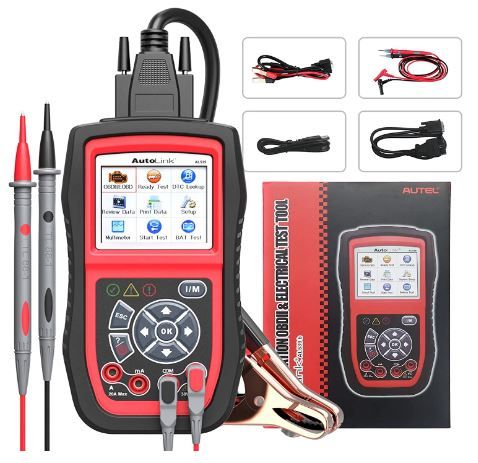
Multifunctional OBD2 Scanner: Autel AL539B
The Autel AL539B is more than just your average OBD2 code reader. It's a 3-in-1 device that combines the functions of an OBD2 scanner, a top-rated battery tester, and an AVOmeter. This versatile tool is compatible with most 1996 and newer American, Asian, and European OBDII/CAN-compliant vehicles, offering you a comprehensive vehicle analysis solution.
Battery Testing Capabilities: More Than Just an OBD2 Scanner
One of the standout features of the AL539B is its ability to perform battery tests. This expanded function makes it a valuable tool for quickly and accurately testing most types of 12V batteries. Whether you're dealing with AGM, standard, or maintenance-free batteries, the AL539B provides reliable results.
Circuit Testing Made Easy: Built-In AVOmeter
Autel AL539B boasts an easy-to-read built-in AVOmeter, allowing you to test voltage, continuity, and current with ease. This feature simplifies the process of accessing information about your vehicle's battery status. With this tool, you'll be able to conduct detailed analyses of voltage, continuity, and current.
Comprehensive OBD2 Functions: Complete Vehicle Diagnostics
With the AL539B, you're not just getting a simple code reader. This device offers complete car diagnoses, including reading and erasing codes, viewing live data and freeze frames, checking I/M readiness status, conducting O2 sensor tests, and more. One of its most useful functions is the ability to turn off the check engine light (MIL) by clearing stored fault codes once problems are resolved.
Faster, More Convenient Diagnoses: Advanced Features
The Autel AL539B is designed for speed and convenience. It supports DTC lookup for detailed code information retrieval, and it offers data playback and print capabilities for easy analysis of vehicle health status. If you're unsure whether this scanner tool is suitable for your vehicle or if you have any questions, our technical support team is always ready to assist via email or Q&A.

Gives the severity of the codes so you know if they need an urgent fix. All around, a very capable scanner.

Some units may have a problem with the battery tester.
Our Thoughts - Great design, and with a multi-meter. This multi-tool scanner is of good value. Does a very good job with all the diagnostic codes.
Very Good
Product information
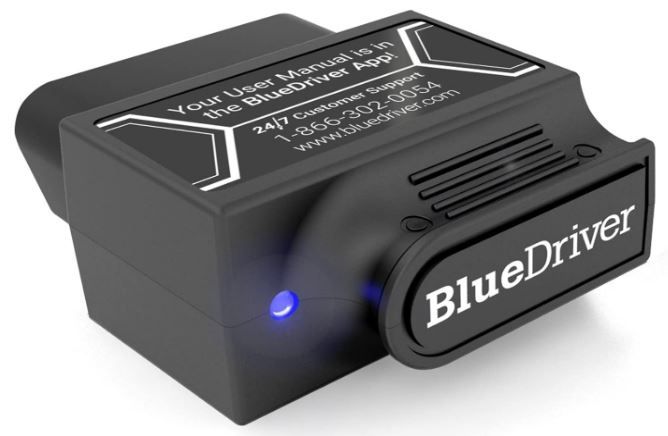
Pro OBD2 Scanner: BlueDriver, A Mechanic's Insight at Your Fingertips
BlueDriver is more than just an OBD2 scanner; it's your key to understanding your vehicle like a professional mechanic. This tool allows you to read and clear your car’s trouble codes with ease. With BlueDriver, checking the engine light becomes a simple task, giving you peace of mind and control over your vehicle's health.
Access Comprehensive Vehicle Diagnostics: Read & Clear All Codes. BlueDriver's enhanced vehicle diagnostics open up a world of information that was once exclusive to mechanics with professional OBD2 scan tools. Now, you can access this wealth of data from the comfort of your driveway. From ABS and Airbags to SRS and TPMS codes, and much more, BlueDriver allows you to read and clear them all.
More Than Just a Code Reader: Get the Right Fix
BlueDriver is a comprehensive diagnostic tool, not just a simple car code reader. It provides unlimited specific repair reports for virtually every vehicle make and model, offering insights into possible causes and reported fixes. With BlueDriver, you get the right fix every time.
Wireless Convenience: Bluetooth-enabled device
Bid farewell to cumbersome wires. BlueDriver connects wirelessly to your phone or tablet via Bluetooth. A sensor plugs into your car's OBDII port, providing all the capabilities of an expensive code reader & scan tool without any annoying wires.
User-Friendly Solutions: Accessible App and Repair Videos
BlueDriver aims to make vehicle maintenance as straightforward as possible. Our iOS & Android app connects you to a vast database of repair videos, offering step-by-step directions for repairs. With BlueDriver, you get more ways to scan, understand, and fix your vehicle.
No Hidden Costs: Zero Subscription Fees or Add-Ons
With BlueDriver, what you see is what you get. One purchase gives you access to everything you need, with no in-app fees or add-ons. We believe in transparency and straightforward pricing.
Real-Time Monitoring: View Live Data
BlueDriver stands out from many OBDII scanners by offering real-time monitoring. It stays connected to your vehicle even while you drive, allowing you to monitor your car’s health in real-time. With BlueDriver, you're always in the know.
Unmatched Support: 24/7 Assistance
Our commitment to you doesn't end with your purchase. BlueDriver offers unmatched support, with our team of highly trained technicians available 24/7. Whether you need assistance over the phone or through the in-app chat, we're there for you anytime, anywhere.

Easy to use, install easily, and give all the basic information one needs. It saves reports and can be seen as a graph.

Requires the smartphone app. Seems inconsistent with the results. Expensive for what it does.
Our Thoughts - A good, user-friendly app. Connection via Bluetooth is great.
Best Value
Product information
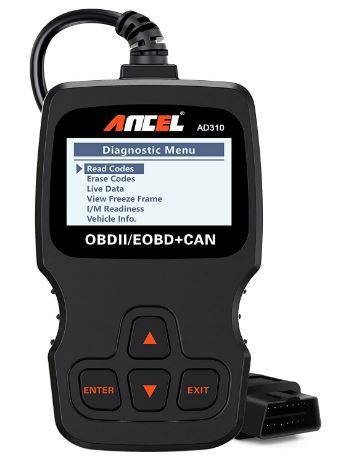
CEL Doctor: ANCEL AD310, Your Personal Mechanic
The ANCEL AD310 is a top-rated OBD II scanner, recommended by renowned YouTuber and auto mechanic, Scotty Kilmer. This device simplifies the process of diagnosing your vehicle's issues, providing easy access to check engine light causes, diagnostic trouble codes, live data, freeze frames, I/M monitor readiness, and vehicle information. With the AD310, you can troubleshoot your car at home, saving the time and cost of a visit to the mechanic.
Robust and Compact: A Portable Diagnostic Tool
Designed for durability, the AD310 comes with a 2.5-foot cable featuring thick, flexible insulation. Its sturdy construction ensures it can withstand the occasional fall while working on a car. Weighing just 12 ounces and measuring 8.9 x 6.9 x 1.4 inches, this sleek device is compact and portable. It features clearly labeled buttons and a large screen for a crisp, clear result display.
Accurate, Fast, and User-Friendly: Simplifying Vehicle Diagnostics
The AD310 scanner offers you or your mechanic a quick, accurate way to assess your car's health. It reads and clears engine trouble codes in seconds, providing immediate insights into the cause of your check engine light. Even without prior car knowledge, you can quickly identify and resolve issues using this device. Powered directly by the OBDII Data Link Connector in your vehicle, there's no need for batteries or a charger.
Comprehensive OBDII Protocols and Vehicle Compatibility: One Device Fits All
Unlike many budget scan tools, the AD310 supports all OBDII protocols, including KWP2000, J1850 VPW, ISO9141, J1850 PWM, and CAN. Its extensive compatibility extends to 1996 US-based, 2000 EU-based, and Asian cars, as well as light trucks, SUVs, and newer OBD2 and CAN vehicles, both domestic and foreign. Always check compatibility with your vehicle model before purchasing.
A Must-Have Home Tool: Compact, Accurate, and Versatile
The AD310 is an ideal home or travel companion due to its lightweight and compact design. Easily portable, you can carry it in your backpack or keep it on your dashboard for on-the-go diagnostics. Not only is the AD310 portable, but it also delivers fast, accurate results, making it a worthy investment for any car owner.
Legal Disclaimer: Respect for Trademarks
The related car logos and brand names mentioned on our product page are used only to indicate compatibility with our products. We do not sell products manufactured or sold by these car brands.

The documentation is well-written and easy to follow. The software user interface works well.

Doesn't seem to read the codes from some vehicles. Can be hard for newbies to use.
Our Thoughts - We found that it doesn't do live data. Not great, but it will read codes. Fast and easy to use.
Good
Product information
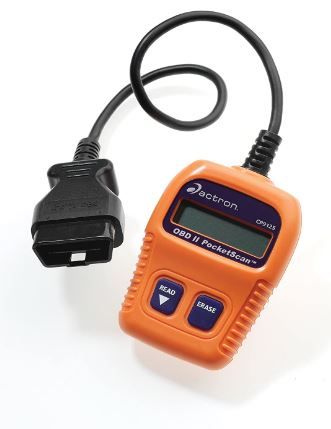
Actron's CP9125 C PocketScan: A Handy Tool for Car Diagnostics
The Actron CP9125 C PocketScan is a versatile device designed to read engine Diagnostic Trouble Codes (DTCs). It's compatible with all 1996 and newer import/domestic vehicles sold in the USA, including those operating on OBD II & CAN protocols. Additionally, it works with 1994-1995 OBD II-compliant vehicles, making it a comprehensive tool for a wide range of car models.
Perfect for Novice and Intermediate DIY Mechanics
This user-friendly tool is ideal for both novice and moderately experienced do-it-yourself mechanics. The PocketScan empowers you to determine the cause of Check Engine Lights without the need to rely on a repair shop. It provides the convenience of home diagnostics, saving you time and money.
Quick Diagnosis and Repair
With the PocketScan, you can quickly identify the cause of a Check Engine light. Once repairs are made, the device allows you to clear the DTCs, effectively turning off the Check Engine Light. This feature makes it an invaluable tool in maintaining the health and performance of your vehicle.
Comprehensive Data Display
Apart from reading and clearing DTCs, the PocketScan offers additional useful features. It displays the number of DTCs, the status of the Malfunction Indicator Light, and the Emissions status. This comprehensive data display ensures you're fully informed about your vehicle's condition.
Convenient Connection via OBD II 16-Pin Connector Cable
The PocketScan comes with an attached OBD II 16-pin connector cable that provides both power and data connections. This design eliminates the need for separate cables or batteries, making it even more convenient and portable. With the Actron CP9125 C PocketScan, vehicle diagnostics have never been easier.

Great for receiving the basic codes. Good value and is easy to read. Other scanners cost more for the same service.

Like some electronic products, the quality control is poor. Just a code reader.
Our Thoughts - It will do the basic things that one needs. Looks simple, but it is a good code reader.
Good
Product information
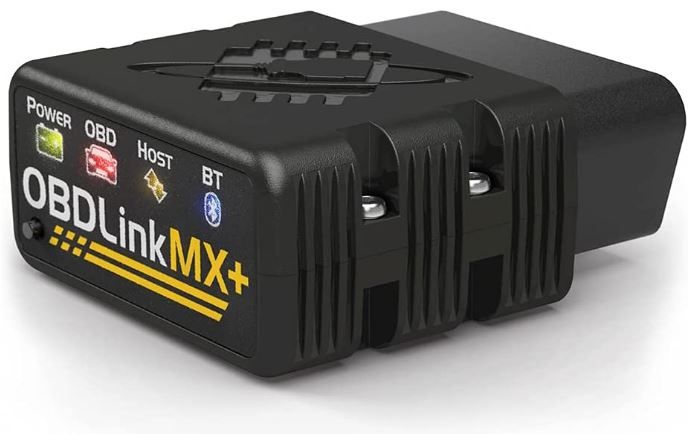
Transform Your Device Into a Professional Diagnostic Scan Tool
Imagine transforming your iPhone, Android device, or Windows PC into a professional-grade diagnostic scan tool. Well, it's now possible. With the right adapter, you can turn your everyday devices into powerful tools for diagnosing vehicle issues. This technology brings the capabilities of a professional mechanic's workshop right into your home or garage.
A Recommended Adapter for Multiple Applications
This tool comes highly recommended for use with various applications, including FORScan, Torque, BimmerCode, Dashcommand, AlfaOBD, Carista, and many more. This wide range of compatibility allows you to use your preferred diagnostic software, providing versatility and convenience. It's like having a mechanic's toolbox at your fingertips.
Enhanced OEM Support for Various Vehicles
In addition to its broad application compatibility, this adapter offers enhanced Original Equipment Manufacturer (OEM) support. It works seamlessly with a variety of car brands, including Ford, GM, Mazda, Nissan/Infinity, Toyota/Lexus/Scion, Honda, Hyundai, and Kia. This broad vehicle compatibility ensures that whether you're a multi-car family or a mechanic working on different models, you're covered.
Clear Check Engine Light and Access More Live Parameters
With this tool, you can do more than just read diagnostic codes. You can clear the Check Engine Light and access more live parameters such as ABS, SRS, TPMS, and more. This capability surpasses many other scanners in the market, offering a more in-depth look into your vehicle's health and performance.
Over-voltage and Battery Drain Protection, Plus Firmware Updates
Safety is paramount when dealing with vehicle electronics. This adapter comes with over-voltage and battery drain protection to ensure safe usage. Plus, you can stay up-to-date with the latest improvements and fixes thanks to regular firmware updates. This commitment to safety and ongoing improvement sets this adapter apart, making it a smart choice for any vehicle owner or mechanic.

Good product and customer service. Communicates with all the computers in the vehicle very well. Easy to program.

You need to pay extra for more advanced apps. Be careful when updating the software.
Our Thoughts - What we read and tested is different. There seem to be small issues with the quality of some scanners.
Good
Product information
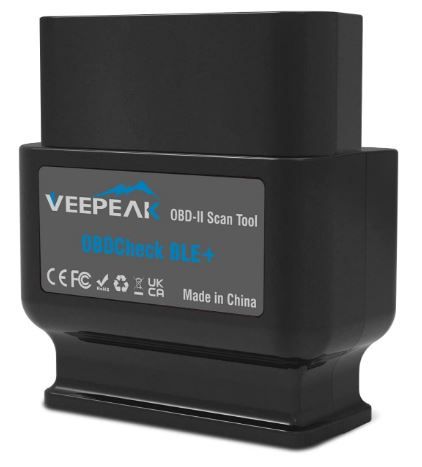
Transform Your Device Into a Comprehensive Car Diagnostic Tool
With the right tool, you can convert your phone or tablet into a comprehensive car diagnostic device. This innovative tool allows you to read engine diagnostic trouble codes, reset the Check Engine Light, and view I/M readiness for SMOG checks. Moreover, it provides real-time sensor readings, including O2 Readings, EOT, EGT, Throttle, Boost, Speed, and Fuel Trim, among others.
Advanced Features Through Third-Party Apps
There's an extensive array of third-party OBD Apps available on the App Store and Google Play that are compatible with this tool. These apps unlock advanced features such as enhanced diagnostics and PIDs on selected vehicles. You can even examine the battery in hybrid & electric vehicles, customize and service selected vehicles, and much more. It's like having a mechanic's workshop on your device.
Latest Model with Enhanced Compatibility
The latest model of this tool comes with support for more AT commands, provided there's app support. It features optimized firmware and reduced power consumption. It's compatible with iPhone, iPad, and Android phones and tablets via dual-mode Bluetooth 4.0 (Classic + LE), making it a versatile choice for users with different devices.
Works with all OBD II/EOBD-compliant
This tool works with all OBD II/EOBD-compliant cars and light trucks. In the United States, it has supported vehicles since 1996, without any brand limitation. It also supports all five OBD II protocols: CAN, KWP2000, ISO9141-2, J1850 VPW, and J1850 PWM. This wide range of compatibility makes it a must-have for all car owners.
User-Friendly Design
The design of this tool makes it easy to plug in and unplug, and it won't obstruct legroom. However, note that a third-party App/software is required to achieve all its functions, and some may require a separate purchase. The tool comes with a mini carrying case, making it ideal for car owners to check their cars at home or on the go.

It's a good device and works well. Great replacement service.

Can be a bit difficult to pair with iOS 15. Some minor packaging and quality control issues. The cab drains the battery if left on for long periods.
Our Thoughts - OK, this scanner is not the greatest, but it does a fairly good job.
FAQs: OBD-II Scanners
Is it worth buying an OBD2 scanner?
The short answer is a resounding yes, and here's why.
OBD2 scanners are essential diagnostic tools for monitoring your vehicle's engine, transmission, and other systems. They detect issues early, preventing costly repairs, and help you avoid unnecessary part purchases. Available at various price points—from basic models under $100 to advanced options—they empower car owners and enthusiasts to make informed maintenance decisions while deepening their automotive knowledge.
What does OBD-II stand for?
On-Board Diagnostics, second generation. It's the standardized diagnostic system required on all vehicles sold in the United States since 1996 (and most countries worldwide thereafter).
Where is the OBD-II port located?
Usually under the dashboard on the driver's side, within 2 feet of the steering column. Sometimes it's hidden behind a small panel or cover. Your owner's manual will show the exact location.
Do I need an OBD-II scanner if my car runs fine?
It's not required, but it's cheap insurance. When a warning light appears (and it will eventually), you can diagnose it yourself in minutes instead of paying $150 at a shop.
Can an OBD-II scanner damage my car?
No. Reading codes is a passive operation that doesn't change anything in the vehicle. Clearing codes is also safe, though it resets emissions readiness monitors. Bidirectional controls (on advanced scanners) activate vehicle components and should be used with care.
Will an OBD-II scanner work on my hybrid or electric vehicle?
Most OBD-II scanners work on hybrids for basic engine codes. Full access to the hybrid battery system or EV-specific modules usually requires a manufacturer-specific or professional scanner.
What's the difference between a code reader and a scan tool?
A code reader is a basic tool that reads and clears generic OBD-II codes. A scan tool offers live data, freeze-frame data, readiness monitors, and often manufacturer-specific codes and additional system access. The line between them is blurry at the midrange, but in general, readers are cheaper and simpler; scan tools are more capable.
Can I use an OBD-II scanner on any car?
Any car sold in the United States from 1996 onward should work with a standard OBD-II scanner for basic engine codes. Pre-1996 vehicles use older OBD-I systems that require different tools. European and Asian imports from 1996+ also use OBD-II, though some manufacturer-specific features may require brand-specific scanners.
Is a Bluetooth dongle as good as a handheld scanner?
For basic code reading and live data, yes—often better, because your phone's screen is larger and more capable than most handheld scanner displays. The tradeoff is reliance on app quality and Bluetooth pairing. For professional-level diagnostics, dedicated handheld or tablet-style scanners still lead.
Why does my code keep coming back after I clear it?
Because the underlying problem hasn't been fixed. The code is a symptom, not the disease. Clearing codes without repair is like silencing a smoke alarm without putting out the fire.
Can clearing codes make my car fail emissions testing?
Yes, temporarily. Clearing codes resets readiness monitors, and most states require most monitors to show "Ready" before passing an emissions test. After clearing, you'll need to drive the vehicle through a standard drive cycle (varies by manufacturer) to reset the monitors before testing.
Do I need to keep the engine running to read codes?
Usually no. Codes can be read with the ignition in the "on" position (engine off). However, live data requires the engine running, and some advanced tests require specific engine conditions (warm engine, specific RPM, etc.).
Do OBD2 scanners work on all cars?
The simple answer is yes, but with some important caveats.
OBD2 (On-Board Diagnostics 2) has been standard in U.S. vehicles since 1996. While universally compatible, scanner capabilities vary—basic models read generic codes, while advanced versions interpret manufacturer-specific codes and provide real-time data. Ensure your chosen scanner matches your vehicle's make and model, and locate your car's OBD2 port before purchasing.
Can you leave the OBD2 scanner plugged in while driving?
The short answer is yes, you can. However, there are some considerations to keep in mind.
OBD2 scanners safely connect to your vehicle's diagnostic system while driving, provided they're in good condition. However, they draw power and may drain your battery during extended parking periods, especially if they keep the car's electronics awake. For infrequent drivers, unplugging is recommended. Bluetooth models designed for continuous use consume minimal power for regular drivers.
 Save With Reviews